

JFlemingFBCZ
Inspiring
January 10, 2023
Question

Indesign doesn't update master and parent pages

  • January 10, 2023
  • 2 replies
  • 1757 views

I'm suddenly having trouble with the master pages after that annoying name change.


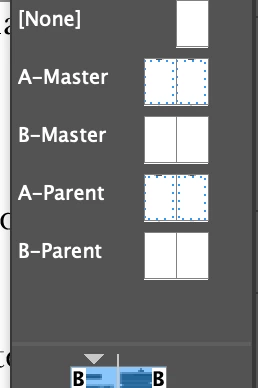
When I created most of the documents in the book, I created two master page spreads, but later attempted to update them from a newly created file and ended up with the mess you see in the screenshot below after synching the book. Instead of updating the A-Master and B-Master, it added Parent page spreads, so now I have 4 pair of master pages and still have to manually update the master pages for each document in my book. I really don't relish the idea of having to recreate all of the documents in the book to fix this issue.


Ideas?


I'm using InDesign version 17.3 on a Mac running the Monterey OS 12.2, if that makes a difference. And no, haven't updated CS for a while. Would that help or make things worse?
 

This topic has been closed for replies.

2 replies

Willi Adelberger
Community Expert
Community Expert
January 10, 2023

You should never use generic names for spreads and layers because you will run into those problems, if you do.

A-Master is a different page than A-Parent. 


Are you aware, that a master/parent can be based on another master/parent? I ask because you use independent master/parents.

JFlemingFBCZ
Inspiring
January 12, 2023

Thanks - interesting idea.

I am aware that a-master is different than a-parent - that's the issue I am having. I guess I assumed that the default name for the master pages would just update themselves and they didn't. And yeah, I know about the ability to base a master on another master, but your comment about the names for the master spreads makes me wonder if I change the name of those 'parent' master pages if it might update them the way I want them to when I sync the book. Thanks for giving me another direction to run in as I troubleshoot.

Peter Spier
Community Expert
Community Expert
January 10, 2023

Changing versions mid-project is, unfortunately, fraught with potential problems. I would go back to using the original version if you have 17.3 still installed.


If you checked the box to delete old versions when you installed version 18 all is not lost. You should still be able to reinstall version 17 though the Creative Cloud Desktop App, but don't wait too long. Once version 19 is released version 17 will no longer be offered.

JFlemingFBCZ
Inspiring
January 12, 2023

Thanks.

I haven't updated since I started the layouts for this book. I'm still in 17.3 - I'm not sure why I'm suddenly seeing the 'parent' page nomiker now even though I haven't updated. Maybe there was an auto update, but I doubt it cause I usually keep that turned off. But your suggestion makes the most sense and I'll look into that. This book file's document settings wouldn't allow me to change the margins and I found that strange too. I think I broke something LOL

BobLevine
Community Expert
Community Expert
January 12, 2023

Suddenly? Master was changed to parent with the initial release of InDesign 2022 (version 17.0). I wonder if the master was there because it was created in an earlier version and modified so the naming was still hardwired.