
Participant
September 13, 2018
Answered

Indesign end notes numbering in sidebar or box

  • September 13, 2018
  • 1 reply
  • 959 views

I have imported text from Word with end notes. I need to extract certain paragraphs that are currently within the text as a separate sidebar, or box.

Copying and pasting into a new text box loses the sequential numbering-- those end notes are now numbered from the 'end of the line'.
    This topic has been closed for replies.
    Correct answer Laubender

    Hi Marianne,

    endnotes do not support the sidebar layout you envision by default.

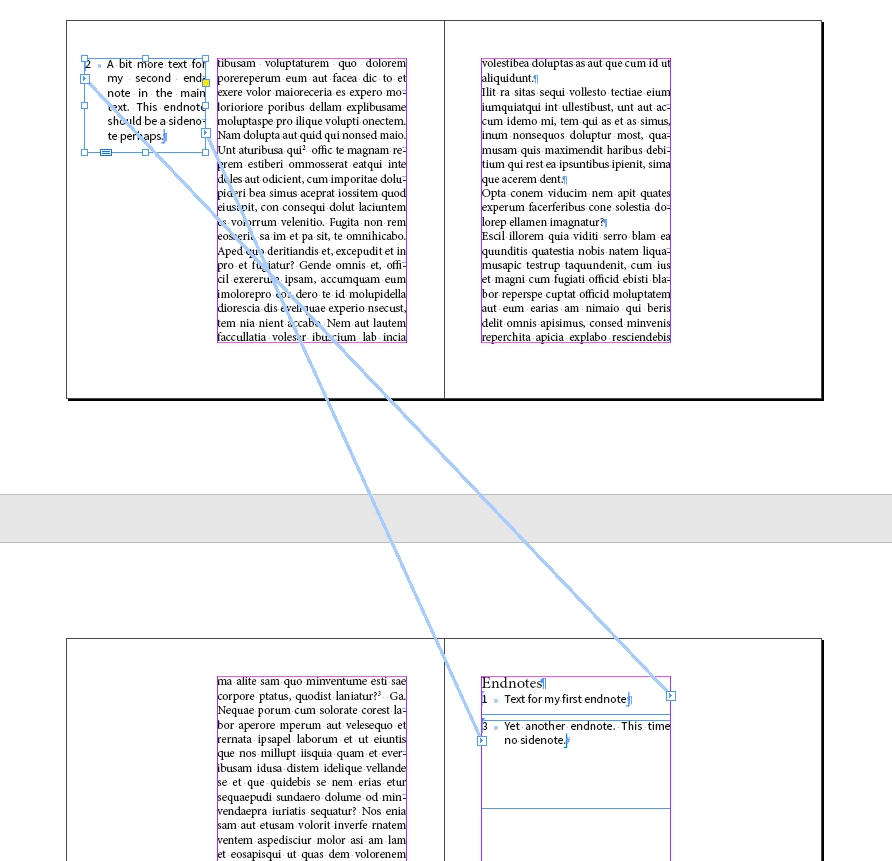
    What you can do is "threading" the endnotes text story to several text frames, one of it your envisoned sidebar.

    The endnotes text will flow through several text frames then:

    Regards,
    Uwe

    1 reply

    LaubenderCommunity ExpertCorrect answer
    Community Expert
    September 13, 2018

    Hi Marianne,

    endnotes do not support the sidebar layout you envision by default.

    What you can do is "threading" the endnotes text story to several text frames, one of it your envisoned sidebar.

    The endnotes text will flow through several text frames then:

    Regards,
    Uwe

    Participant
    September 13, 2018

    Hmmm. you mean the end notes can be threaded to many different text boxes through a document?

    Community Expert
    September 13, 2018

    Yes. As you already said: Copy/paste will not work.

    But you should also consider doing footnotes instead of endnotes and use a script by Peter Kahrel to create sidenotes out of footnotes:

    Sidenotes | Peter Kahrel

    More scripts around footnotes and endnotes by Peter Kahrel:

    Dynamic endnotes, column notes, margin notes | Peter Kahrel

    Regards,
    Uwe