Hi Jumpenjax
Thanks. However it's not the preset that is the problem. When I export (or package) I want book page, plus 3mm bleed (and slug) then I want the crop mark at the edge of the book page so the printer knows where to trim. The finished pdf page should be 146 x 226mm including crop marks.
This doesn't happen, no matter what I do. If I choose export to pdf, choose page bleed definition, and NO crop marks - I get the right size (146 x 226mm) but no crop marks to indicate the trim.
I don't know how to fix this? 😞
thanks
Annemarie ask99
You aren't doing anything wrong. Crop marks need to be outside the bleed area so there is no possibility they well show after trimming. If your trim size is 140 x 220 with a 3 mm bleed, the PDF with no marks (but including the bleed) will be 146 x 226. Now you add marks, say 5mm in length (not sure what ID's default crop mark length is), offset by 3 mm (the bleed), and your PDF must become 156 x 236.
You cannot have marks unless your output page size is large enough to extend to the outer edges of the marks.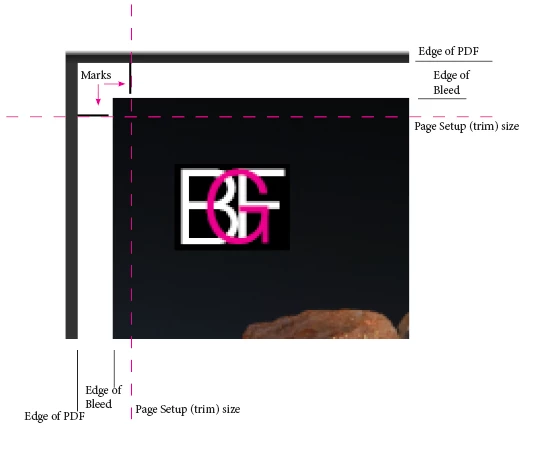

 AdChoices