OsakaWebbie
Inspiring
May 4, 2025
Answered

InDesign falsely claims a font is missing

  • May 4, 2025
  • 4 replies
  • 2792 views

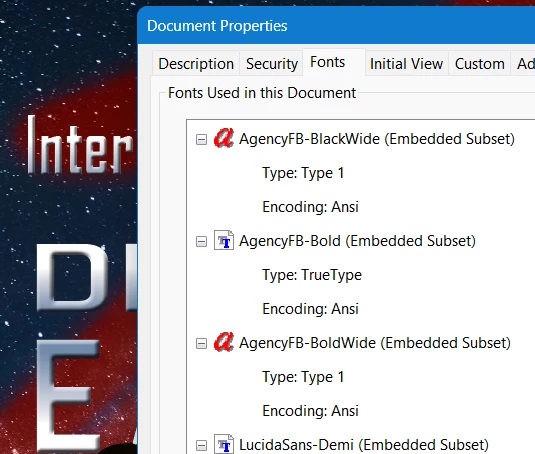
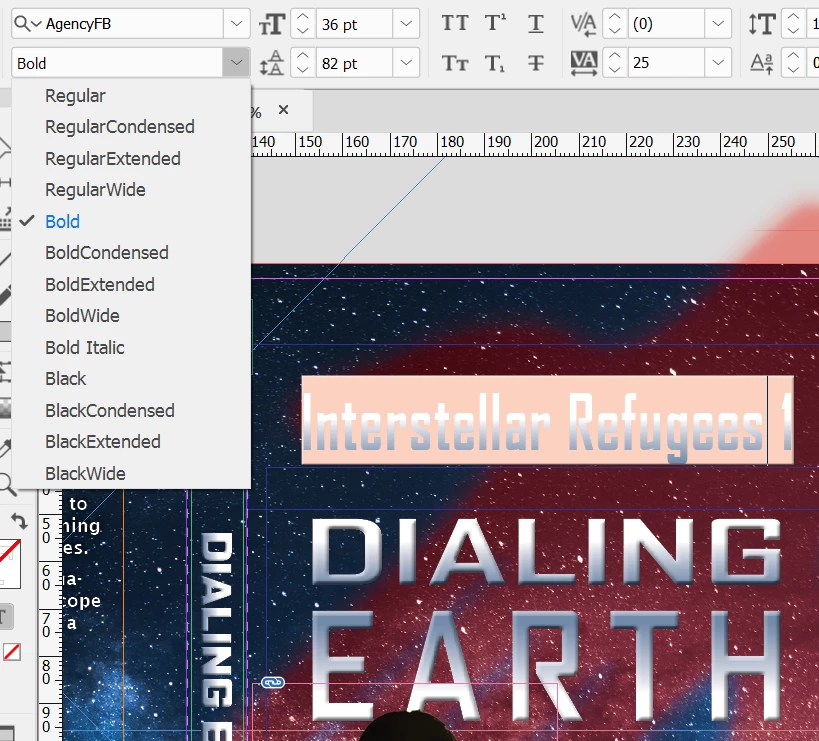
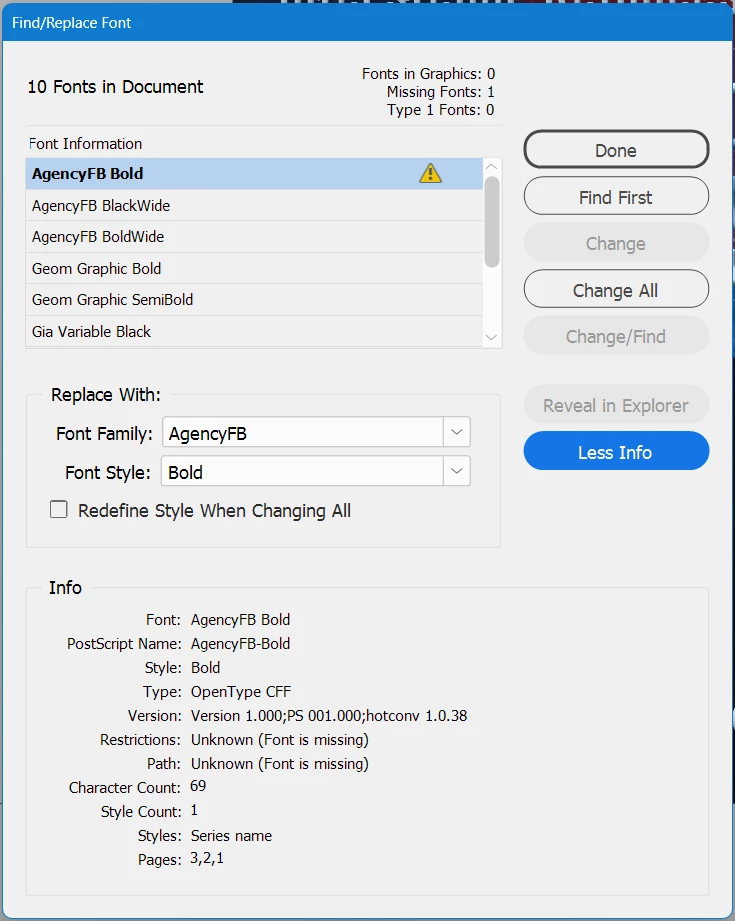
I added several Adobe fonts from the family AgencyFB, and then used three of them (Bold, BoldWide, and BlackWide) in an InDesign document. A day or so later, InDesign started claiming that the Bold version is missing, but it's definitely not. I removed and re-added it on the Adobe Fonts page, but there was no change in InDesign. I can still choose that font variation in the pulldown, and InDesign will render it properly and even embed it in exported PDFs, while continuing to claim it's missing! I did notice that in the list of embedded fonts in the PDF, Bold is rumored to be TrueType while BoldWide and BlackWide are Type 1 Open Type - it seems unlikely that different fonts in the same family would be different types, so that got my attention. In InDesign's Find/Replace Font dialog, the More Info area says the font is supposed to be OpenType CFF, not TrueType, so that's definitely odd. What should I do to try and fix this?


Here are three screenshots to support what I just wrote: (1) a view in InDesign showing the font pulldown and one of the pieces of text being displayed by InDesign in classic "I can't find this font" pink, (2) Find/Replace Fonts with the full info showing, and (3) the relevant part of the font list in an exported PDF.
Correct answer Brad @ Roaring Mouse

There is literally no mechanism in InDesign to change a font from OpenType CFF to TrueType when creating a PDF. That means there must be a version of Agency FB Bold in TT format somewhere on your system that is conflicting.

Since it appears you are on Windows, just know Windows/Office apps include AgencyFB Regular and Bold in TrueType; I suspect that is causing your issues, so if you want to use the expanded family from Adobe Fonts, you will need to deactivate the TT version that Windows supplies. e.g. check your C:\Windows|Fonts folder or C:Users\**Username**\AppData\Local\Microsoft\Windows\Fonts

4 replies

Brad @ Roaring Mouse
Community Expert
Brad @ Roaring MouseCommunity ExpertCorrect answer
Community Expert
May 4, 2025

There is literally no mechanism in InDesign to change a font from OpenType CFF to TrueType when creating a PDF. That means there must be a version of Agency FB Bold in TT format somewhere on your system that is conflicting.

Since it appears you are on Windows, just know Windows/Office apps include AgencyFB Regular and Bold in TrueType; I suspect that is causing your issues, so if you want to use the expanded family from Adobe Fonts, you will need to deactivate the TT version that Windows supplies. e.g. check your C:\Windows|Fonts folder or C:Users\**Username**\AppData\Local\Microsoft\Windows\Fonts

OsakaWebbie
Inspiring
May 5, 2025

I just noticed you wrote "...deactivate the TT version that Windows supplies." Can I deactivate it without uninstalling/deleting it completely?

Brad @ Roaring Mouse
Community Expert
Community Expert
May 5, 2025

Okay, I did that (and removed and re-added the Adobe font for good measure) and now it appears to be behaving. If I need the Windows font later, I'll probably never remember where I saved it, but oh well - sometimes we have to live with workarounds instead of real fixes. It's bizarre that Regular didn't have any problem at all, but only Bold.


The other thing to consider is the the newer Office apps have Cloud fonts of their own, and might have automatically downloaded and activated a "secret" instance of AgencyFB you don't know about.

rob day
Community Expert
Community Expert
May 4, 2025

Hi @OsakaWebbie , Also, check your Creative Clound>Apps>Managed fonts window and make sure AgencyFB is listed and active:


And if you go to the Adobe Fonts site, search for AgencyFB and make sure the Add font button has changed to Remove, which indicates it is active on your account:


OsakaWebbie
Inspiring
May 4, 2025

I had already confirmed both those things. I even took screenshots of them, but I didn't bother including them in my initial post because it was already really long.

rob day
Community Expert
Community Expert
May 5, 2025

Variations on this problem are starting to be common on the forum, and I think in all cases they involve conflicts between fonts activated at Adobe Type, and fonts with the same name installed in the local system’s font folders. In the end it will be better not to mix local and cloud fonts with the same name and different version numbers.


When I opened your example file there were no missing fonts because I don’t have a local version of Agency FB installed in my system, and I have InDesign setup to auto activate Adobe Fonts as needed:


Robert at ID-Tasker
Legend
May 4, 2025

What platform - Windows? 


What OS and InDesign versions? 


If you've updated recently to 20.3 - try downgrading to 20.2 or lower. 


OsakaWebbie
Inspiring
May 4, 2025

Windows 11. InDesign 20.3, but I'm pretty sure I was already on that version before I added the fonts at all.

Mike Witherell
Community Expert
Community Expert
May 4, 2025

Hi Osaka,

I have strange things like this happen to me occasionally. Here are some things I try:

I use a file utility to search for all instances of that font and delete them (or move them to some neutral place).

I use the CC App (fonts tab) to remove all the fonts in question.

I visit fonts.adobe.com to make sure it doesn't think I have those fonts loaded.

I then sign out of my CC account, reboot, then sign back in.

This way I can try to begin the process again, probably by visiting fonts.adobe.com to install the font family.

Optionally, I usually also go to the CC App and install the same font so I can use it in any and all apps.

PS: Don't forget to check for the font in some "Document fonts" folder (and delete them from there, too)

Mike Witherell