
Participant
October 24, 2022
Answered

InDesign file icon shows blank/white/no thumbnail in ID 18

  • October 24, 2022
  • 9 replies
  • 20119 views

After updating Indesign and deleting the previous version, all my files are saved as different versions (not Indesign) I have attached a screenshot of what they are saved as, all the files that are just a white page with a folded corner are supposed to be my indesign folders. I can open them from the indesign app, but I cannot open them straight from the documents folder of my computer or send them as an Indesign file to someone for them to edit on their own computer.

I tried creating a new document on this new version of the app and saving it, and same thing happened. 

How can I get it to save as Indesign file as usual, like with Illustrator and others?

Thanks in advance!
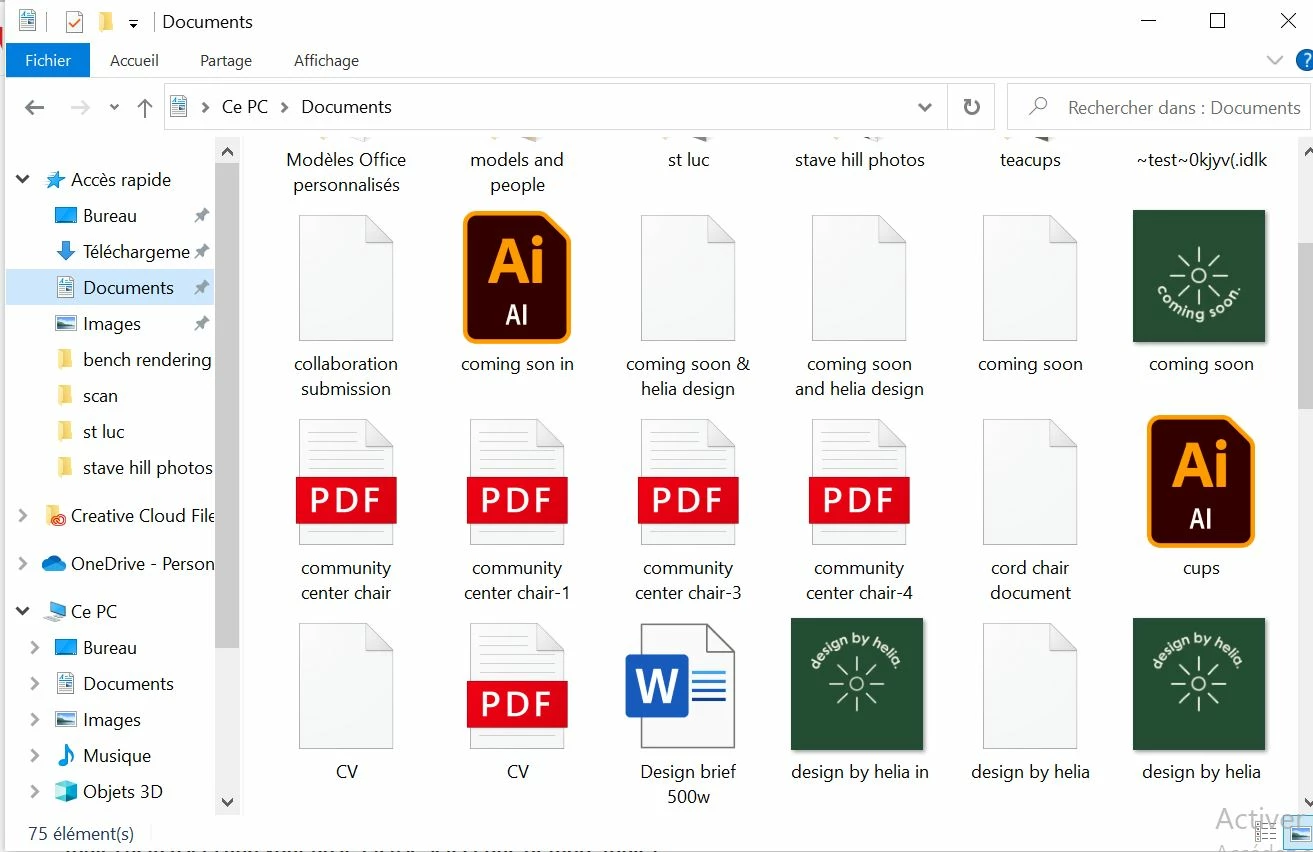
 

<Title renamed by moderator>

This topic has been closed for replies.
Correct answer Da7

After a quick private briefing with @HARSHIKA_VERMA  I solved my problem probably caused after the update to 18.2.1 by some kind of conflict with a second version 17.4.1 already installed in a different language (two different versions active at the same time).

In my case I have two versions installed, one in English (18.2.1) and the other in Italian (17.4.1). Everything worked normally until the English one was updated to v. 18.2.1.

Disappearing thumbnails were fixed by simply uninstalling all versions while keeping preferences and reinstalling 18.2.1 first.

Now everything seems to be working fine.

Thank you

9 replies

Francesca Anna
Participant
October 31, 2023

Hello! I was able to fix my inDesign file icons on my Windows PC.


  1. First, make sure you have a file that was created with the latest InDesign application. You will be using the same file that will help convert the icons back to normal. Make sure its just an empty file.
  2. After this, I  re-install and opened the old inDesign file [v18.5] while keeping the new InDesign file [v19.0] closed but installed. Then I opened the file created with v19.0 in the v18.5 version and converted it so the file would open. I saved the file after it converted and exited InDesign completely. 
  3. From here, I uninstalled InDesign v18.5. 
  4. Once that was done, I right-clicked on the same file I converted and clicked 'Open with'. I searched for the latest InDesign file [v19.0] and clicked 'Always'. [I found mine in C:\Program Files\Adobe\Adobe InDesign 2024, this may vary if you have your Adobe files saved in a different folder.]
  5. After I did this, all the file icons changed from the white paper icon to the maroon and pink 'Id' icon. 

I also tested this theory on my friends computer as she was having the same issue as me, and it worked!


As I opened my files, all my settings remained too and so far haven't experienced anything wrong with the program.

I hope this helped, let me know if you have any questions 🙂

Participant
January 13, 2024

Point 4 doesn't work.

Inspiring
January 24, 2024

I have the same problem. Updated to the new version. deinstalled the old one, all icons gone. Usuallly setting a new file  extension link to always works, but not in this case. ugh, so annoying.

Participant
October 30, 2023

This is happening to me now with 19.0, it's super annoying - how do I fix it?

lorrainer35151512
Participating Frequently
June 23, 2023

Hiya


Took me ages to find this thread - I have the exact same problem on Mac Studio. Ventura 13.3.1 (a). Just installed the latest version of Adobe Indesign and all my files appear completely white in the Documents Folder. How do I fix this problem on Mac. I tried right-clicking on the file > open with > Indesign. No luck. Help please.


Inspiring
March 21, 2023

Same issue updating to 18.2.1 on Win 10.

I tried to right click and open with the new version as default but doesn't work.

If I assign to open as default with the previous release there is no problem.

HARSHIKA_VERMA
Community Manager
Community Manager
March 28, 2023

Hi All,


Thank you for your patience. We would need a few more details to process this bug faster and investigate further.


  • Could you please share a screen recording of the issue for a better understanding of the issue? 
  • How you are updating the InDesign application - using update with keeping the previous version or deleting the previous version?
  • Also, if you are keeping both versions while updating, are you uninstalling the previous version when 2 versions co-exist?


The above information will help us investigate better on this issue. The product team is waiting for this info from our customers.


We will try our best to help you.


Thanks,

Harshika

Participating Frequently
March 28, 2023

Hi Harshika,


Please see below screenshot of issue. I don't have an older version of InDesign installed so the solution given by Da& below does not apply to me. 


HARSHIKA_VERMA
Community Manager
Community Manager
November 18, 2022

Hi @Helia24457872v5wh,


Thank you for reaching out. It looks like you're experiencing a similar issue reported here: https://community.adobe.com/t5/indesign-discussions/symbole-aller-indesign-dateien-verschwunden-pc-mit-windows-10-enterprise/td-p/13318301.


If so, then it's a known issue, and the team has logged a ticket with the Microsoft team. You'll definitely see the improvements in future releases.


Thanks,

Harshika

Participant
April 10, 2024

No. Its 2024 and the bug still hasn't been fixed!

BobLevine
Community Expert
Community Expert
April 10, 2024

You just responded to a post from over a year ago. Please start a new discussion with full details on whatever issue you're having and you'll get far more help.


I'm locking this discussion to avoid any further confusion.

Kevin Stohlmeyer
Community Expert
Community Expert
November 18, 2022

Did this work for you or are you still having issues?

Participant
February 25, 2023

None of these "fixes" work for me - all my Indesign files are blank icons. Help.

judithw59989534
Participant
February 5, 2024

Same here. I'm not sure that any of the answer(er)s actually understand what the problem is. Because double-clicking the blank icon still opens the document in InDesign... it just doesn't show the InDesign icon in the folder, which is only annoying when trawling through trying to find it. I just want the icon to display like it did before. The software works and you can open a document when InDesign is not open by double-clicking it. It'll find the software. It just doesn't display the icon. It's irritating, more than anything. 🙂


Kevin Stohlmeyer
Community Expert
Community Expert
November 17, 2022

1. You should enable file extensions:


  • In the search box on the taskbar, type file explorer, and in the search results, select File Explorer.

  • In File Explorer under View, in the Show/hide group, select the File name extensions check box.

2. Change the default application for the .indd file type.

  • Right-click the file and choose Open With > Choose Another App>Select InDesign.


Participant
April 9, 2024

Just wanted to mention for anyone who lands on this page that this does work, even though I had already tried setting Indesign as the default app once I went into file explorer and selected show file name exentions the next Indesign file I once again had to click open with and then choose to always open with Indesign and that fixed it. 

Participant
November 14, 2022

Updated my Indesign CC to latest version (18.0) and now my working files are showing up as PDFs. I can still work on them as they are indesign files, but I need to open from Indesign instead of my computer. Does anyone know what is causing this issue or how to fix it?

Community Expert
November 14, 2022

That would be a file association issue.

https://www.digitaltrends.com/computing/how-to-change-file-associations/#:~:text=Step%201%3A%20Right%2Dclick%20on,With%20from%20the%20resulting%20menu.&text=Step%203%3A%20Windows%20will%20then,default%20for%20that%20file%20type.


I believe there is a known issue with InDesign 18.0 on windows shows a blank document icon for InDesign.

So if no icon shows correctly for InDesign, I believe it's being worked on.

jans45937306
Participant
November 3, 2022

Hallo zusammen,

ich habe seit geraumer Zeit das Problem, dass alle Indesign-Dateien nur noch ein "Leeres Papier-Symbol" zeigen. Auf Doppelklick öffnen sie sich zwar korrekt in Indesign, aber optisch stört es mich einfach. Alle anderen Programme wie z.B. Photoshop, Illustrator und Co. aus der CS zeigen ihre korrekten Icons.

Die google-Suche führte zu ein paar Lösungsansätzen, die aber alle bei mir nicht funktionierten.

Eine Neuinstallation von Indesign blieb ebenfalls erfolglos.

Kann hier vielleicht jemanden helfen?


Vielen Dank im Voraus,

Jan


Participant
October 24, 2022

Having this issue after installing 2023 InDesign.  Tried above but did not resolve.  Any other advice?