Participant
January 11, 2018
Answered

Indesign: first and last word in the header of the page (phone book)

  • January 11, 2018
  • 1 reply
  • 632 views

hey everyone!

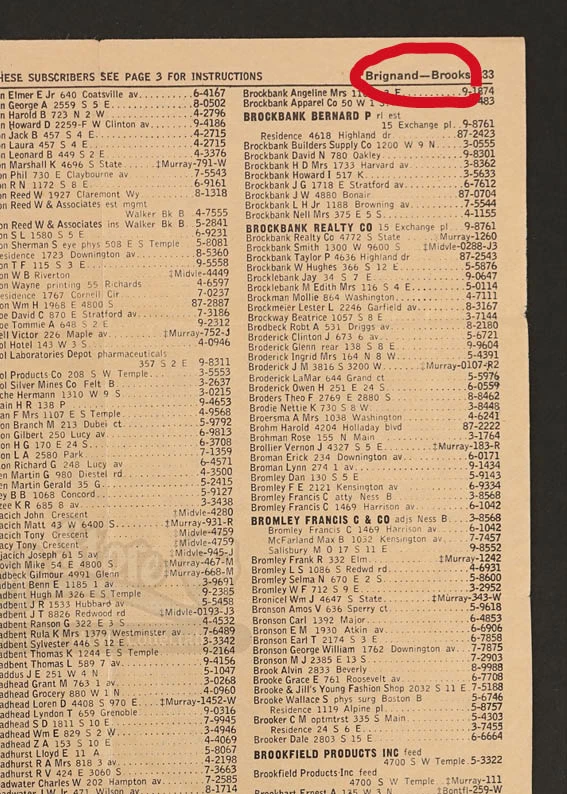
in my document, i have content that is similiar to a phone book content, and like in phone books, i want the first and last word (or even better: the first and last paragraph) of the page to appear in the header of the page. i have a very large amount of text, so i can't do it manually. do you know if there's an indesign tool that just does that? like, selecting this information by itself and always putting it into the right textframe, like page numbers?

i'm attaching a photo with what i mean.

every help is appreciated!

thanks xx
This topic has been closed for replies.
Correct answer TᴀW

Yes, it can certainly be done.

You need to set up a couple of running-header text variables based on a character style that you create specially and apply to all the names in the directory (I think they can be applied via a nested style as well, so they could be part of the paragraph style definition you're using for names -- not sure about that offhand, but I seem to recall that that is the case).

For the details about how to do this, check out Adobe's Help page here: https://helpx.adobe.com/indesign/using/numbering-pages-chapters-sections.html

Learn how to number pages, chapters, and sections in InDesign

(scroll about halfway down to the section called "Create Headers and Footers".

HTH,

Ariel

1 reply

TᴀW
TᴀWCorrect answer
Legend
January 11, 2018

Yes, it can certainly be done.

You need to set up a couple of running-header text variables based on a character style that you create specially and apply to all the names in the directory (I think they can be applied via a nested style as well, so they could be part of the paragraph style definition you're using for names -- not sure about that offhand, but I seem to recall that that is the case).

For the details about how to do this, check out Adobe's Help page here: https://helpx.adobe.com/indesign/using/numbering-pages-chapters-sections.html

Learn how to number pages, chapters, and sections in InDesign

(scroll about halfway down to the section called "Create Headers and Footers".

HTH,

Ariel

lisamuellAuthor
Participant
January 13, 2018

Thanks man, that helped!

Just too bad that InDesign can't make running headers with several lines in it. But it seems that can't be fixed