
Inspiring
October 29, 2021
Answered

Indesign freezes all the time when making PDF

  • October 29, 2021
  • 3 replies
  • 3346 views

working with 16.4 version on Catalina. Restarted with com/ctrl/alt/shift but same trouble ! 

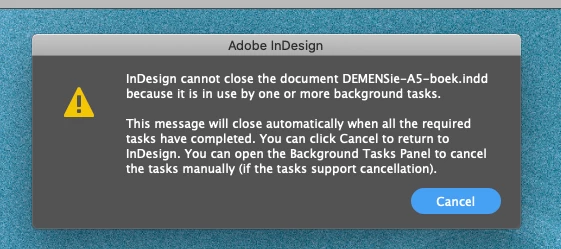
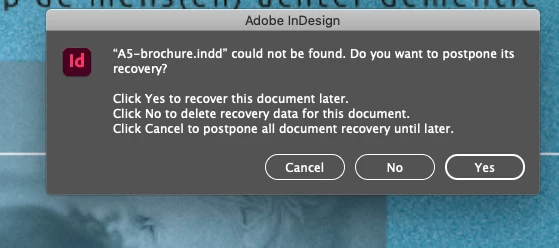
I get these window pop-ups - have to do a forced quit and restart and get those windows back.

After doing 'yes' all pages are back filled-in and the look normal but afterwards I can't make the PDF.

See attachments please. Thanks for any feedback. (I'm from Belgium - Dutch) 

S
This topic has been closed for replies.
Correct answer spyderABC

IT's DONE! 

I thought and if I try with one page? ...

All PDF's were made one by one and afterwards stick together again in one global file.

Why ID prints all the separative pages and not the whole book is a mystery !


It cost me hours and hours searching and searching and without the help of Peter I don't know what I would have done...so many thx again!

3 replies

Community Expert
November 3, 2021

Hi spyderABC,

just want to know if you tried my suggestion to run the export process not as a background one.


Thanks,
Uwe Laubender

( ACP )

Community Expert
November 2, 2021

Hi spyderABC,

what you also could try:

Export to PDF without using a background process.


Warning: You'll need admin rights for steps [3] or [4]:


[1] Quit InDesign.

[2] Create a blank text file named exactly:

DisableAsyncExports.txt


[3] For Mac OS users:

Open your InDesign app in the application folder with a right click with "Show Package" and go to: Contents/MacOS/

Copy the file DisableAsyncExports.txt to that folder.


[4] For Windows 10 users:

Copy the file DisableAsyncExports.txt to the folder where your InDesign exe file resides. E.g. to

C:\Program Files\Adobe\Adobe InDesign 2021\


If you want to revert to background processing simply remove the text file.


Regards,
Uwe Laubender

( ACP )

spyderABCAuthor
Inspiring
November 3, 2021

this is really unbelievable!!!! as I was able to export those complete pages I thought let's do only all the images (everything that's no text - since I can do anything in that Indesign document (what can be corrupt in that ID file?) and keep the text separate in another layer. So I had a document with the export images on one layer and text on the other - everything looks fine but NO PDF! Why dos he loose always .idlk file with 0 k ????

I don't get it ! ggggrrrrr


spyderABCAuthorCorrect answer
Inspiring
November 3, 2021

IT's DONE! 

I thought and if I try with one page? ...

All PDF's were made one by one and afterwards stick together again in one global file.

Why ID prints all the separative pages and not the whole book is a mystery !


It cost me hours and hours searching and searching and without the help of Peter I don't know what I would have done...so many thx again!

spyderABCAuthor
Inspiring
October 29, 2021

When I do open another ID document I get the ID-document where I asked for and that's OK too, but Indesign opens also that corrupt file again and ask the same thing: A5-brochre couldn't be found....


Community Expert
October 29, 2021

You can try the following steps:


[1] Quit InDesign.

[2] Hunt down a *.idlk file that falsely states that the corresponding document is still open.

It should be in the same folder of that document InDesign cannot find.

And then remove the *.idlk file.

[3] Trash your InDesign cache. See where you can find this:

https://helpx.adobe.com/indesign/kb/indesign-preferences-support-file-locations.html


When on Mac OS you should see a Version 17.0 folder in:

/Users/[User Name]/Library/Caches/Adobe InDesign/

Remove that Version 17.0 folder entirely.


[4] Restart InDesign.


Regards,
Uwe Laubender

( ACP )

Peter Spier
Community Expert
Community Expert
October 29, 2021

Thanks for your feedback but (sorry) I don't see or find any files or maps in my library as explained in your link. I've allready deleted the .idlk files (there were two of them).


Also look for the HIDDDEN InDesign Recovery folder and empty it.