Participant
November 18, 2022
Answered

InDesign GPU not recognised on M1 Max

  • November 18, 2022
  • 4 replies
  • 3850 views

Hi all

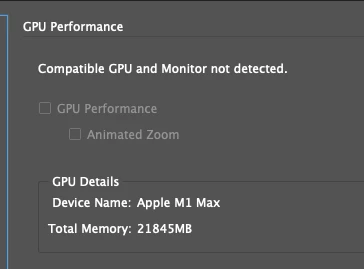
I have a Mac Studio M1 Max and a Mac Mini M1. For some reason, even when opening with Rosseta, the GPU is not recognised on both machines. Is this just me?

 

Correct answer Kevin Stohlmeyer

Hi @Lewis Tsalis I'm using PD2700U - they have to be HiDPI versions. I have a 24" BenQ at home that also does not register, but I don't use it for ID/PS work. My 27" shows as the GPU monitor.


4 replies

Participant
October 25, 2023

Hi, I had a similar problem.

My InDesign screen blink everytime I try to select a text. It was terrifying, every moment blinks in white and donn't know where text mark is...


At first, ID didn't recognixe my Monitor and says not detected. Changing the resolution on my computer 347 times (joking), it sayd DETECTED AND COMPATIBLE GPU. But still I couldnt's ativate the GPU performance.

My MAC OS version is SONOMA 14.0 and InDesign version 19.0


I contact Adobe support and they told me nowadays these both versions are not 100% compatibles and they are working to fix it.


In InDesign 18.4 version also it didn't work, so I insist on it. I was chating with an specialist and he told me to DEACTIVATE THE RULES. VIEW/RULES.

IT WORKED. Amazing.

It's not a final solution but we can work while they fix the problem.


I hope it works for you'll.

Kevin Stohlmeyer
Community Expert
Community Expert
October 25, 2023

@Blanca26001448ytge turning off the rulers has always been an old school solution to the first-click screen blink. That has nothing to do with GPU though.

Kevin Stohlmeyer
Community Expert
Community Expert
November 18, 2022

It's your monitor not your GPU. We had the same issue with a lesser model monitor and after upgrading to a BenQ it works now.

Participant
February 20, 2023

Hey Kevin. Which BenQ monitor are you using? My pair of BenQ SW240 monitors seem to not be supported. Cheers.

Kevin Stohlmeyer
Community Expert
Kevin StohlmeyerCommunity ExpertCorrect answer
Community Expert
February 20, 2023

Hi @Lewis Tsalis I'm using PD2700U - they have to be HiDPI versions. I have a 24" BenQ at home that also does not register, but I don't use it for ID/PS work. My 27" shows as the GPU monitor.


Willi Adelberger
Community Expert
Community Expert
November 18, 2022

How did you install InDesign? Via CC Desktop Application or via file transfer from another computer or backup?

Steve Werner
Community Expert
Community Expert
November 18, 2022

That's the M1 Max chip. What about on the Mac Mini M1? What operating system?


I have no problem with a MacBook Pro 2021 running Ventura with an Apple M1 Pro chip.