Participating Frequently
May 6, 2019
Answered

InDesign Gradient

  • May 6, 2019
  • 3 replies
  • 3955 views

Why do I get gray in the center of my gradients? It actually looks more gray in the file.

    This topic has been closed for replies.
    Correct answer Bill Silbert

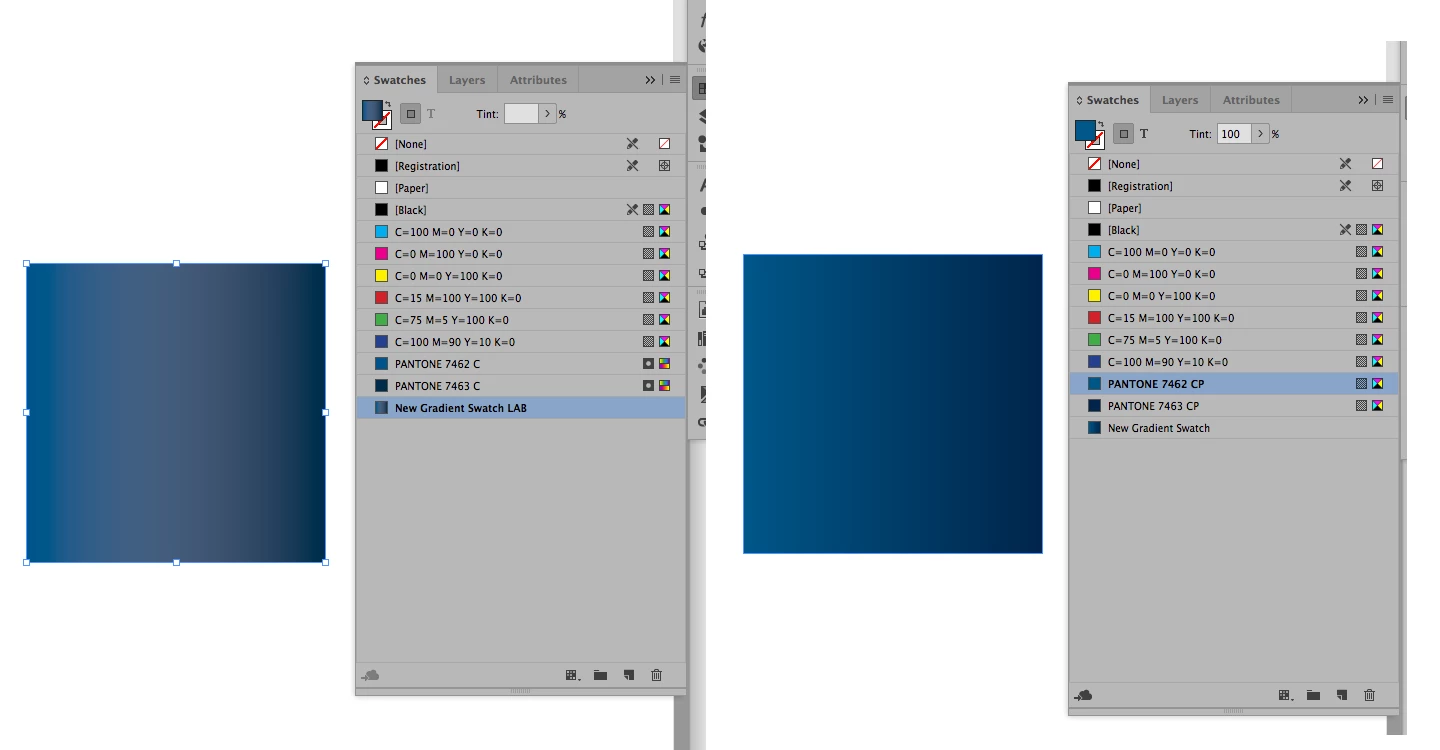
    The results you're getting are because you are trying to gradiate (if that's actually a word) two spot colors together. The reality of gradients is that you will need to break down the transition to CMYK or RGB. As you can see in the screen shot below if you use the CMYK breakdowns from the PANTONE CMYK Color Bridge Coated Library rather than the PANTONE Solid Coated (Lab Color) versions you will get a smooth transition.
    3 replies

    Bill Silbert
    Community Expert
    Community Expert
    May 6, 2019

    What colors are you using as the beginning and end points of your gradients? Are you trying to blend spot colors or CMYK? Please show a screen shot of your New Gradient dialog window and your gradient panel while a sample of the gradient is selected.

    Participating Frequently
    May 6, 2019

    using pantone coated 7462 and 7463

    Bill Silbert
    Community Expert
    Bill SilbertCommunity ExpertCorrect answer
    Community Expert
    May 6, 2019

    The results you're getting are because you are trying to gradiate (if that's actually a word) two spot colors together. The reality of gradients is that you will need to break down the transition to CMYK or RGB. As you can see in the screen shot below if you use the CMYK breakdowns from the PANTONE CMYK Color Bridge Coated Library rather than the PANTONE Solid Coated (Lab Color) versions you will get a smooth transition.

    Steve Werner
    Community Expert
    Community Expert
    May 6, 2019

    What version of InDesign? What operating system?

    Either double click the swatch, or make a swatch from the gradient and show us the values of each color stop in the gradient, like this:
