Participant
February 12, 2023
Answered

InDesign GREP: Apply Character Style to multiple objects after a tab

  • February 12, 2023
  • 1 reply
  • 610 views

Hi All, I've been trying to change colours of whole stand listings through GREP styles in InDesign for a exhibitor list but I'm getting an error that I can't get past. I've set up character styles to denote different colours depending on what the first letter of the "stand" is eg. TA = light blue, 2 = green, etc.


This is an example of a line:

<paragraph open>TAEKwondo <tab> 2F34; 3G29; EW8; TA19 TA20 TA21<end of paragraph>


This is the GREP style for TA that I have set up:

(?<=\t)*\<TA\w+\>

...but it's still applying to TAEKwondo even though I've got a positive lookbehind on a tab.


Am I close or way off?


Thank you in advance,
This topic has been closed for replies.
Correct answer proxyluke

The reason why it doesn't work with the tab is because it's always going search in a logical order.


Text <Tab> Text


Why this does not work is because the qualifier is the tab - then it's looking  directly after the tab for the number or the text which in the example below only illustrates 1 number as expected


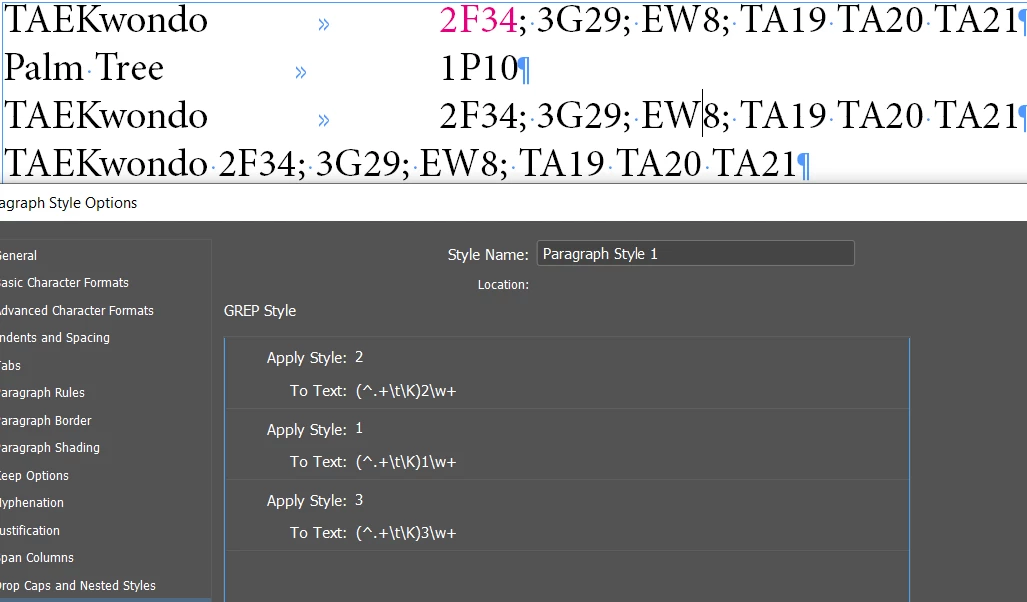
A simpler approach would be to apply different paragraph styles


The only one with No Colour style applied is the bottom line of text which has no Tab character. You'd have to find the lines of text with a tab with a search. And apply the paragraph style.


Then the coloured style is done the same way


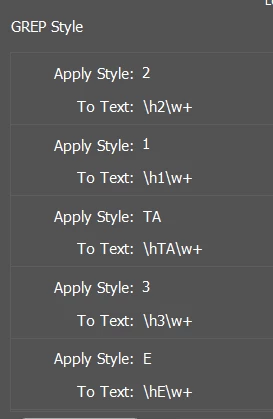
Thank you so much Eugene, but I've created something that works:


(?<=\t)*\<TA\w+\>

...which will find all instances that start with TA


Last GREP style in the sequence:

Apply Black character style:

(?<=^).+(?=\t)

To any character between the start of the paragraph and the start of the tab


Really appreciate your help,

1 reply

Community Expert
February 12, 2023

The regular expression (?<=\t)*\<TA\w+\> would try to match a word that starts with "TA" and is preceded by a tab character. However, the use of the asterisk after the positive lookbehind assertion  (?<=\t) is not valid and would likely result in an error or unexpected behavior.


You just need a different qualifier instead of a tab character

This works based on your sample which I put 3G29 inbetween TA to make sure it was working


Community Expert
February 12, 2023

\h represents any space character - nonbreaking, hair space, tab etc.

proxylukeAuthor
Participant
February 12, 2023

Thank you very much for your suggestion Eugene but that does not work because it does need to incorporate the option of having *only include items after the tab*