


January 19, 2017
Answered

InDesign GREP code help

  • January 19, 2017
  • 1 reply
  • 2517 views

Hello all,

In InDesign CS6 I'm dealing with a bunch of listings for a directory. Each listing requires multiple styles and I'm wondering what GREP code might be used, if possible, to get the job done.

An example listing reads as follows:

     NAME OF COMPANY                 

     Company address

     Company contact info

     Company phone number

     Booth(s): 2129

     Description of company.

This is how the final should appear:
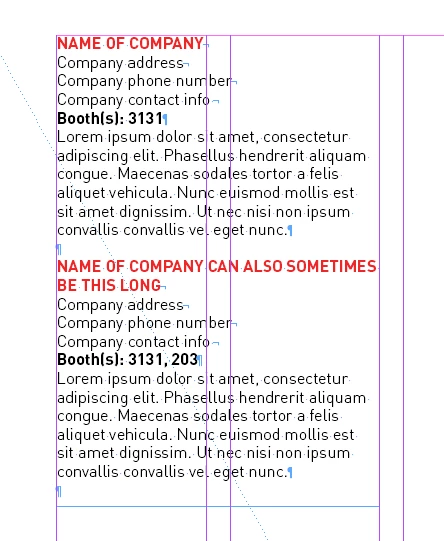
I've already created the desired character styles.

I need to format the name of the company, which sometimes continues onto the second line,

and I need to format each line that starts with "Booth(s):...", which is followed by a sequence of numbers.

The rest can be styled as body copy.

Any advice on how to get this done? Thanks a lot!!

This topic has been closed for replies.
Correct answer Peter Kahrel

By the looks of it the company name is in all capitals. Are those caps real or is it lower case with AllCaps applied? If they're real capitals they're easy to find: ^\u\u+?$. If not, maybe the company name is the paragraph with two returns before it, which you find using

(?<=\r\r).+?$

The booths are easy to find: (?<=\n)Booth.+?\d$

P.

1 reply

Peter Kahrel
Community Expert
Peter KahrelCommunity ExpertCorrect answer
Community Expert
January 20, 2017

By the looks of it the company name is in all capitals. Are those caps real or is it lower case with AllCaps applied? If they're real capitals they're easy to find: ^\u\u+?$. If not, maybe the company name is the paragraph with two returns before it, which you find using

(?<=\r\r).+?$

The booths are easy to find: (?<=\n)Booth.+?\d$

P.

Obi-wan Kenobi
Legend
January 20, 2017

Hi Peter,

Strange Grep behavior!

I don't find a Grep style code to format "Name of company" followed by a \n and, using a F/R, I can't catch the first one!

F/R:  \r\K^.+\n

"Name of company" could be: "Adobe", "Apple", "IBM", "The GREP Company", … and I don't use a double \r.

Of course, one single para style!

(^/) 

Community Expert
January 22, 2017

Hi Obi-wan,


GREP styles cannot look outside of the bounds of a single paragraph.

So if a paragraph return \r is preceding some text one cannot catch this with a GREP style e.g. using a positive lookbehind with \r . With GREP Find/Replace you can.

What we should find with a GREP style is some text at the beginning of a paragraph until the first \n is reached.

So the answer for a GREP style expression catching "Name of Company" simply is:

^.+(?=\n)

Regards,
Uwe