Inspiring
June 13, 2023
Answered

InDesign Grep Style for Composite Fonts

  • June 13, 2023
  • 1 reply
  • 5248 views

Hi,
Is it possible to use Grep Style to do composite fonts, the base is Chinese or Japanese and Latin and Number is DinPro? or

How to set a Grep Style if I type in latin letters A-Z or 1-10 and it automatic switch to DinPro font?


Thanks

This topic has been closed for replies.
Correct answer m1b

Mark has pretty much nailed this already, but i will point out that i usually achieve the same effects by using regular expressions syntax to specify Unicode ranges. For example, "every glyph past basic ASCII" would be


[/x{0100}-/x{FFFF}]+

You can make a GREP style that applies to e.g. only Thai Unicode ranges. It can get complicated, as in the case of parentheses in CJK text that are not fullwidth, but it works quite well to capture All the Glyphs in a given writing system. 


That's the sort of thing I was looking for Joel! Thanks. Also, I notice that Indesign grep can understand \p{Punctuation} which is great, but not other unicode blocks, eg.  \p{Han}.


@iampurple you can implement the grep with Joel's method by changing the grep to something like:

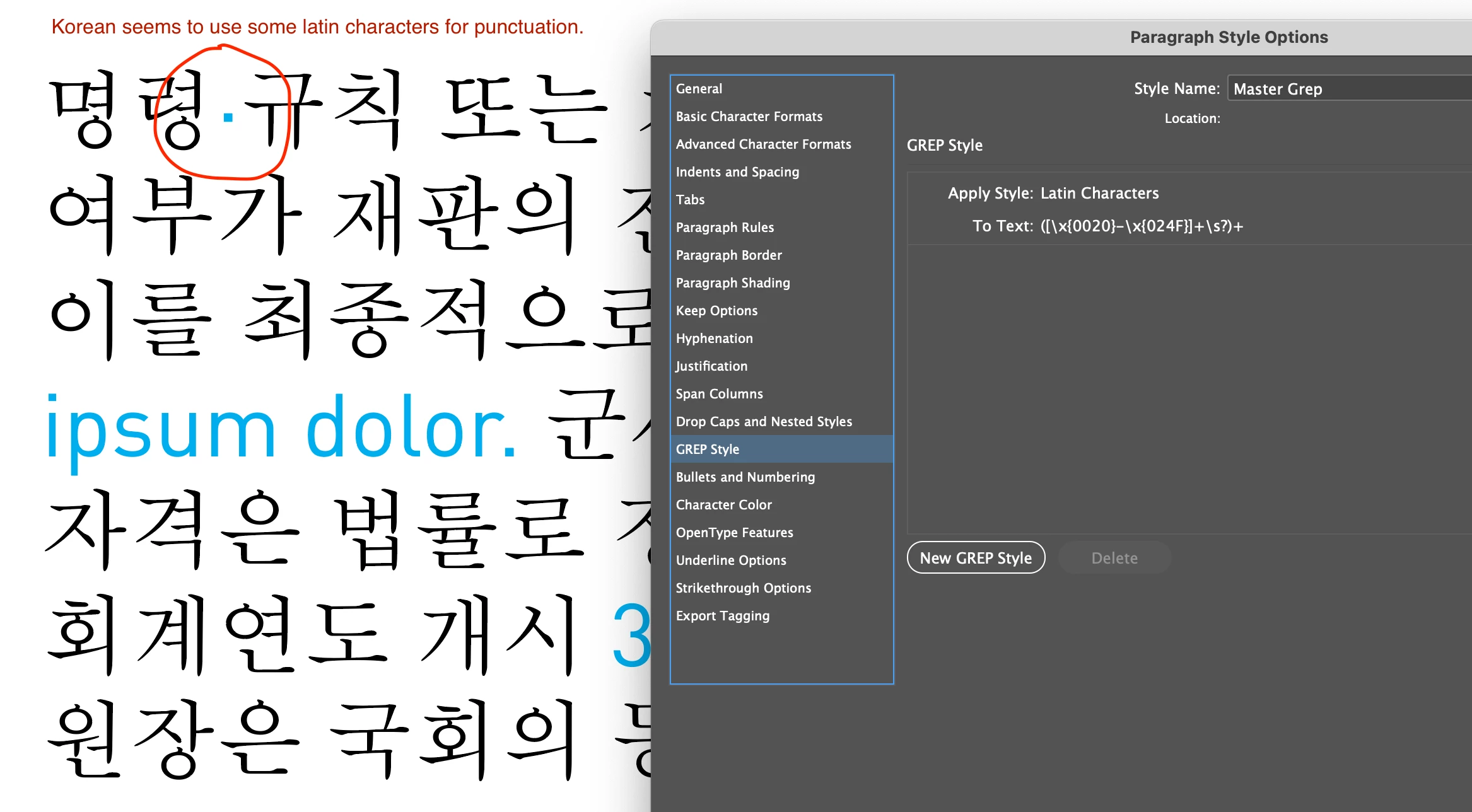
([\x{0020}-\x{024F}]+\s?)+

(By the way, see unicode blocks here.)


You may still have to go more sophisticated with the grep though, if you don't want to match some things, for example Korean seems to use some latin punctuation characters:

 

1 reply

m1b
Community Expert
Community Expert
June 13, 2023

Hi @iampurple, I don't have any experience with what you are asking, but in case it helps, here is a little test I just did, that might be worth playing with. I set up a paragraph of chinese text with a grep style that targets specific latin characters and draws them in DIN cyan color.


The grep I used is this:


([A-Za-z0-9,;\.\?\!]+\s?)+


which isn't great, because it only targets the explicitly included characters, so you will have to add any other characters you want to target, such as hyphen, dollarsign, em-dash, accented characters, eg. öà. (I tried targeting a unicode code block eg \p{Han} but couldn't get it working—maybe a grep expert will chime in on that.)

See attached demo document.

- Mark


Edit 2023-06-14: added Japanese and Korean examples to demo.indd.

Edit 2023-06-14: added a couple of extra unicode blocks to demo.indds. Thanks to @Joel Cherney for the idea.

Edit 2023-06-15: now I'm using this grep in my demo.indd:

[\x{0020}-\x{024F}\x{1E00}-\x{1EFF}\x{2100}-\x{214F}\x{0A}\x{2000}-\x{206F}]+


iampurpleAuthor
Inspiring
June 13, 2023

Thanks a lot Mark!! Yes, this is, but what if the document has multiple languages, Japanese, Korean, Thai...etc? 5 pages are Chinese, another 5 pages are Japanese? 

Do we set a paragraph style per languages that include the grep style? or we can do script? or?


Many thanks 

Joel Cherney
Community Expert
Community Expert
June 14, 2023

Hi @iampurple, this is all new to me, but it seems that the trademark ™character isn't in the unicode block we specified. Looking at this list, we can see that it is part of "Letterlike Symbols". We can add it to the grep:

([\x{0020}-\x{024F}\x{2100}-\x{214F}]+\s?)+

While we are here, I noticed that there is an "Latin Extended Additional" block that includes a lot of latin with diacritics. If we add those too we have:

([\x{0020}-\x{024F}\x{1E00}-\x{1EFF}\x{2100}-\x{214F}]+\s?)+

- Mark 


You're 100% correct Mark, you do have to be a bit more sophisticated. I personally try to keep languages in separate documents, in order to avoid collisions like the bullet character you pointed out. But sometimes my client wants 40 languages in live text in a single document, so I have to be sparing with my use of GREP styles, because I don't want any styling collisions. Also, having 40 different GREP styles running all the time can be a performance hit, if your hardware isn't particularly recent.


So, some caveats:


Spaces are weird. If you're setting type in Khmer or Amharic, I find that spaces ought to be quite wide for those languages. However, if you look at their Unicode values, they're usually still using U+0020, the Boring Normal Space. Some Amharic input methods actually insert "Ideographic Space" U+3000, which is space you'd use if you were doing fullwidth layout in Chinese. Other Amharic input methods use other spaces that aren't quite as wide as the ideographic space. Some Amharic fonts just have an extra-wide space encoded at 0020. On the other side, lots of Khmer and Lao text uses "Zero-With Space", U+200B, which is exactly what it looks like, it allows line-break at words with zero visible space, which is important for many SE Asian Languages. There are lots of spaces!


Sorry for the info dump there, but the main point is that \s captures all of these. Or, maybe I should test it? It certainly captures at least most of these special-use spaces. So be wary of just including \s in any regex meant to apply specifically to a single language. 


Additionally... if you have both Chinese and Japanese in the same document, you'll need to be careful, as some of the glyphs are encoded at the same point but drawn differently. It's important to use only Japanese-style glyphs when typesetting Japanese, but if you're capturing all the Simplified Chinese glyphs with one regex, a Japanese-specific search will often capture the exact same glyphs. Using Simplified mainland glyphs for Japanese is the acme of Things Not Done When Typesetting Japanese, I think.


Finally, some fonts will do things differently if they are marked with a different language in the InDesign interface - different glyph alternates or glyph shaping, which is quite often necessary if you're doing work into a bunch of right-to-left languages in a single doc. So, more imporant to me than capturing individual glyphs with a GREP, is marking text with appropriate language in the paragraph style. So I'll have a English paragraph style, and then a whole bunch of other languages Based On the parent English style, with their own language settings and GREP styles.

