Inspiring
May 13, 2021
Answered

InDesign > Edit > Transparency Flattener not sticky?

  • May 13, 2021
  • 1 reply
  • 945 views

After a clean reinstall of InDesign today, I began the process of updating my settings and Workspace. But one setting isn't working the way it used to. InDesign > Edit > Transparency Flattener keeps reverting to [Low Resolution].

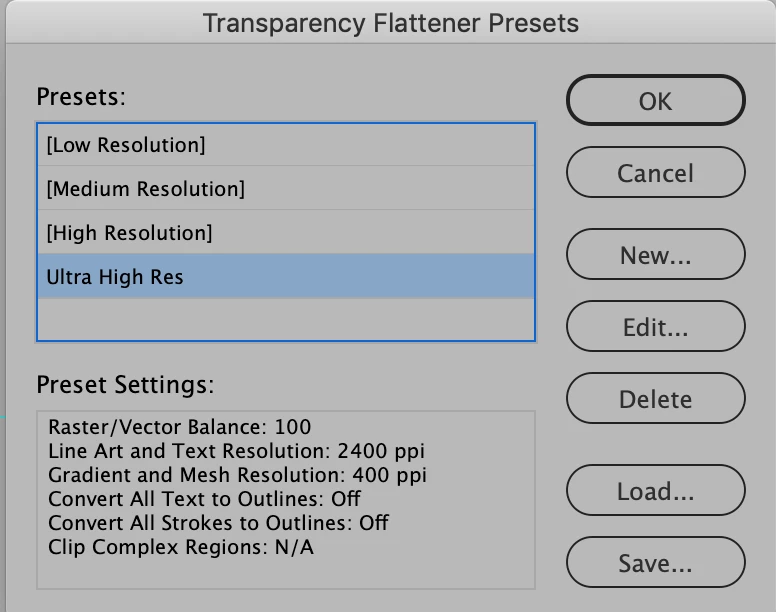
Our standard setting is here, and shown in the screen shot below.

  • Raster/Vector Balance: 100
  • Line Art and Text resolution: 2400
  • Gradient and Mesh Resolution: 400
  • The rest is off or N/A.

But after selecting this Preset, I noticed that it doesn't stick. It keeps reverting to [Low resolution].

Any ideas why? How can I get this preset to stick?
This topic has been closed for replies.
Correct answer rob day

Yes, that works. I've updated my presets and the settings sticks. But that still leaves the question about why the initial setting, InDesign > Edit > Transparency Flattener doesn't stick. 


Edit>Transparency Flattener Presets... works like File> Print, Document, and Adobe PDF presets, you use those dialogs to edit existing, or create new presets. The selected preset is not applied to anything so they are not sticky.

1 reply

rob day
Community Expert
Community Expert
May 13, 2021

What version of InDesign are you running? Can you load your PDF preset that uses the custom flattener and show a capture of the Advanced tab?

B-EhrlichAuthor
Inspiring
May 13, 2021

Just updated InDesign today to 16.2.1


From the previous conversation thread, I had gone ahead and updated the PDF Export Preset to be sure I can export files correctly, and it looks like it is sticky. But I still don't understand why the Transparency Flattener Presets  are not sticky.


If the Transparency Flatter Presets panel doesn't stick and the only way to address it via an updated PDF Export preset, that's fine. I just want to be clear before I send out an update to the entire office requesting that they update their PDF Export preset.


I really appreciate your time on this!

rob day
Community Expert
rob dayCommunity ExpertCorrect answer
Community Expert
May 14, 2021

Yes, that works. I've updated my presets and the settings sticks. But that still leaves the question about why the initial setting, InDesign > Edit > Transparency Flattener doesn't stick. 


Edit>Transparency Flattener Presets... works like File> Print, Document, and Adobe PDF presets, you use those dialogs to edit existing, or create new presets. The selected preset is not applied to anything so they are not sticky.