

InDesign having issues exporting hi-res PDFs; low-quality or missing image in PDF
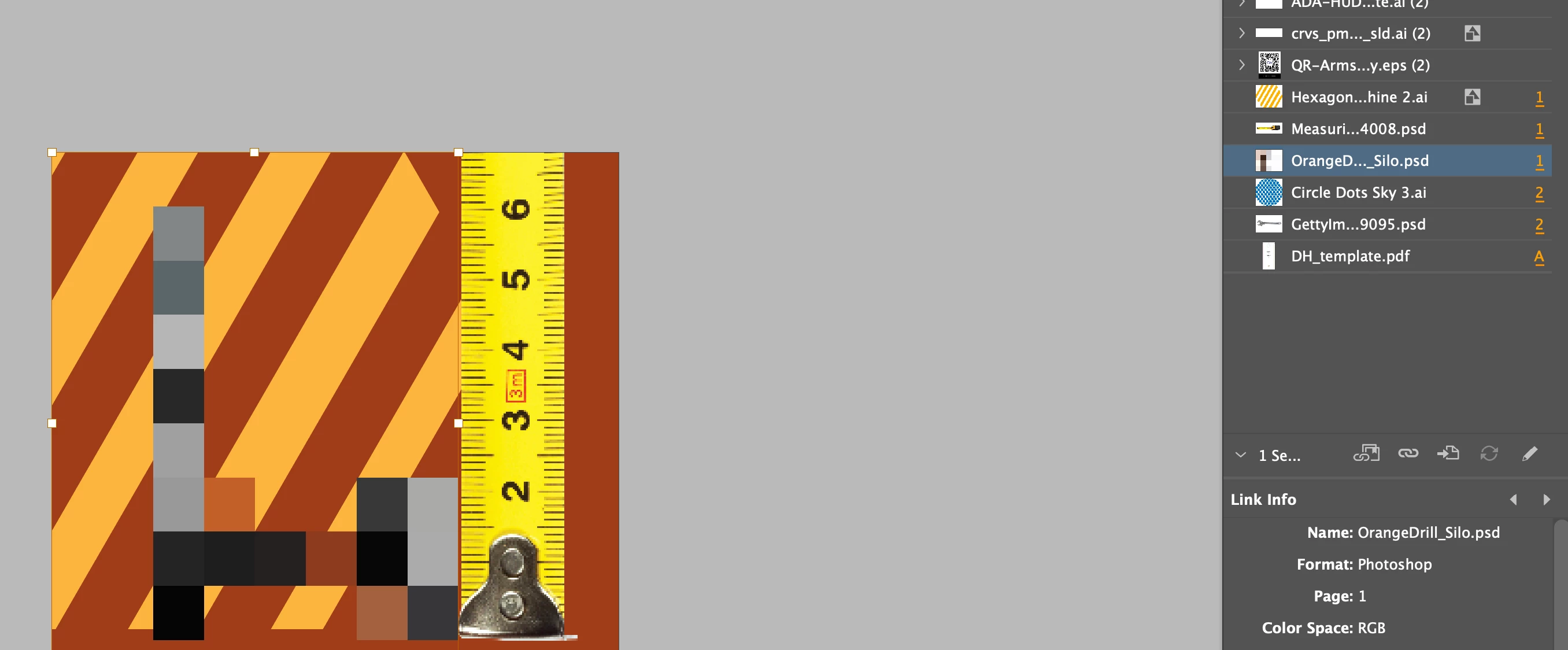
Started having this odd issue a couple months ago.. I export an InDesign doc to a high-quality print PDF, and some of the images export like they are missing/low proof quality. When I open the PDF images that have a silo, or shapes, have a white square, or the photo is pixelated. Happens with raster and vector.
It happens with both images that I have placed directly and shapes that I drag from my CC Library (like our logo).
I don't get "missing image" errors when exporting, and in InDesign, all the links are correct.
The way I fix it, is I open my LINKS panel, click on each image and click on the "Go to link" button. This corrects it.
It's like InDesign is saying the link is correct, but in actuality is not.
Here's a screenshot from InDesign of a Drill that shows as large pixels, and the measuring tape is low-res. My display is set to high-quality display.
Only thing I can think of is, I work off one-drive, so images get uploaded to the cloud. Maybe it's losing part of the sync? It never happened before the last 4 years working in this setup.
I know it's going to be an issue, or perhaps it already has, that I export a PDF and one image will be low-res and I will miss it and sent it out.
 AdChoices