

MichaelT13
Participant
August 1, 2025
Answered

InDesign Imports Wrong pdf File, Even Though Other Apps Open It Just Fine

  • August 1, 2025
  • 2 replies
  • 473 views

A client sent us a pdf of something that they wanted us to print for them. They later sent us a new copy with some changes that had been made. So we completely deleted the old files and saved the new ones to the same folder. The new pdf opens the way it should in Acrobat, Photoshop, internet browsers, and the preview in File Explorer. But when I import it to InDesign, it pulls up the old version of the file every time, even though they have been deleted and didn't have the same file name anyway. So I deleted the contents of InDesign's cache folder and used the shift+ctrl+alt shortcut on startup to delete the preference file. I also tried it on a different computer. I also saved the files from the email from the client to a different location and imported that copy. All to no avail. Is this a problem with InDesign or could it be something in the way he made the changes to the pdf? Any help or insight would be greatly appreciated. Thanks
Correct answer Joel Cherney

No assumption of design choices expressed or implied, got it 🙂


These two PDFs are very different. I don't think that you're trying to tell me that "STEPS" is a revised version of "Life Tract" but that's the way it reads. I'm going to assume that both PDFs show the problem where what you see in InDesign doesn't match what you see in Acrobat, or elsewhere. 


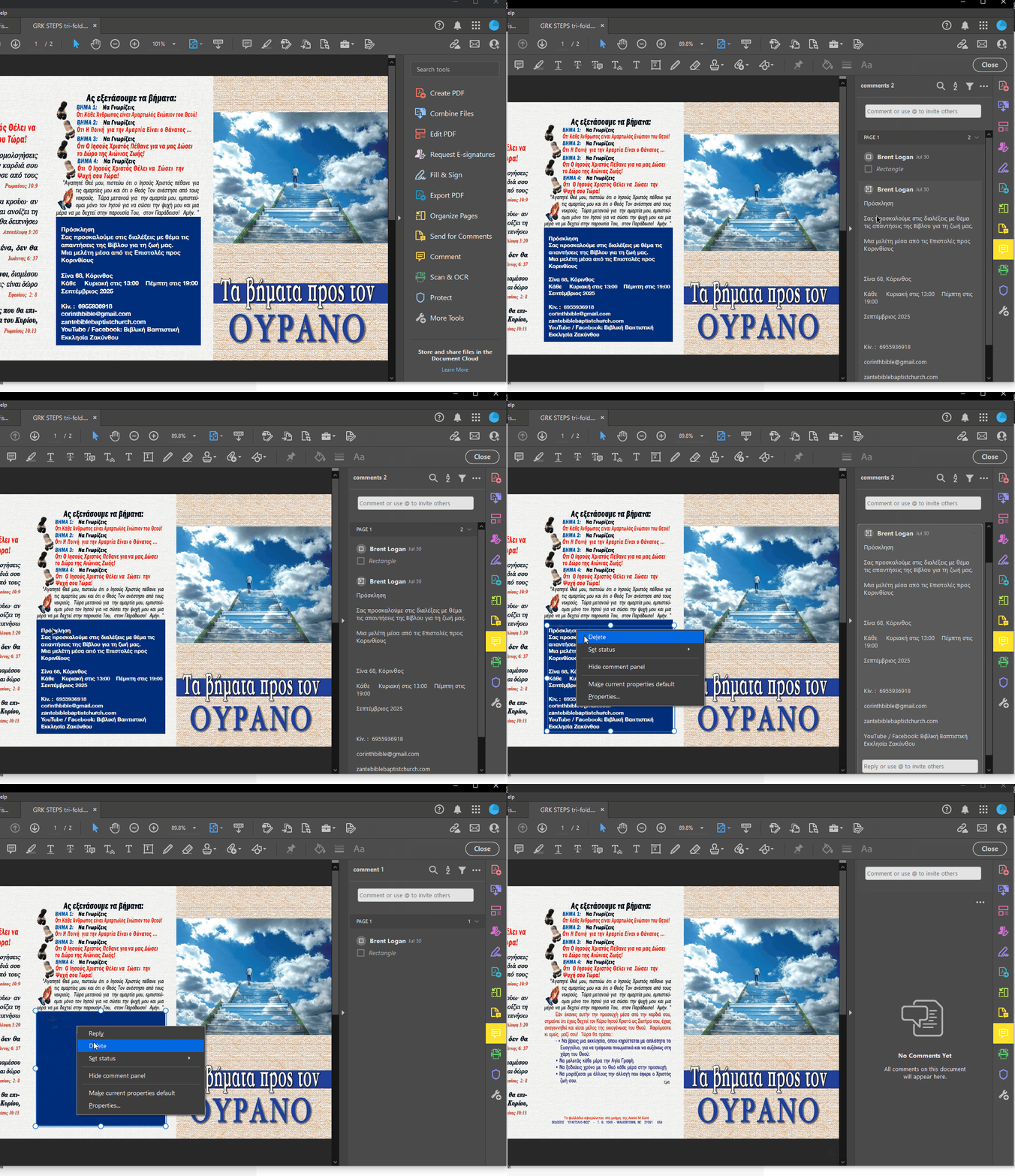
The reason is that your client has used PDF markup tools to attempt to make edits. So, in the last panel of the STEPS trifold, where they've added the blue box? The tools they've used to make those edits don't render in InDesign. They're actually meant for comments and editorial workflows, to show an InDesign operator where to make edits, for example. Here's a GIF showing that the old content is still there under the nonprinting markup:


Everything else - Acrobat, Photoshop, Explorer - they're all rendering the comments. InDesign is pickier, and uses commented PDFs very differently, and clearly doesn't render those comments. If I were in your shoes, I'd likely reimplement the client's changes in InDesign - copy the comment text, import the PDF into InDesign, draw that blue box in InDesign, paste in the white text and style appropriately. 

2 replies

Joel Cherney
Community Expert
Community Expert
August 1, 2025

Is this a problem with InDesign or could it be something in the way he made the changes to the pdf?


You said that you tried the exact same procedure with the exact same PDF on a different computer? And you had the same result there, correct? Abhishek suggested testing the same procedure with a different PDF; if this issue occurs with this PDF on another computer, but another PDF doesn't display this issue, then it's more likely that it's an issue with the PDF. 


Can you share the potential-problem PDF here? 

MichaelT13
Participant
August 1, 2025

That is correct. I wondered if it might be the pdf. If InDesign was pulling a copy of the old file from somewhere, I would've thought that clearing the cache would have solved it. But yes, I have attached the two pdf's. For the record, I would like it to be clear that we did not do any design work on these. 😉

Joel Cherney
Community Expert
Joel CherneyCommunity ExpertCorrect answer
Community Expert
August 1, 2025

No assumption of design choices expressed or implied, got it 🙂


These two PDFs are very different. I don't think that you're trying to tell me that "STEPS" is a revised version of "Life Tract" but that's the way it reads. I'm going to assume that both PDFs show the problem where what you see in InDesign doesn't match what you see in Acrobat, or elsewhere. 


The reason is that your client has used PDF markup tools to attempt to make edits. So, in the last panel of the STEPS trifold, where they've added the blue box? The tools they've used to make those edits don't render in InDesign. They're actually meant for comments and editorial workflows, to show an InDesign operator where to make edits, for example. Here's a GIF showing that the old content is still there under the nonprinting markup:


Everything else - Acrobat, Photoshop, Explorer - they're all rendering the comments. InDesign is pickier, and uses commented PDFs very differently, and clearly doesn't render those comments. If I were in your shoes, I'd likely reimplement the client's changes in InDesign - copy the comment text, import the PDF into InDesign, draw that blue box in InDesign, paste in the white text and style appropriately. 

Abhishek Rao
Community Manager
Community Manager
August 1, 2025

Hi @MichaelT13,


Thanks for sharing the details. Could you please confirm the version of InDesign you are using and your operating system? Also, does this behavior happen only with this particular PDF, or do you notice it with other updated PDFs as well? If possible, try placing a completely different PDF in the same document to see if it imports correctly.

It would also help to know whether you are placing the PDF into an older InDesign file or a newly created document. If you can create a short screen recording showing the steps you take when importing the PDF, that will help me for further checks.


Looking forward to your update.

Abhishek

MichaelT13
Participant
August 1, 2025

The version of InDesign is 20.5 x64. The version of Windows is Windows 11 Home version 24H2. Well, this is the first time it has happened with a pdf, but our client actually sent us two initially, edited both of them, and then sent a copy of both edited pdf's via email. Both of the edited pdf's do the same thing. I was creating a brand new InDesign file for each one. I have no idea how to create a screen recording, but the steps I used to import it are pretty simple. I created the new document, created a frame to place the pdf into, clicked the "import" button in the contextual menu, and selected the file I wanted to import. As an alternative method, I also tried using the "Place" function under "File" in the menu at the top, as well as simply dragging the pdf file from the File Explorer to the InDesign document