


- Home
- InDesign
- Discussions
- Re: Indesign Inverts images when placed
- Re: Indesign Inverts images when placed
Indesign Inverts images when placed

Copy link to clipboard
Copied
Hi guys,
I've been creating these documents for about an hour and suddenly the last raster I try and place becomes purple and green. I've tried placing it in another document, saving it as a psd and nothing seems to be working. In fact in photoshop it's also opening as purple and green, can anybody help?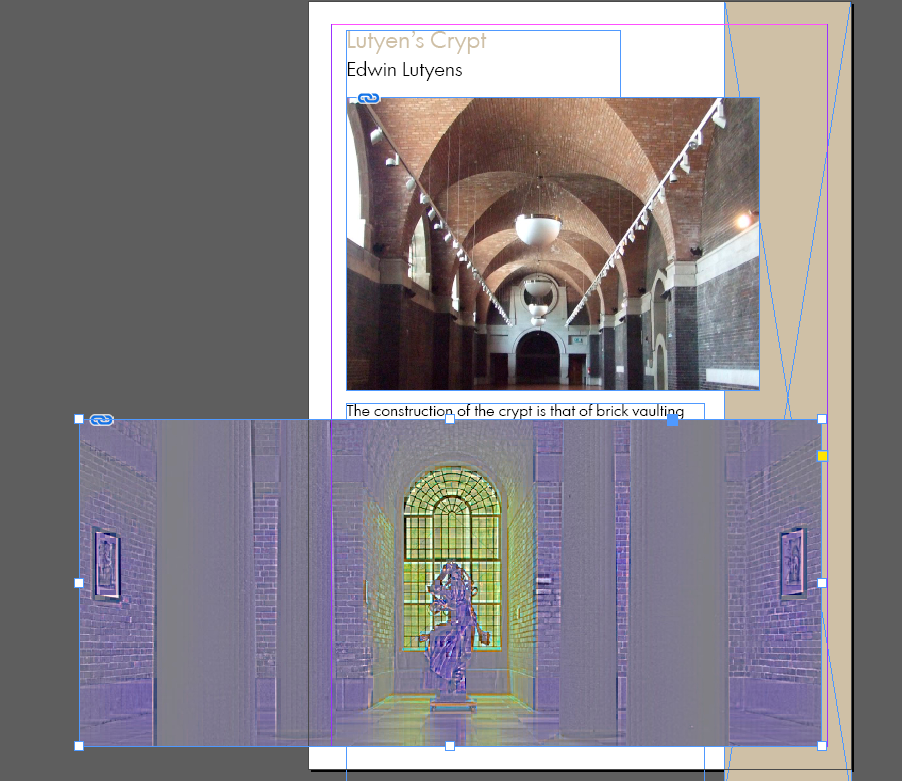


 6
Replies
6
6
Replies
6




Copy link to clipboard
Copied
What file type? Save as PSD (or resave) and place again.
What dolor depth? If it is 1bit or 8bit-grey check the color of frame (Black arrow) and content (white arrow).
If it is in Photoshop inverted you might have inverted accidentally.
Copy link to clipboard
Copied
I think it's probably that I've inverted accidently because it does the same with other images as well, do you know how I could uninvert?

Copy link to clipboard
Copied
Hi BlueMonday_88 ,
InDesign usually cannot do this without using any effects from the Effects panel.
Could be a bug. Especially with a specific image file format.
I found this bug report:
Best reply there and do back linking to this thread.
What's your exact version of InDesign?
What operating system?
If on Mac OS X, is GPU support turned on or off ?
Regards,
Uwe
Copy link to clipboard
Copied
I've just updated to the latest version of indesign and it's still doing the same thing, am also on windows 10

Copy link to clipboard
Copied
It could be that, with no document open, you inadvertedly changed the properties of image boxes setting them in difference or exclusion mode. To check if so, please, without no document open, Ctrl+F7 and go to the "Effects for object" zone and make sure that Transparency is set to "Normal" 100%.
Then make a new document and check if the problem persists
Just in case

Copy link to clipboard
Copied
Make sure you video driver is up-to-date. Go to the video card manufacturer and see if you have the latest version installed.
Check to see if it was recently updated--you could also roll back a version too.


Get ready! An upgraded Adobe Community experience is coming in January.
Learn more
 AdChoices