Participating Frequently
July 24, 2022
Answered

indesign is not trimming to page size

  • July 24, 2022
  • 2 replies
  • 1574 views

Page size: 4.75 x 7.125 in. Single page.

Acrobat page size: 5.00 x 7.38

When exporting with crop marks it increases the page size to 5.33x7.71

With or without bleed or margins makes no difference.


I've tried it all. Any ideas?

This topic has been closed for replies.
Correct answer rob day

I did not set trim. I expected the file to be printed at the size of the page in Indesign. I still dont understand why the pdf is larger than the page size.


I did not set trim. I expected the file to be printed at the size of the page in Indesign.


The page size equals the trim size—if you want the PDF to match the page dimensions export with no bleed.


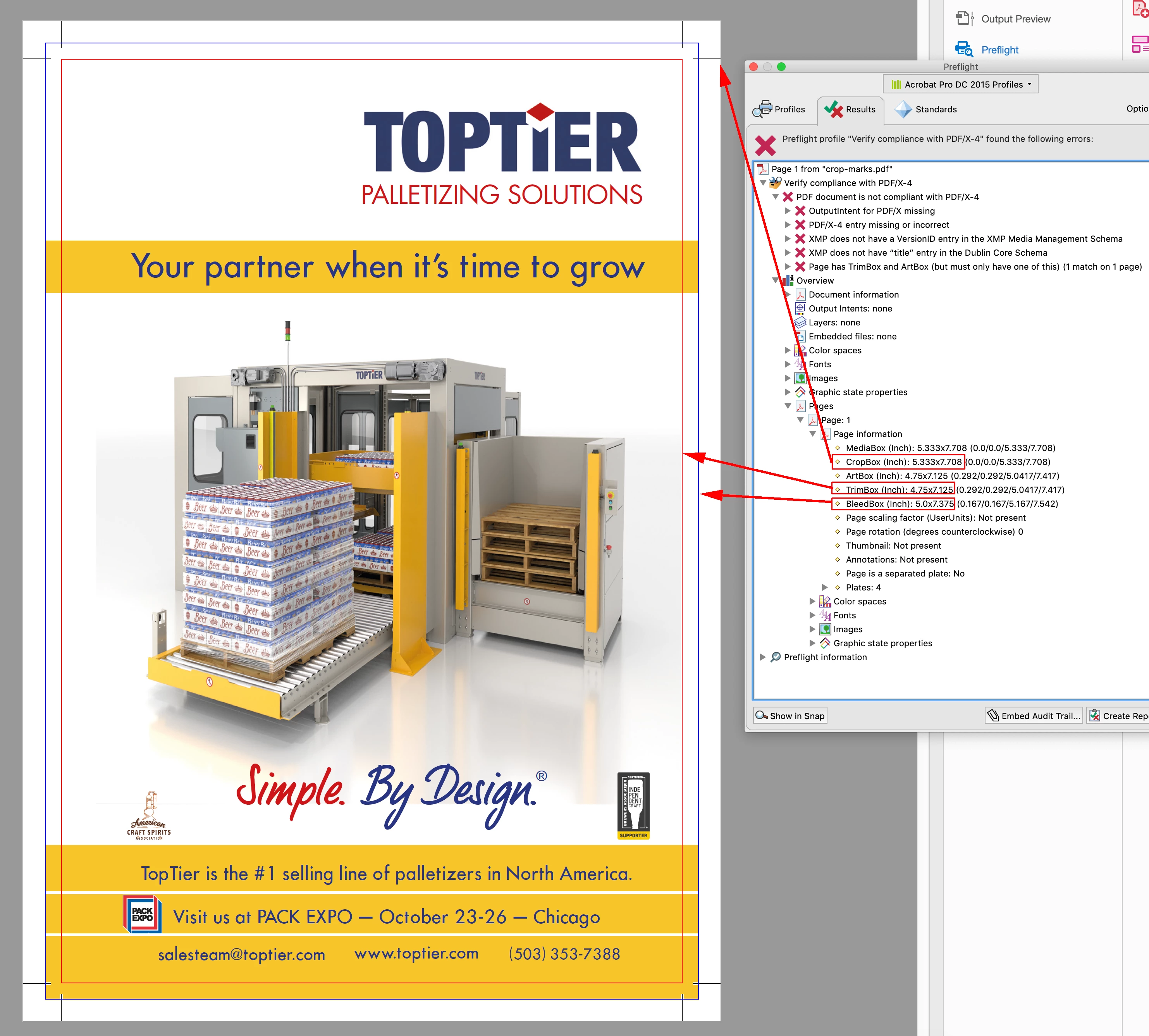
Your attached PDF that includes crop marks makes it a bit more clear—the crop box is the box that includes the marks.


2 replies

rob day
Community Expert
Community Expert
July 24, 2022

Hi @tommytegler , Acrobat’s Document properties doesn’t necessarily list the trimbox. You can get it from Preflight—here I’m using the Preflight’s Verify Compliance with PDF/X-4 to check Page 1’s info, which lists the actual TrimBox dimensions:


Participating Frequently
July 25, 2022

thanks for taking the time.

Acrobat document properties shows the incorrect page size, where .25 in has been added to the height and .255 to the width. Its apparent when viewing the doc in acrobat by placing content outside the page bottom in indesign and it appears in acrobat.

Preflight Page information show the correct trimbox but the incorrect cropbox. When exporting with crop marks the page size (cropping) is correct. 

The single page doc was created new and cant inherent from a master. I'm obviously missing something basic.

rob day
Community Expert
Community Expert
July 25, 2022

Can you share the exported PDF, and show a screen capture of your Export>Marks and Bleeds tab?

Willi Adelberger
Community Expert
Community Expert
July 24, 2022

The margin has nothin gto do with the page size, as it inside of the page edge.

The size of the exported file is page size + bleed + info area or + registration marks.


How do you check the size of the xported PDF?
