Participant
February 25, 2020
Answered

Indesign is skipping a chapter number

  • February 25, 2020
  • 1 reply
  • 2042 views

I have a Book document. I have a master page that uses the chapter number. It's applied to the first page of each chapter. It's supposed to update automatically. Each doc contains exactly one chapter. Pretty normal, right?


But if I look at all the chapter numbers across the book I get 1,3,4,5,6,7.  The Chapter 3 should actually be Chapter 2. I checked, all the docs in the book have the right master pages set. I don't recall ever using that variable anywhere else, and I can't find a stray "2" anywhere. All docs are in the right order. There is no document between 1 and 2.


• Why is my chapter number skipping? How could this happen?

• Is there a way I can search for, or visually detect, the presence of variables?


Any other ideas?
This topic has been closed for replies.
Correct answer Dave Creamer of IDEAS

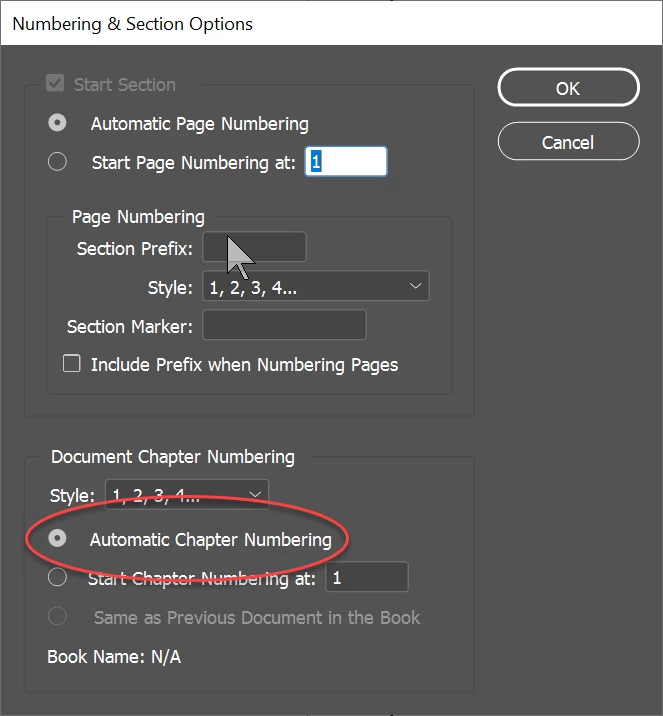
Check the problem document and see if the Number  & Sections Options is set to Automatic. Technically, the numbering is controled by each document's setting--the book just updates based on those settings. 

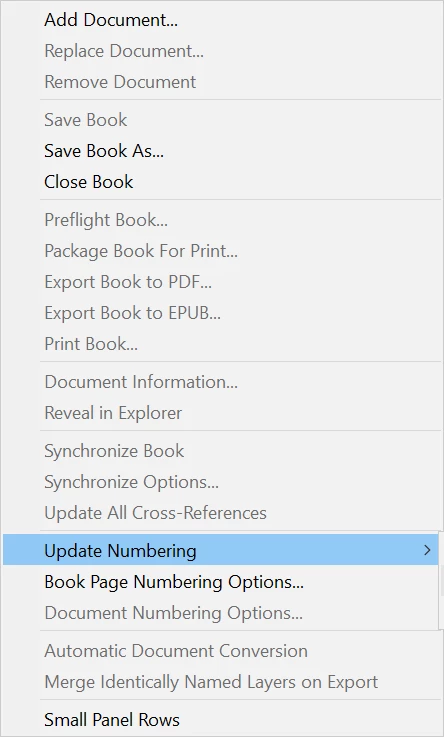
Also, sync'ing is not the same as updating book numbering--be sure you are choosing the correct option.

1 reply

ustamillsAuthor
Participant
February 25, 2020

Forgot to say: I have done a sync. More than once.

Dave Creamer of IDEAS
Community Expert
Dave Creamer of IDEASCommunity ExpertCorrect answer
Community Expert
February 25, 2020

Check the problem document and see if the Number  & Sections Options is set to Automatic. Technically, the numbering is controled by each document's setting--the book just updates based on those settings. 

Also, sync'ing is not the same as updating book numbering--be sure you are choosing the correct option.

David Creamer: Community Expert (ACI and ACE 1995-2023)
ustamillsAuthor
Participant
February 25, 2020

So, I got it fixed and here's where it got interesting.  I went back to make sure I did everything you said.  Nothing worked. But then I CLOSED all the documents that were open (including the problem document), ran the Update Numbering again. Et voila. It was updated as I expected.


Thanks for the pointers!