Exit
  • Global community
    • Language:
      • Deutsch
      • English
      • Español
      • Français
      • Português
  • 日本語コミュニティ
  • 한국 커뮤니티
0

InDesign line spacing

New Here ,
Apr 11, 2022 Apr 11, 2022

Hello,

I need help with line spacing. 
I need to follow strict guidelines of 14pt font size and 1.5 line spacing. Word has this type of spacing, but InDesign has it in pt. How do I make it 1.5?


Erika

TOPICS
Type
999
Translate
Report
Community guidelines
Be kind and respectful, give credit to the original source of content, and search for duplicates before posting. Learn more
community guidelines

correct answers 1 Correct answer

Community Expert , Apr 11, 2022 Apr 11, 2022

Hi Erika,

14 * 1.5 is 21. So your leading value must be 21 pt for your 14 pt text.

If you want to automate this define autoleading as 150% in your applied paragraph style.


From my German InDesign where the Paragraph Style Options are open and the applied font size of 14 Pt corrensponds with an Auto Leading value of 21 Pt, because I changed Auto Leading from 120% to 150%:
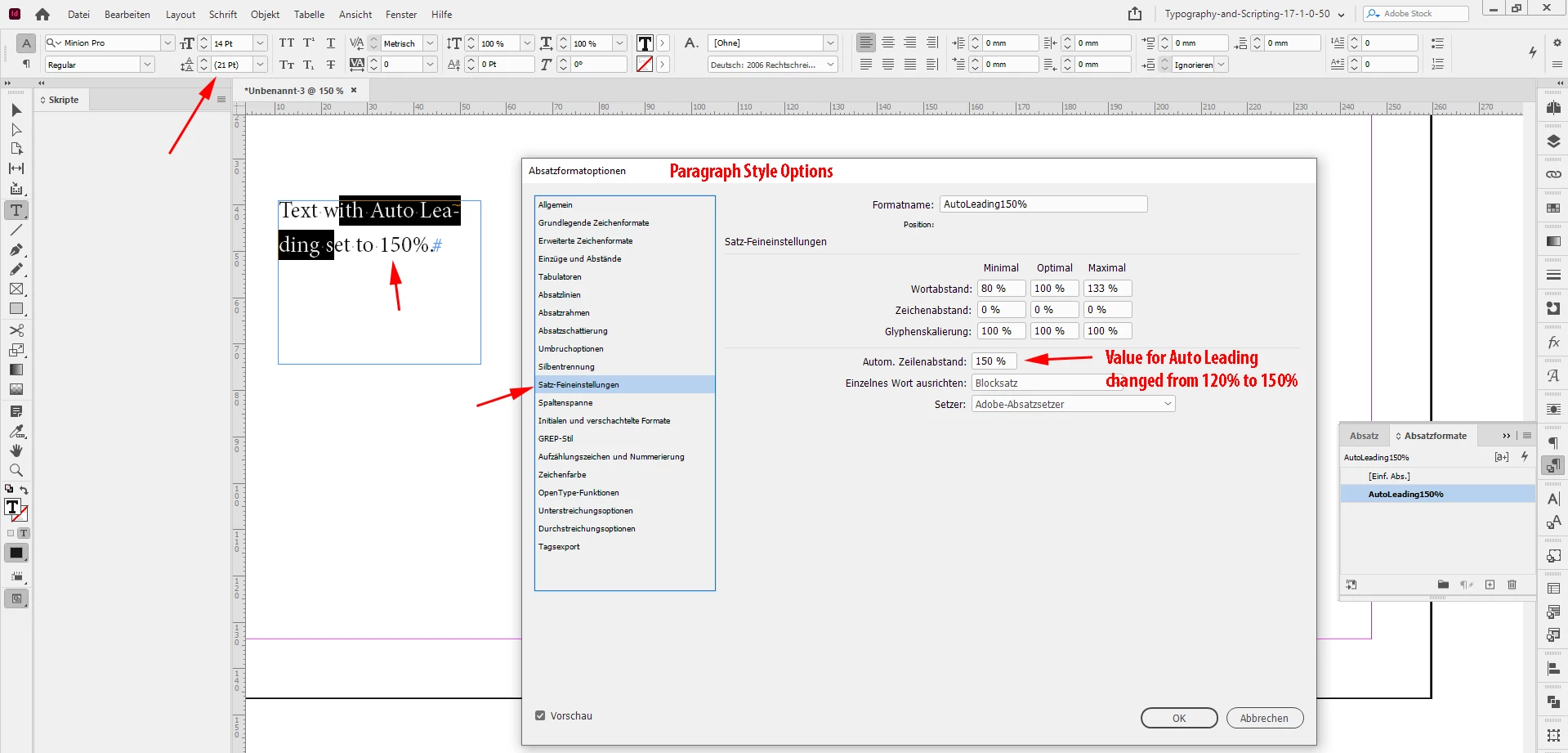
 

AutoLeading-150%-AppliedParagraphStyle.PNG


Regards,
Uwe Laubender

( ACP )

Translate
Community Expert ,
Apr 11, 2022 Apr 11, 2022

Create paragraph Styles!

If you insert 14pt in the size, insert 150% in the leading field. It will calculate as any other field does in InDesign.

Translate
Report
Community guidelines
Be kind and respectful, give credit to the original source of content, and search for duplicates before posting. Learn more
community guidelines
New Here ,
Apr 12, 2022 Apr 12, 2022
LATEST

I did that, thank you so much.

Translate
Report
Community guidelines
Be kind and respectful, give credit to the original source of content, and search for duplicates before posting. Learn more
community guidelines
Community Expert ,
Apr 11, 2022 Apr 11, 2022

Hi Erika,

14 * 1.5 is 21. So your leading value must be 21 pt for your 14 pt text.

If you want to automate this define autoleading as 150% in your applied paragraph style.


From my German InDesign where the Paragraph Style Options are open and the applied font size of 14 Pt corrensponds with an Auto Leading value of 21 Pt, because I changed Auto Leading from 120% to 150%:


AutoLeading-150%-AppliedParagraphStyle.PNG


Regards,
Uwe Laubender

( ACP )

Translate
Report
Community guidelines
Be kind and respectful, give credit to the original source of content, and search for duplicates before posting. Learn more
community guidelines
New Here ,
Apr 12, 2022 Apr 12, 2022

Thank you so much!

Translate
Report
Community guidelines
Be kind and respectful, give credit to the original source of content, and search for duplicates before posting. Learn more
community guidelines