
Participant
July 28, 2020
Answered

Indesign linking to Acrobat

  • July 28, 2020
  • 3 replies
  • 1743 views

Please forgive my lack of technical knowledge here...


But what I have done is created an interactive PDF in indesign with form fields - each with the font size adjusted and correct font selected.


I then open this in acrobat, fill the form fields with a text file this I then export. Now the problem I have is that the PDF looks perfect on my computer but as soon as I send to myself or anyone else and they open it all the font field boxes are the wrong font completely.


I have used fonts:


Space Mono

Neue Haas Grotesk Text Pro


Any help would be much appreciated
This topic has been closed for replies.
Correct answer Dave Creamer of IDEAS

Hey @idea-training,


Sorry I am not massively proficient on adobe acrobat... How can I embed the following fonts?


I have 3 fonts that don't seem to work
Jinky - hand written font
Neue Haass - I agree doesnt make much of a difference

Space Mono - which is used a lot to populate on fields that need to be populated

In my case it is a recipe card.. the method never changes but the amounts of ingredients and nutritional information does.

So that is why there is some areas that need to populate in the same text.

Thanks again


Martyn


InDesign should embed fonts automatically unless it can't. Some fonts have a setting to prevent embedding.

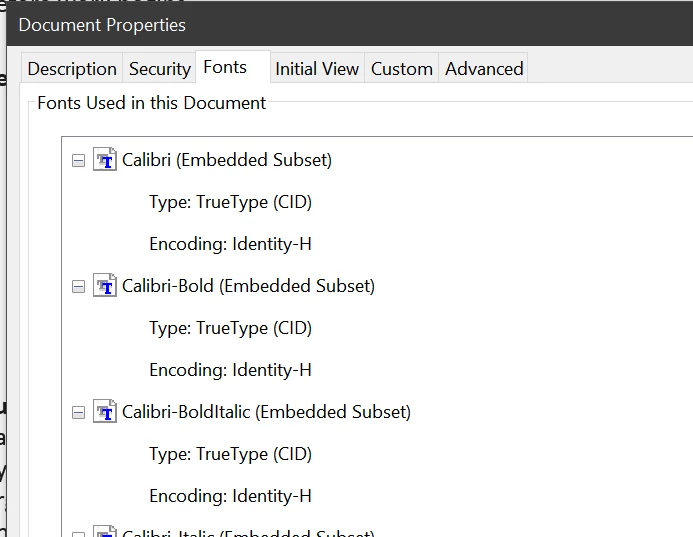
You can check to see if the font is embedded in Acrobat by going to the File>Properties menu. In the Fonts tab, you should see Embedded or Embedded Subset. When viewing on another computer, be sure to use Adobe Acrobat Reader (free) for best viewing and make sure the font is NOT installed on the other computer.

3 replies

Geоrge
Legend
July 29, 2020

>>  I have is that the PDF looks perfect on my computer

and 

>> but as soon as I send to myself 

These two things that can't live in parallel. Are you really use it same Adobe Reader to look your PDF?


>> but I dont know how to embed a font. 

https://helpx.adobe.com/indesign/using/pdf-options.html#font_embedding_and_substitution


Remember, never say you can't do something in InDesign, it's always just a question of finding the right workaround to get the job done. © David Blatner
Participant
October 29, 2020

My case is not related to InDesign but to acrobat reader. When I want to fill and sign document and use Polish character it automatically changes the font to Times New Roman and includes MinionPro-Regular in the document. I removed this annoying font from windows fonts directory but Acrobat still uses it. Where else I is the place to completely throw out this font from the system?


Participant
October 29, 2020

Ok removed this faulty font from following location and now it uses MyriadPro which looks better.
c:\Program Files (x86)\Adobe\Acrobat Reader DC\Resource\Font\MinionPro-Regular.otf

Seems the problem what I had since years now is now resolved!
Hope this helps someone

Derek Cross
Community Expert
Community Expert
July 28, 2020

Use system fonts for the fields.

Participant
July 29, 2020

This is the problem - I had a graphic designer design pdf which used different fonts and am

trying to make it work.


so looking for a work around

Dave Creamer of IDEAS
Community Expert
Dave Creamer of IDEASCommunity ExpertCorrect answer
Community Expert
July 29, 2020

Hey @idea-training,


Sorry I am not massively proficient on adobe acrobat... How can I embed the following fonts?


I have 3 fonts that don't seem to work
Jinky - hand written font
Neue Haass - I agree doesnt make much of a difference

Space Mono - which is used a lot to populate on fields that need to be populated

In my case it is a recipe card.. the method never changes but the amounts of ingredients and nutritional information does.

So that is why there is some areas that need to populate in the same text.

Thanks again


Martyn


InDesign should embed fonts automatically unless it can't. Some fonts have a setting to prevent embedding.

You can check to see if the font is embedded in Acrobat by going to the File>Properties menu. In the Fonts tab, you should see Embedded or Embedded Subset. When viewing on another computer, be sure to use Adobe Acrobat Reader (free) for best viewing and make sure the font is NOT installed on the other computer.

David Creamer: Community Expert (ACI and ACE 1995-2023)
Ian Sayers
Inspiring
July 28, 2020

When making the PDF did you check that the fonts are embedded ?

Participant
July 28, 2020

Hey giantraining - 

My skills are pretty basic so excuse me - but I dont know how to embed a font. 


Is that in the export from InDesign or in Adobe Acrobat?


Thanks again


Martyn