Bethany24827540qilv
Known Participant
January 4, 2024
Answered

InDesign losing style settings when pasting text to new document; text with unidentified overrides

  • January 4, 2024
  • 4 replies
  • 9867 views

I have a 300-page file of mostly text that gets revised and updated every few years. Sometimes I need to copy text out of the file and into a new document. I am having trouble that InDesign does weird things with the text styles when I copy it. Sometimes the text appears the same as the orginal, but it has style overrides on that should not be there. I don't want to clear all overrides, becasue there are places that overrides are needed. Here is what I have tried so far:

  1. Checked that all the styles are based on "no paragraph style." (They are now, but they weren't originally.)
  2. Checked the "basic paragraph style" for anything strange. (It was set to a font that no longer existed. I updated it to the same as my current standard. This seems significant, because the one override is that the font style is set to "Roman," which is what that old font called for, but which is not available for most fonts.)
  3. Did a find and replace in the copied text to replace "Roman" style with "Regular." (InDesign still showed overrides, either unidentified or with "Roman.")
  4. Recreated the file using the idml method. (This significantly reduced its size, but did not fix the copying error.)
  5. Recreated a problem paragraph style and tested it. (It made no difference.)


What do you think? Is this a bug in InDesign? (I think it has happened with other files, but this is the one I've tested the most.) What else shall I try? The file has likely been converted from Quark, but that was before I was involved with the project. The file appears to have "code" in it that it doesn't know what to do with. I've noticed similar unidentified overrides when a file has text copied or imported from an html source. The only way I know to solve that is to clear all the overrides before I begin formatting or else I will have a hopelessly messy file at the end. Would it be possible to write a script to clear all styling not explicitly defined by the paragraph style but retaining purposeful overrides? Any other ideas?

Correct answer rob day

Hi @Bethany24827540qilv , I can see that none of your styles are based on [Basic Paragraph], so there is a corruption in your file causing the problem that saving as IDML does not fix.


Normally the default [No Paragraph Style] can not be edited either via the UI or scripting, but there have been reported cases like yours where it gets altered—it might be the file originated from Quark or a very early version of InDesign?


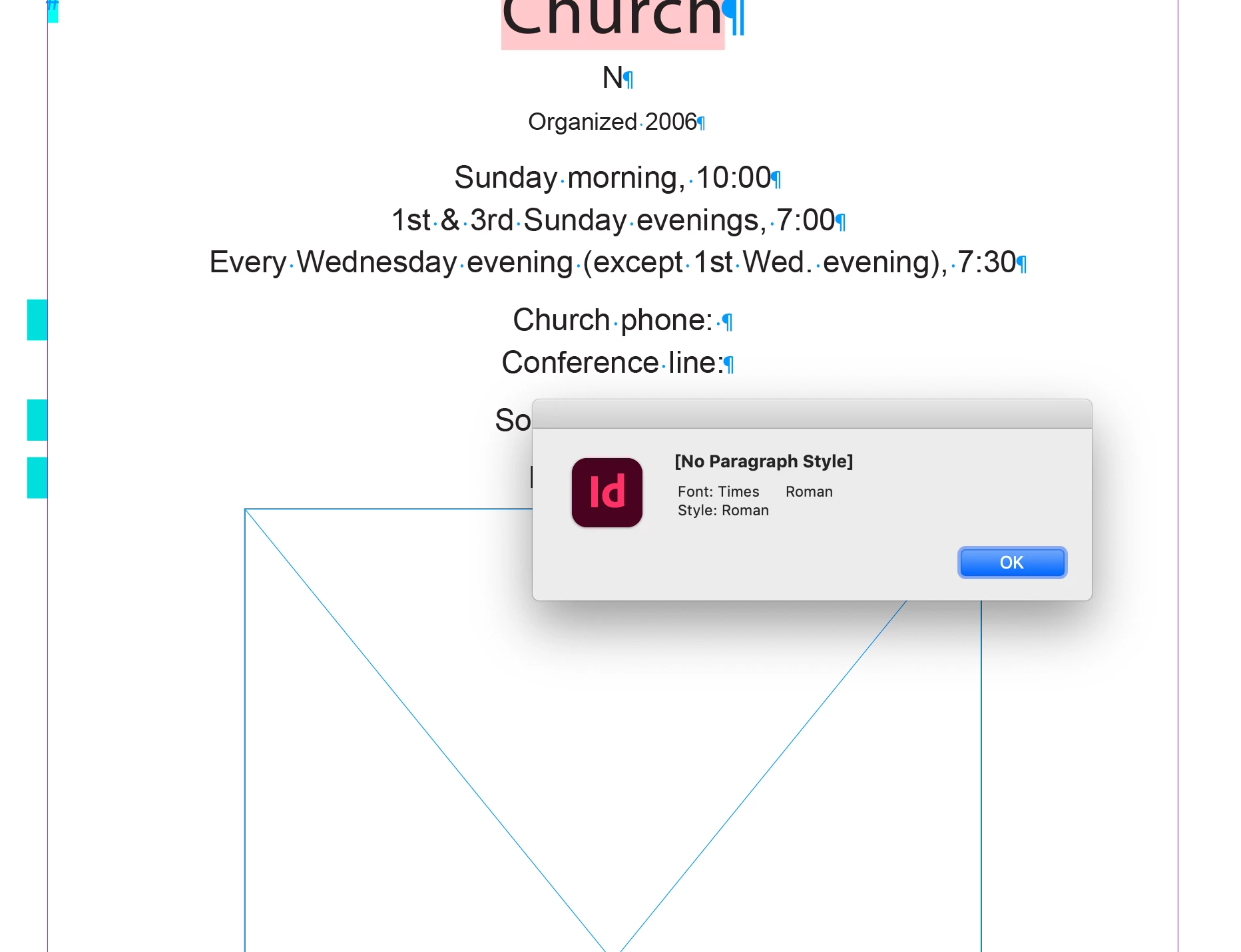
In your document the [No Paragraph Style] applied font is Times Roman and not Minion pro. If I run this script on your document:


var s = app.activeDocument.allParagraphStyles
alert(s[0].name + "\r Font: "  + s[0].appliedFont.name+"\r Style: "  + s[0].fontStyle) 


I get this—the [No Paragraph Style] font is Times and the style is Roman:


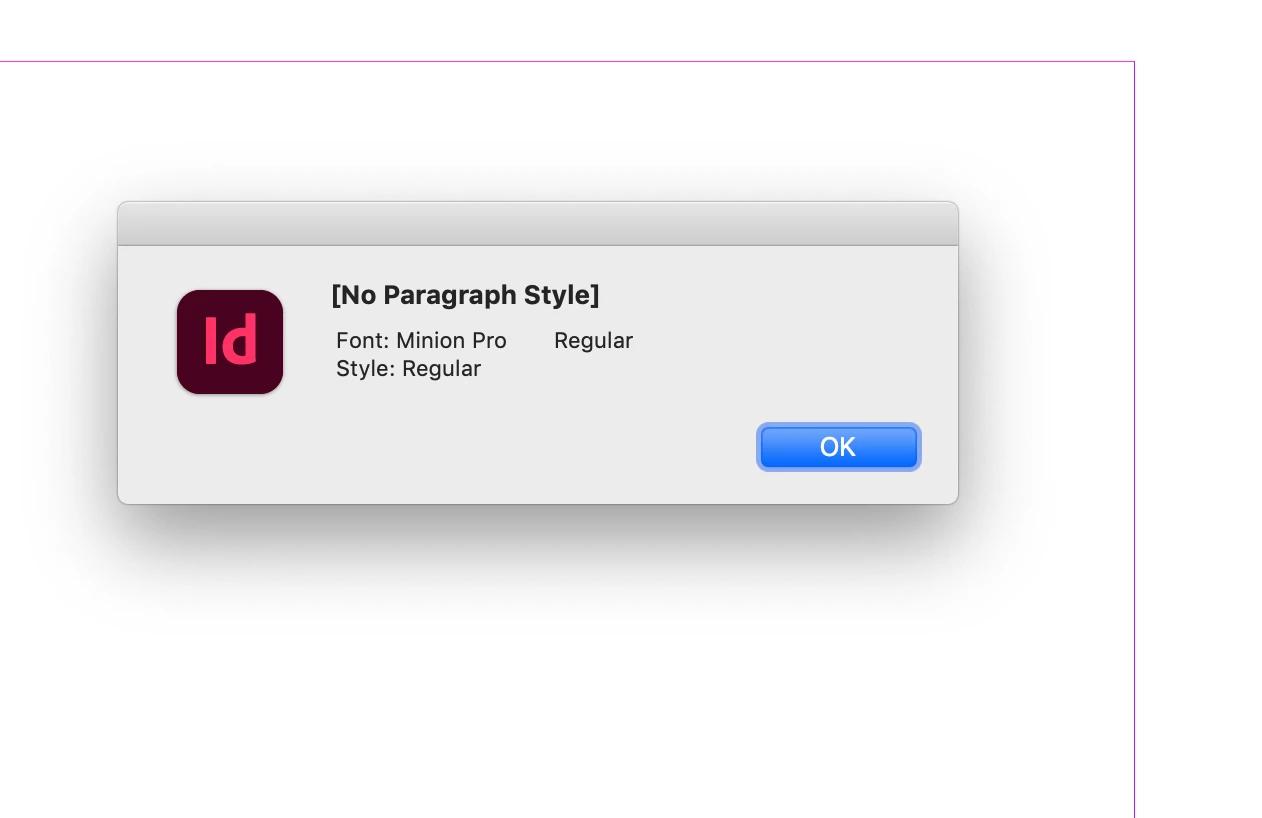
But if I create a new document I get the expected Minion Pro Regular—InDesign will not let me alter [No Paragraph Style] in either case:


This is causing the behavior you might expect when cutting and pasting between documents where the style has been Based On [Basic Paragraph], but the document’s [Basic Paragraph] styles are not the same.


I think a solution might be to edit the IDML file’s Styles.xml and restore the [No Paragraph Style] definition to the InDesign default. Do a search for editing IDM, e.g:


https://opensource.com/article/18/7/adobe-indesign-open-source-tools


4 replies

Community Expert
July 31, 2024

@rob day said: "… In your document the [No Paragraph Style] applied font is Times Roman and not Minion pro. "


Well yes, that's exactly the symptom that the InDesign document was once created with a version before CS5 Version 7.

InDesign's CS4 for example had the [No Paragraph Style] defined with Times Roman.


Regards,
Uwe Laubender
( Adobe Community Expert )

Bethany24827540qilv
Known Participant
July 31, 2024
Thank you for confirming that. I thought Adobe changing the main font had been part
of the problem.

I haven't seen anyone comment yet on the problem of imported text having overrides
that appear to be stored in fields that aren't accessible in English (example - text
direction: left to right). Sometimes the setting is familiar, but the format isn't
compatible with the usual field (example - leading: 200%, autoleading (a pt
measurement is shown in the leading box, so where these overrides are stored is
unknown)).
--Bethany24827540qilv
rob day
Community Expert
rob dayCommunity ExpertCorrect answer
Community Expert
January 6, 2024

Hi @Bethany24827540qilv , I can see that none of your styles are based on [Basic Paragraph], so there is a corruption in your file causing the problem that saving as IDML does not fix.


Normally the default [No Paragraph Style] can not be edited either via the UI or scripting, but there have been reported cases like yours where it gets altered—it might be the file originated from Quark or a very early version of InDesign?


In your document the [No Paragraph Style] applied font is Times Roman and not Minion pro. If I run this script on your document:


var s = app.activeDocument.allParagraphStyles
alert(s[0].name + "\r Font: "  + s[0].appliedFont.name+"\r Style: "  + s[0].fontStyle) 


I get this—the [No Paragraph Style] font is Times and the style is Roman:


But if I create a new document I get the expected Minion Pro Regular—InDesign will not let me alter [No Paragraph Style] in either case:


This is causing the behavior you might expect when cutting and pasting between documents where the style has been Based On [Basic Paragraph], but the document’s [Basic Paragraph] styles are not the same.


I think a solution might be to edit the IDML file’s Styles.xml and restore the [No Paragraph Style] definition to the InDesign default. Do a search for editing IDM, e.g:


https://opensource.com/article/18/7/adobe-indesign-open-source-tools


m1b
Community Expert
Community Expert
January 8, 2024

Hey @rob day, this is great work! I now realise that I really did not understand what was going on here at all.


I tested your idea quickly and you are right, the problem goes away if we export the original Indesign document as IDML and edit the Styles.xml to change "Times" font to "Minion Pro" and fontStyle to "Regular".


Here it is in my editor:


After making that change (for details on how to expand/compress IDML files see note at end), I can paste into a new indesign document and it does not show overridden style!

- Mark


EDITING IDML FILES:

I learned about how to expand idml files into folders of files (IDML files are actually zip files) and I learned the fiddle required to re-compress them (it's more complicated than just zipping them back up). BUT then I came across this answer by léo which shows that you can use Indesign App object has built-in methods for expanding and re-compressing IDML documents. I think that is the best way to go now.

rob day
Community Expert
Community Expert
January 8, 2024

Also, just to be safe, you could IDML a new document and get the entire [No Paragraph Style] definition, and paste that into the corrupted Styles.xml—I’m guessing @Bethany24827540qilv might have more than one problem document.

Scott Falkner
Community Expert
Community Expert
January 4, 2024

This is likely caused by the two documents having different definitions of he Basic Paragraph style that is included in every InDesign file and cannot be deleted. I have found that text copied from one document to another iwll often look different when pasted even if the source and target documents use the same style names and the same attributes for each style.


The Basic Paragraph style, when it is different between two documents, can cause the text to change appearance, even if you are not using that style. For this reason I have a few hard and fast rules I tell everyone (I was an InDesign instructor at a local community college):

  1. Never use Basic Paragraph
  2. Never edit Basic Paragraph
  3. Never base any styles on Basic Paragraph


If, like me, you believe it was a mistake to include the style and wish Adobe would remove it (or at least make it deletable), please vote here.

m1b
Community Expert
Community Expert
January 4, 2024

I agree Scott, and I never use Basic Paragraph Style. But I believe that [No Paragraph Style] is also essentially a paragraph style, and that might be the culprit here.

- Mark


(Something went crashed while I was commenting on your post at uservoice and I seem to be locked out of it for now, so I'll try and vote later.)

Bethany24827540qilv
Known Participant
January 4, 2024

Thank you, m1b . I have wondered too if the [no paragraph style] isn't involved somehow.


Scott, I agree about not using [Basic Paragraph Style]. In fact, I rarely base any styles on other styles; it just causes problems in the future. But I have a few questions.


  1. What do you say about editing the default font for InDesign? (To do this, open the program without any file open. Select the text tool and choose the font settings you wish to be your default.) I have found that these changes are carried over to the [Basic Paragraph Style] in any new documents created after that. Do you think this causes problems?
  2. If it does, then what should be done with old files using an obsolete font? That is the only reason why I edited this one.


Have any of you seen this kind of odd override, often unidentified, when text is brought in from Word? I run into that alot, especially when the text originated from an email and might even be translated text (one overide that shows up is text direction, which doesn't apply to English). I don't know the exact way to recreate it because it comes to me that way. My normal editing process is to look for overrides only when I am almost finished fine-tuning the document, to make sure that nothing is riding along that shouldn't be. But if I clear all overrides then (the only way I know to get rid of these odd settings that aren't available in InDesign, or at least not for English text), I am likely clearing overrides that are important and waste time resetting them up. I also risk missing something important unless I reread the whole document. If I leave all the overrides there because it is too time-involving to review each one when most of the text is affected, I might miss settings that will look strange once printed. If this is new to you, I will try to save an example to send in the future.

m1b
Community Expert
Community Expert
January 4, 2024

Hi @Bethany24827540qilv, someone may have the exact answer for you, but it might help if you could post an .indd document with a small sample of the text (just enough to show the problem when someone else tries to copy to another document).


Even better if you specify the steps to reproduce the problem, eg. step 1: open "sample.indd" doc, step 2, copy all text from main story, step 3, new document, step 4, paste, step 5. compare paragraph #3 on both documents.


This sort of approach can really speed things up.

- Mark

Bethany24827540qilv
Known Participant
January 4, 2024

Ok. I've left just enough text for you to get the picture. The first file is from the original document after it was recreated with IDML. The second is text that I copied and pasted into a new file. Both have the override highlighter turned on. Almost all of the copied text has overrides, while very little of the original file did.


To recreate the problem.

  1. Open "sample of file . . ."
  2. Copy the text.
  3. Open new document.
  4. Paste text.
  5. Turn on style override highligher.
  6. Compare files.
  7. Note that the "Roman" override shown when you hover on the paragraph style override button is not reflected in the actual text displayed. If it was, it would show in the style box like this: [Roman] (because it doesn't exist for the Arial font).
m1b
Community Expert
Community Expert
January 4, 2024

Hi @Bethany24827540qilv, thanks for the demo files, that was helpful. I had a look and I can confirm the behaviour that you see. There is something interesting going on, but I'm not knowledgeable enough to nail it down I'm afraid.


See the attached "demo.indd" document which is based on your document, but is simplified—it has one text frame with one paragraph set in one paragraph style ("church page"). I have removed the extra styles from the document. Even so much simplified, the problem still happens, so this demo document is a good test case.


Here are some notes:

1. If I copy and paste in the same document, the problem doesn't occur.

2. If I delete all the text and text frames, and paragraph styles from the demo document, and save it as a copy, then paste from the demo.indd the problem doesn't occur. This suggests that the problem is an interaction between a document-level preference and the demo paragraph style.

3. When I paste into a new document (and the paragraph shows an override) when I then create a new Paragraph Style from that selected text, and edit it, here's what I see:

This implies that the only "override" is the "Regular" font style. But this is weird because the "church page" style I am using for the test already has a font style of "Regular".


Unfortunately in my opinion your options are: (a) bite the bullet and fix all the styles in the new document (this is what I would do I think), or (b) make an empty copy of the first document, and use this as the base for your new document as I found in (2) above.


Still, there are some amazingly knowledgable people on this forum, so we might still get a better answer.

- Mark