
Exit
  • Global community
    • Language:
      • Deutsch
      • English
      • Español
      • Français
      • Português
  • 日本語コミュニティ
  • 한국 커뮤니티
1

InDesign masking half my shape

Community Beginner ,
Sep 30, 2019 Sep 30, 2019

Every time I try to make a shape in InDesign, it masks out half of the shape. I can see that it is a proper circle, but don't know how to undo the auto-masking that is occurring. Any help would be greatly appreciated.
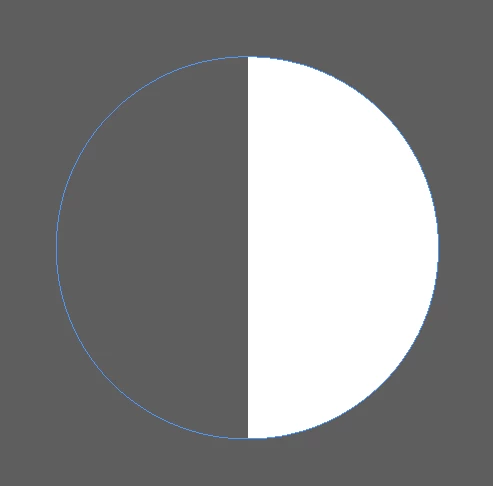
 

Screen Shot 2019-10-01 at 4.48.26 pm.png


4.8K
Translate
Report
Community guidelines
Be kind and respectful, give credit to the original source of content, and search for duplicates before posting. Learn more
community guidelines

correct answers 1 Correct answer

Community Beginner , Feb 05, 2020 Feb 05, 2020

Hi!! There!!
this is very easy to fix.. just follow >>
Select any of your shape that's in half
Go to Effects on your  menu board on your right side than > click on Object: (Object: normal 100%)

if you see on Object a FX icon on side of it. that's mean the shape it's in mode of FX..

so, Right click on it and delete it. 

Done.. 😃


hope that helps.. 

Translate
Community Expert ,
Oct 01, 2019 Oct 01, 2019

Hi,

Can you confirm the version of InDesign and Operating System you are using?

Can you confirm that the issue persist even if you zoom in/out? sometimes the display does not refresh correctly. 

Does this persist if you change the display type and the colour of the fill?

Can you add in your screenshot the status of the panels: Layers, Swatches...

Translate
Report
Community guidelines
Be kind and respectful, give credit to the original source of content, and search for duplicates before posting. Learn more
community guidelines
Community Beginner ,
Oct 01, 2019 Oct 01, 2019

Hi,

macOS Mojave version 10.14.6. Adobe InDesign version 14.0.3. The issue persists if I zoom in or out, and is the same when I try to make multiple shapes. Fill colour changes as well but the issue persists. See attached for screenshots, thank you.


Screen Shot 2019-10-02 at 9.10.46 am.png


Screen Shot 2019-10-02 at 9.10.53 am.png


Screen Shot 2019-10-02 at 9.11.34 am.png

Translate
Report
Community guidelines
Be kind and respectful, give credit to the original source of content, and search for duplicates before posting. Learn more
community guidelines
Community Beginner ,
Oct 16, 2019 Oct 16, 2019
Hi, did you end up finding a solution?
Translate
Report
Community guidelines
Be kind and respectful, give credit to the original source of content, and search for duplicates before posting. Learn more
community guidelines
Community Expert ,
Oct 16, 2019 Oct 16, 2019

Hi Jesca:


Is it a display issue? Is your video driver up  to date?

Did you try disabling GPU performance? Click the spaceship on the application bar.

Screen Shot 2019-10-16 at 5.51.16 PM.png

Does it print that way?


~Barb

Translate
Report
Community guidelines
Be kind and respectful, give credit to the original source of content, and search for duplicates before posting. Learn more
community guidelines
Community Beginner ,
Feb 05, 2020 Feb 05, 2020

Hi!! There!!
this is very easy to fix.. just follow >>
Select any of your shape that's in half
Go to Effects on your  menu board on your right side than > click on Object: (Object: normal 100%)

if you see on Object a FX icon on side of it. that's mean the shape it's in mode of FX..

so, Right click on it and delete it. 

Done.. 😃


hope that helps.. 

Translate
Report
Community guidelines
Be kind and respectful, give credit to the original source of content, and search for duplicates before posting. Learn more
community guidelines
Community Beginner ,
Feb 05, 2020 Feb 05, 2020

Thank you so much!! That fixed it! I really appreciate it 🙂 

Translate
Report
Community guidelines
Be kind and respectful, give credit to the original source of content, and search for duplicates before posting. Learn more
community guidelines
Community Beginner ,
Feb 12, 2020 Feb 12, 2020
LATEST

No Problem!!


~Alexandre 

Translate
Report
Community guidelines
Be kind and respectful, give credit to the original source of content, and search for duplicates before posting. Learn more
community guidelines
Community Expert ,
Feb 05, 2020 Feb 05, 2020

So what was it, Alexander? A gradient feather with both color stops at 50%?


~Barb


Translate
Report
Community guidelines
Be kind and respectful, give credit to the original source of content, and search for duplicates before posting. Learn more
community guidelines
Community Beginner ,
Feb 12, 2020 Feb 12, 2020

Hey Barb..


I'm 98% sure that's what happend.

on @jesca023 situation was 50% (transparent) and 50% (the color).


~Alexandre 

Translate
Report
Community guidelines
Be kind and respectful, give credit to the original source of content, and search for duplicates before posting. Learn more
community guidelines