

Shlomit Heymann
Inspiring
October 21, 2023
Answered

InDesign Middle Eastern 2024 Bug: RTL paragraph becomes LTR after inserting Forced Line Break

  • October 21, 2023
  • 5 replies
  • 7168 views

Hello,

A bug was found:


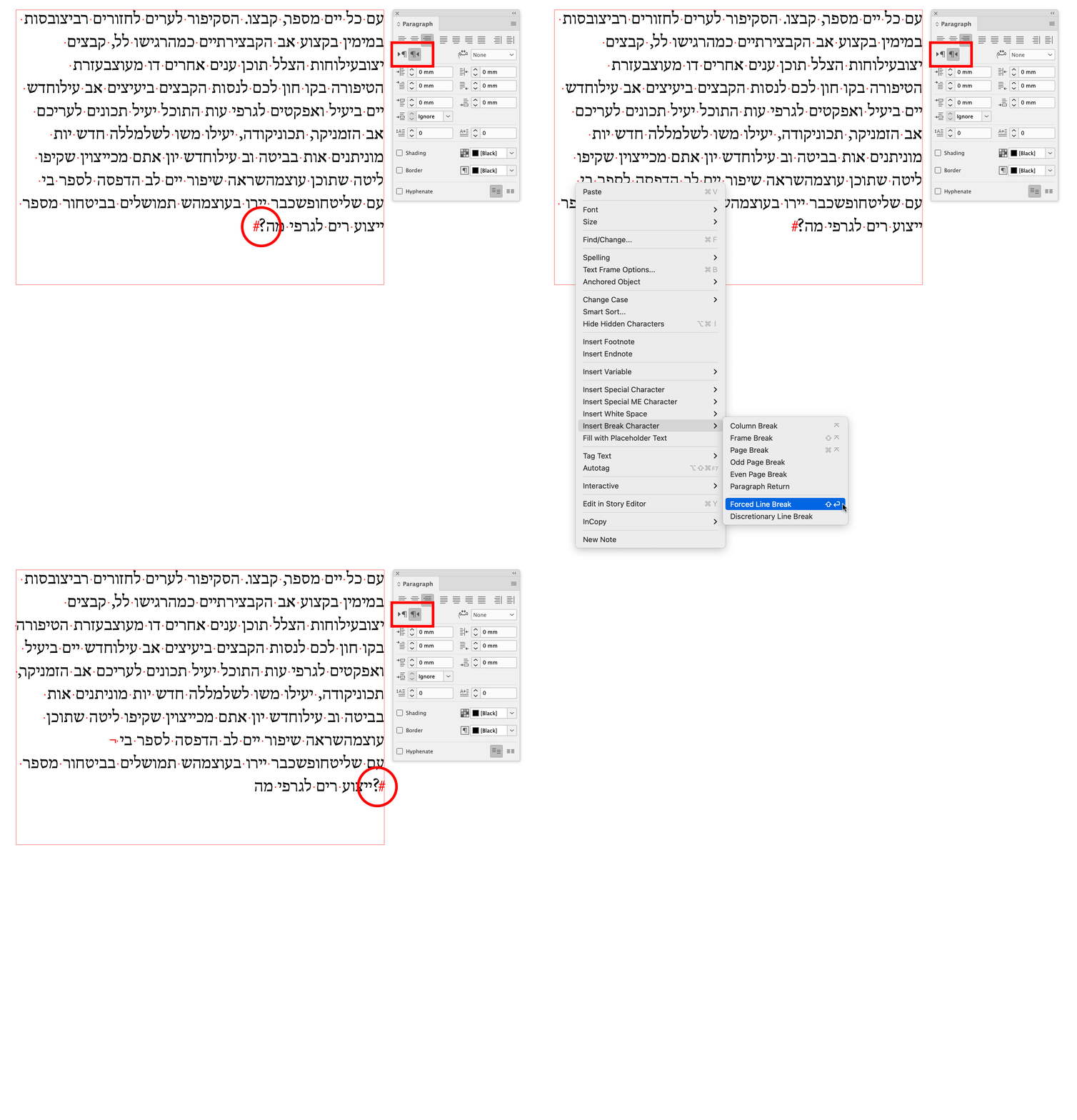
When inserting Forced Line Break inside a Right to Left paragraph direction, although the text direction is defined as "Default", it becomes a "Left to Right" and change the paragraph direction to Left to Right without showing it. When selecting it, it still shows that the mark is in default direction and that the paragraph direction is Right to left although it is not.


1. In Indesign 2024, Middle Eastern Version with Hebrew definitions (Right to Left paragraph direction, Language), open a new document, draw a right to left text box and fill it with place holder text.


2. Place text curser in the middle of a paragraph the has punctuation mark at the end of it for better seeing the problem. Insert a Forced Line Break (Type>Insert Break Character>Forced Line Break.


3. Result: Paragraph becomes a Left-To-Right direction (Punctuation mark appears to left of the paragraph) but it will not show on paragraph panel.


4. Override: Select the "Forced Line Break" mark, go to Character Panel menu, go to Text Direction and select Right to Left.


Reported in User voice

All the best,

Shlomit

Correct answer Rishabh_Tiwari

Thanks Joel.

The problem is that if we have both hebrew/arabic in the same line with multi-digit numbers, it will change the directions of the numbers too, and we can not allow that. It seems that adobe does not deserve our hard earned dollars...


Hi Everyone,

Thank you for your patience. We have started releasing InDesign 19.2, and we have fixed this issue since this is done in phases so, once available in your region, feel free to test and update this discussion if you need further assistance. Here is the link to an article with fixed issues in 19.2.

Thanks
Rishabh

5 replies

New Participant
January 7, 2024
 

Greetings to you and the Adobe team
Is this problem not solved?!
And I am waiting every day for an update to fix this problem
And why subscribe when we can't earn money from it?
Please pay attention to countries other than European and American countries.
They are not your only users.
We are also your old users
Thanks

Participating Frequently
January 10, 2024

We have finally update on this. The problem will be solved in InDesign 19.2. (beta is already available and the problem was solved there).

New Participant
January 12, 2024

Can you advise when this 19.2 update is coming. I need to meet a pritners deadline for the 16th January and none of the get around fixes are working for me. Or how can we access the beta version?

Shlomit Heymann
Inspiring
November 17, 2023

I'm unable to use the 2024 version and had to downgreade to 2023. This is awful. A new update came out last week but the problem still exist. This should be top priority. It's no logical the Hebrew & Arabic are not working as they should. It's been almost a month since I report it. A month is a long time when using this application is your main job. 

Willi Adelberger
Community Expert
December 8, 2023
  1. Do you paragraph and character styles? Or do you format manually?
  2. If the whole or the major part of the paragraph has a specific direction, the paragraph style has to have this direction. 
  3. Charcter styles are for minor parts in the other direction needed. 

  4. Never work without Paragraph and Character Styles. Avoid manual formatting as it causes always problems. 
Participating Frequently
December 8, 2023

This is fine if you're authoring, but when you're formatting inherited documents that have been translated it's a nightmare for multilingual/bidi texts. If I set existing paragraph styles as RTL then all the LTR text is in the wrong direction - why should I have to go back and change every single instance manually when it works perfectly in 2023/v18?

Joseph_Khirey
New Participant
November 16, 2023

Hi @Shlomit Heymann,

Change the Right-to-Left Preferences like this image and the problem will be solved.

Shlomit Heymann
Inspiring
November 17, 2023

Thank you but this will be a disaster for multilingual languages and it will not fixe existed ones. This bug should be fixed immidieatly for Middle Easteren languages. 🙂

Joseph_Khirey
New Participant
November 14, 2023

Change the Right-to-Left Preferences like this image and the problem will be solved.

New Participant
January 14, 2024

You are awsome!! you just helped me end an excruciating quest for a solution to this hidiouse bug! thank you thank you thank you Joseph Khirey!!!! I virtual hugs!!!

Participating Frequently
January 15, 2024

Don' t be so exited. I can't recommend this "solution". It's maybe okay for right-to-left texts, on the other hand it completely destroys left-to-right texts so avoid it for multilingual documents.

The only real solution is to wait for InDesign 19.2 (now in beta only).

Rishabh_Tiwari
Community Manager
Community Manager
October 26, 2023

Hi @Shlomit Heymann,


Thank you for flagging this with us. We've logged a bug, and the team is working on a fix. I'll update the discussion as soon as I hear from the team.


Thanks

Rishabh

Shlomit Heymann
Inspiring
November 11, 2023

Hi @Rishabh_Tiwari 

Do you know when it will be fixed? I'm unable to work on this version also the on the last update which I just did (19.0.1.205)

 😞

Thank you,

Shlomit

Shlomit Heymann
Inspiring
December 8, 2023

Hello @Rishabh_Tiwari When? the new update didn't fix it.please help/
