

Exit
  • Global community
    • Language:
      • Deutsch
      • English
      • Español
      • Français
      • Português
  • 日本語コミュニティ
  • 한국 커뮤니티
0

InDesign Newbie seeks answer regarding Cursor Behavior

Contributor ,
Mar 02, 2022 Mar 02, 2022

Greetings, Community!  Learning yet another Adobe program, and am stuck regarding cursor, which mysteriously jumps to the very top left of document, and is not easily dislodged.  So far, I have only been able to correct this by Cntrl-Zing my way out of it. Why does this happen, and how do I correct it?  Could not find answer anyway, though I did try.  InDesign is fully updated, and running on Windows 10.  Thank you in advance!
*~*~*~*~*~*~*~*~*~*~*~*~*~*~*~*~*~*~*~*~*~**~*
TOPICS
Performance , Type
890
Translate
Report
Community guidelines
Be kind and respectful, give credit to the original source of content, and search for duplicates before posting. Learn more
community guidelines

correct answers 1 Correct answer

Community Expert , Mar 04, 2022 Mar 04, 2022

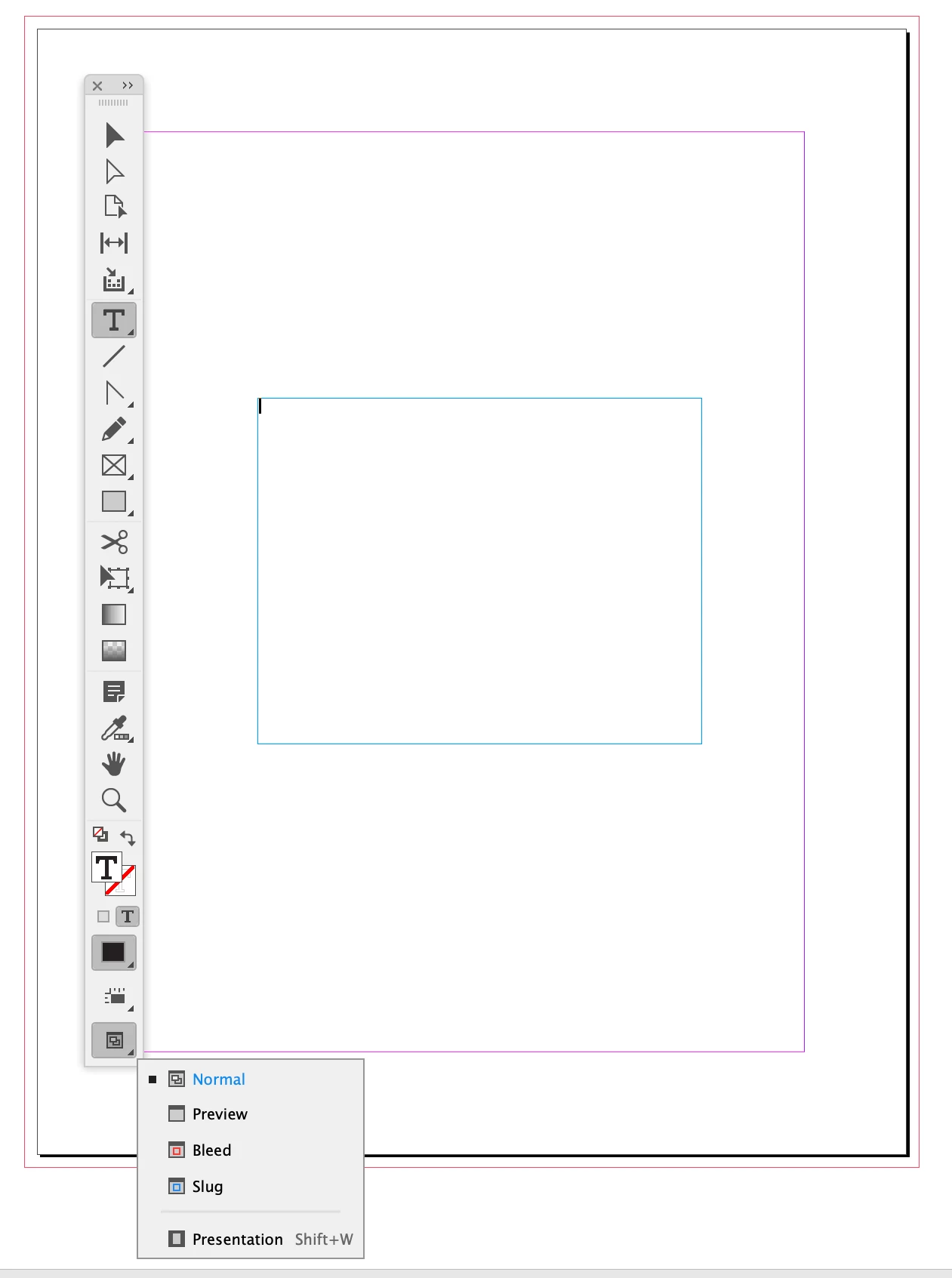
Make sure you are in Normal View—View>Screen Mode>Normal, and you are showing frame edges—View>Extras>Show Frame Edges:


Screen Shot 7.png

Translate
LEGEND ,
Mar 02, 2022 Mar 02, 2022

I suspect that this is related to the preference that turns any empty frame into a Text Frame when clicked on with the text cursor. It's on by default; I make sure that it is turned off after each new update.

Screen Shot 2022-03-02 at 12.02.30 PM.png

Translate
Report
Community guidelines
Be kind and respectful, give credit to the original source of content, and search for duplicates before posting. Learn more
community guidelines
Contributor ,
Mar 02, 2022 Mar 02, 2022

Oddly that solved the problem for a while (I had to turn it off), but now its happening again.  The box remains unchecked. 

*~*~*~*~*~*~*~*~*~*~*~*~*~*~*~*~*~*~*~*~*~**~*
Translate
Report
Community guidelines
Be kind and respectful, give credit to the original source of content, and search for duplicates before posting. Learn more
community guidelines
LEGEND ,
Mar 04, 2022 Mar 04, 2022

It could be that you have a background shape that was already converted to a text box, so clicking on it with the text tool activates it. 

You can fix it by changing the content of the box to Graphic or Unassigned. 

Screen Shot 2022-03-04 at 9.39.46 AM.png

Translate
Report
Community guidelines
Be kind and respectful, give credit to the original source of content, and search for duplicates before posting. Learn more
community guidelines
Community Expert ,
Mar 04, 2022 Mar 04, 2022

Hi @marjimsha , if you drag out a box when the Type tool is active, the new frame will be a text frame regardless of the preference setting, and the cursor will be inserted.


Also Preferences can be saved with a document, or the application. To change the Type Tool Converts Frames to Text Frames Preference for all new documents, close all documents before unchecking the box—any existing documents that had the box check would remain unchanged.

Translate
Report
Community guidelines
Be kind and respectful, give credit to the original source of content, and search for duplicates before posting. Learn more
community guidelines
Contributor ,
Mar 04, 2022 Mar 04, 2022

Thank you, and I hope you are right, but how do I exit out of this situation (with my cursor being stuck upper left).  Whenever this happens, I am unable to use text tool or selection tool to correctly position my cursor.  Is there a way to view bounding boxes to see what is going on?  Please excuse the remedial question.  I did try to find out on my own!

*~*~*~*~*~*~*~*~*~*~*~*~*~*~*~*~*~*~*~*~*~**~*
Translate
Report
Community guidelines
Be kind and respectful, give credit to the original source of content, and search for duplicates before posting. Learn more
community guidelines
Community Expert ,
Mar 04, 2022 Mar 04, 2022

Make sure you are in Normal View—View>Screen Mode>Normal, and you are showing frame edges—View>Extras>Show Frame Edges:


Screen Shot 7.png

Translate
Report
Community guidelines
Be kind and respectful, give credit to the original source of content, and search for duplicates before posting. Learn more
community guidelines
Contributor ,
Mar 04, 2022 Mar 04, 2022
LATEST

Thank you!  Sure enough, there are unneeded boxes galore!

*~*~*~*~*~*~*~*~*~*~*~*~*~*~*~*~*~*~*~*~*~**~*
Translate
Report
Community guidelines
Be kind and respectful, give credit to the original source of content, and search for duplicates before posting. Learn more
community guidelines