Inspiring
January 2, 2022
Answered

InDesign Page Numbering

  • January 2, 2022
  • 3 replies
  • 1568 views

Using v 17.0.1


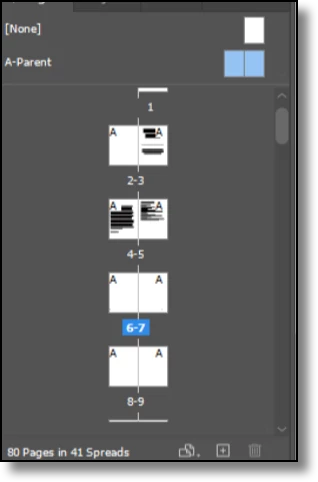
New to Indesign and I've yet to figure this out. I'm trying to have a page number on my journal;. I have the master page (A) selected and all of the pages have the "A" on top. I create a text box on it. I go to:

Type-->Insert Special Character-->Maker__>Current Page Number


The number 1 shows up but the rest of the pages do not have a number. Might be simple but am I missing a step. I've watched a ton of videos but my pages don't seem to populate with the page numbers.


Thanks for your help!
This topic has been closed for replies.
Correct answer Barb Binder

Hi @stwoods:


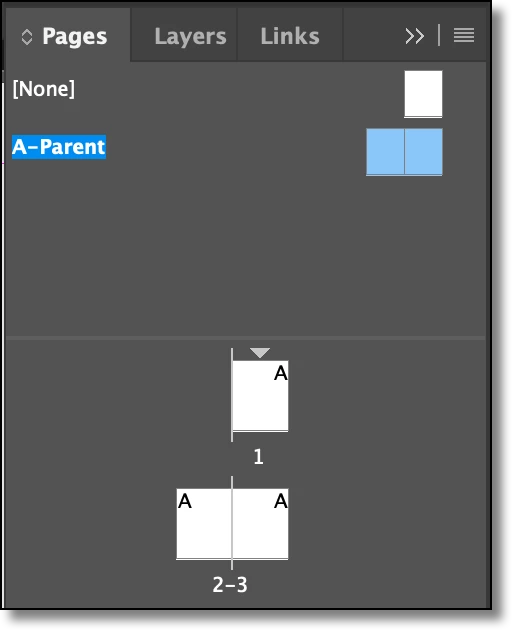
In both of your screen shots you are not yet on the parent pages. Compare how mine looks—name and pages highlighted in blue.

to yours—Parent pages highlighted, but also the numbers 6–7 highlighted and not A-Parent.

Again, double click the A-Parent page name at the top of the Pages panel to navigate to the master/parent pages.


~Barb

3 replies

Barb Binder
Community Expert
Community Expert
January 3, 2022

No worries! We are always happy to help.


~Barb

~Barb at Rocky Mountain Training
Barb Binder
Community Expert
Community Expert
January 3, 2022

Yes I click A-Parent and they are both in Blue!

Double click the A-Parent page name


~Barb

~Barb at Rocky Mountain Training
Barb Binder
Community Expert
Community Expert
January 2, 2022

Hi @stwoods :


If a 1 is showing up when you choose Type > Insert Special Character > Markers > Current Page Number, you are on Body page 1 and not a master/parent page. (Master pages were renamed Parent pages in version 17.)


  • Double click the A-Parent page name at the top of the Pages panel to navigate to the master/parent pages. When you are actually on the Parent pages, both the name and the page icons will be highlighted.
  • Draw a text frame with the Type tool.
  • Choose Type > Insert Special Character > Markers > Current Page Number.
  • The letter "A" will appear at the cursor position when you are on the A-Parent.
  • Repeat this for the facing page if you are working with a double-sided document
  • When you navigate back to the Body pages, you will see a 1 on page 1, a 2 on page 2, a 3 on page 3, etc.


~Barb

~Barb at Rocky Mountain Training
stwoodsAuthor
Inspiring
January 3, 2022

Hi Barb,


Thank you for responding. I did exactly as you specified, and the numbers still are showing up on subsequent settings. Is there some other setting that I need to change or review, that you can think of? Do all the pages have to be blank before I start the numbering?


I'm attaching some screenshots. Thanks