Exit
  • Global community
    • Language:
      • Deutsch
      • English
      • Español
      • Français
      • Português
  • 日本語コミュニティ
  • 한국 커뮤니티
0

Indesign Page Rendering issue

Participant ,
Oct 25, 2021 Oct 25, 2021

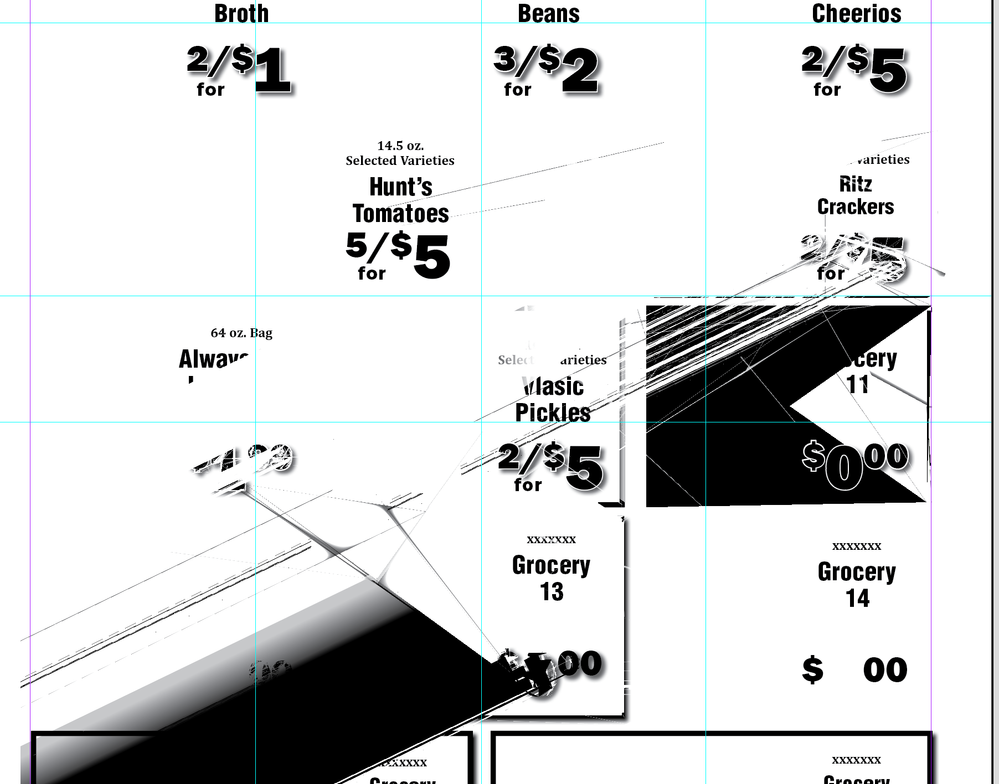
For the past month or two I've been encountering this strange problem in Indesign. It doesn't happen very often put when I place a piece of art, the page rendering does a strange thing until I either resize the page view or close the document and reopen it.  See the image below. This is on a Mac running OSX11.6Screen Shot 2021-10-25 at 8.28.35 AM.png
TOPICS
Performance
456
Translate
Report
Community guidelines
Be kind and respectful, give credit to the original source of content, and search for duplicates before posting. Learn more
community guidelines
Community Expert ,
Oct 25, 2021 Oct 25, 2021

Turn off GPU in the preferences.

Translate
Report
Community guidelines
Be kind and respectful, give credit to the original source of content, and search for duplicates before posting. Learn more
community guidelines
Participant ,
Oct 28, 2021 Oct 28, 2021

I have had the same problem since updating to InDesign 2022. I'm not sure why it's happening now and wasn't before. GPU has been on the whole time and I've a AMD Radeon HD - FirePro D700 6G so that shouldn't have an issue. Turning off GPU makes it worse (see attached).

OSX 11.6

Translate
Report
Community guidelines
Be kind and respectful, give credit to the original source of content, and search for duplicates before posting. Learn more
community guidelines
Participant ,
Oct 28, 2021 Oct 28, 2021
 
Translate
Report
Community guidelines
Be kind and respectful, give credit to the original source of content, and search for duplicates before posting. Learn more
community guidelines
Participant ,
Oct 31, 2021 Oct 31, 2021
LATEST

I reverted back to InDesign 16.4 and all is working again... 17.0 seems to be the problem.

Translate
Report
Community guidelines
Be kind and respectful, give credit to the original source of content, and search for duplicates before posting. Learn more
community guidelines


