


Participating Frequently
July 25, 2018
Answered

InDesign - Page size doesn't match document set-up

  • July 25, 2018
  • 5 replies
  • 6277 views

How is this possible and why?

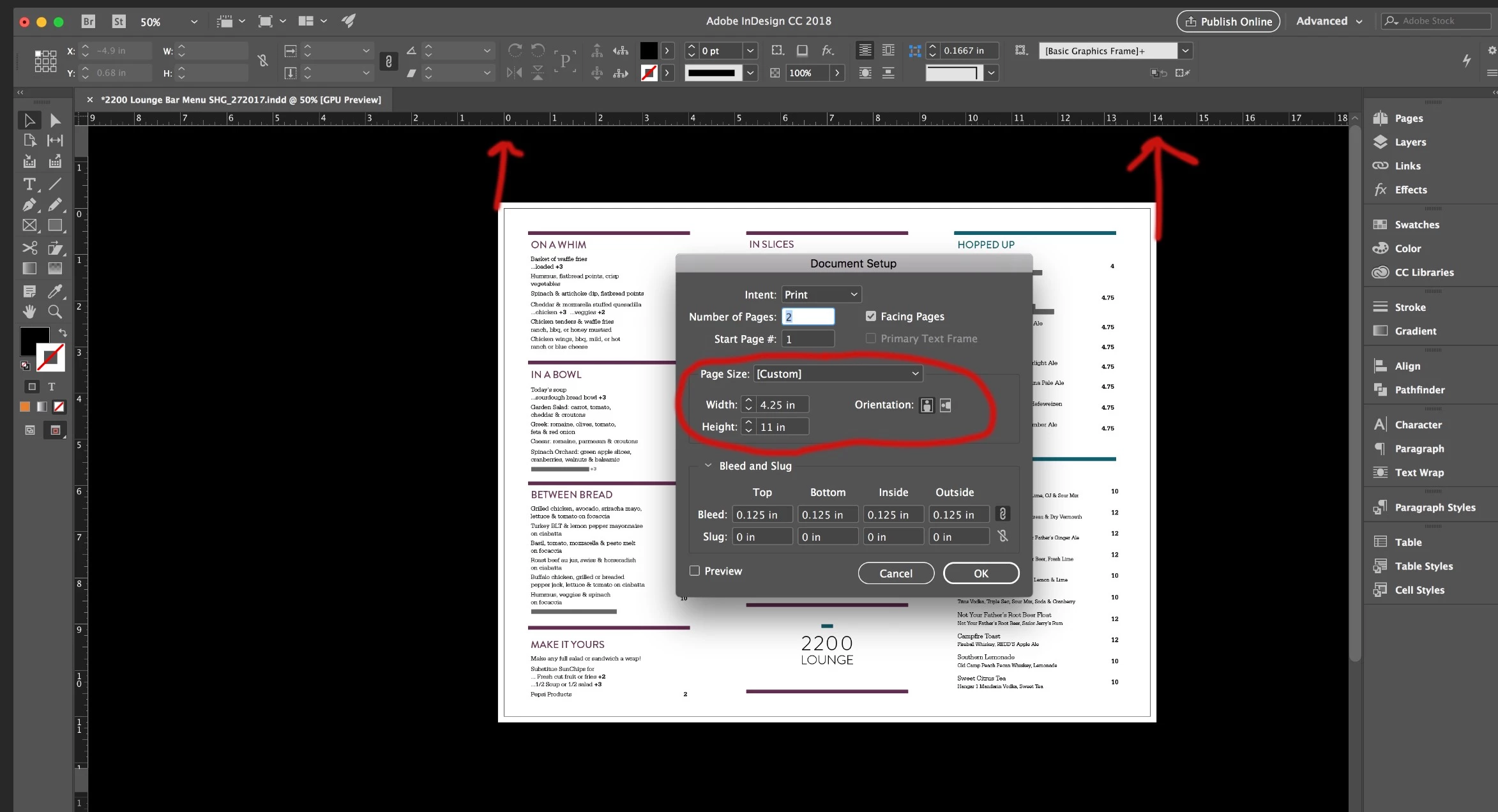
This is a tri-fold - the panels are 4.25 x 11 - but when I open page setup - the page size shows as 4.25 x 11.

And - the orientation shows portrait - not horizontal

Why doesn't it match the actual page size shown?

Note:

I didn't create the template ... when I do create a tri-fold from scratch - I set the overall page size and use columns and gutters.

Note: When I change the overall page size in page set up to be 14 x 11 - nothing changes.
Correct answer Barb Binder

Hi ibaguru:

You can see from your screenshot that the master pages match the document setup dimensions. Your screenshot confirms what Bob and Bill figured out: that the designer used the page tool to resize body pages 1 and 2.

~Barb

5 replies

ibaguruAuthor
Participating Frequently
July 25, 2018

BarbBinder - here's the pages tool screenshot.

and the pages layout

Barb Binder
Community Expert
Barb BinderCommunity ExpertCorrect answer
Community Expert
July 25, 2018

Hi ibaguru:

You can see from your screenshot that the master pages match the document setup dimensions. Your screenshot confirms what Bob and Bill figured out: that the designer used the page tool to resize body pages 1 and 2.

~Barb

~Barb at Rocky Mountain Training
Barb Binder
Community Expert
Community Expert
July 25, 2018

I agree with Bob and Bill. I keystroked it and couldn't make it happen—until I tried the Page tool.

Now, do you need to reset it or did you just want to know what was going on? If you do need/want to reset it, select the Page tool, and restore the dimensions to 4.25 x 11 via the Control Panel. Then return to Document Setup and type in the desired page size.

~Barb

~Barb at Rocky Mountain Training
ibaguruAuthor
Participating Frequently
July 25, 2018

BarbBinder,

Mainly I wanted to know what was going on as I didn't create the 'template'

All of you appear to be correct - I never use the page tool so I wasn't familiar with it..

Now I need to google "Page Tool Indesign"

Thank you everyone...

Bill Silbert
Community Expert
Community Expert
July 25, 2018

It looks to me like the page size for the document pages has been changed using the Page Tool (that's the one right below the selection tool [black arrow]). Click on the page using the page tool and you should see its actual size in the Control Panel. As you say the correct way to set the page size is through the Document Set-Up but I have seen it done using the Page Tool before—usually by inexperienced users.

Bill Silbert
Community Expert
Community Expert
July 25, 2018

It looks like Bob and I are on the same Page (Tool) on this one!

Barb Binder
Community Expert
Community Expert
July 25, 2018

Can you share your pages panel?

~Barb

~Barb at Rocky Mountain Training
BobLevine
Community Expert
Community Expert
July 25, 2018

I just checked out the screenshot. I’m changing my guess to someone using the page tool to change the size.

BobLevine
Community Expert
Community Expert
July 25, 2018

Sounds like it’s a 3 page spread. FWIW, I’d do it as a single page with guides as well.