This topic has been closed for replies.
Correct answer Barb Binder

I agree with Eugene and it's an easy fix, @Asadali92:.
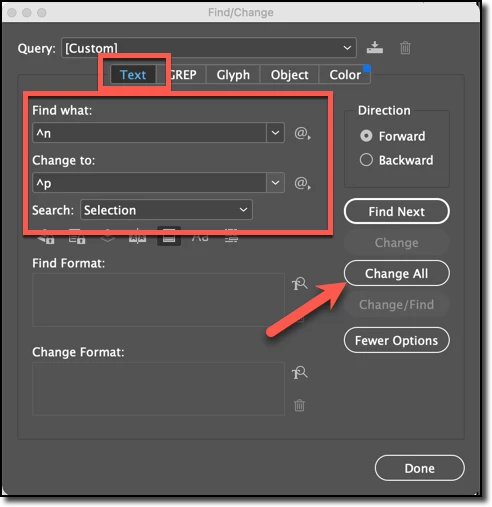
  1. Click in the story
  2. Edit > Select All
  3. Edit > Find & Change

Then try to edit the spsace after, again.


~Barb

2 replies

Barb Binder
Community Expert
Barb BinderCommunity ExpertCorrect answer
Community Expert
June 4, 2022

I agree with Eugene and it's an easy fix, @Asadali92:.

  1. Click in the story
  2. Edit > Select All
  3. Edit > Find & Change

Then try to edit the spsace after, again.


~Barb

~Barb at Rocky Mountain Training
Community Expert
June 4, 2022

Great quick fix @Barb Binder 

Community Expert
June 4, 2022

Most likely the returns are not hard returns but soft returns - it's hard to know cos you don't have Show Invisibles turned on


https://www.youtube.com/watch?v=idIZ48E-KE4


James Gifford—NitroPress
Legend
June 4, 2022

I'm of the opinion that ID should give a slightly scary beep when a soft return is entered. 🙂


Community Expert
June 4, 2022

Seriously, a 'prevent' (or at least highlight/alert) multiple white spaces feature would be useful. Training wheels for newcomers, speed alert for pros.


I know at least one tool allowed multiple spaces to be switched off—was it FrameMaker? Used so many I can't remember.


But we see an awful lot of problems caused by soft returns. Not that ID should be turned into a running tutorial, but this is a basic structural issue it should... recognize and respond to.


Unfortunately, it's the desired workflow.

Just because it's not my workflow doesn't mean it's wrong.


It's just the way it was done before.


The remedy of any task to do it the way you need it - whatever way you need to it.


I've had people take on my InDesign file and they had no idea how I was able to do it. But, they can do it their own way, it might be less or more sophisticated but - it works.


So if it's not broken don't fix it.

If it is broken, then fix it 🙂
