
Inspiring
August 4, 2019
Answered

INDESIGN PDF creation limitations? (for word count)

  • August 4, 2019
  • 2 replies
  • 692 views

If I create a form PDF that I want clients to fill in, like a word book, multiple choice, but also free text entry boxes, can they be limited to the word count (character count) or is it unlimited? (for say like journal or diary type entries where a lot of text will be written).
    This topic has been closed for replies.
    Correct answer Derek Cross

    You create the form in InDesign and fine tune it in Acrobat Pro. This can include changing the size, font, alignment and colour of fonts that appear in the fields and there you can also limit the number of characters.

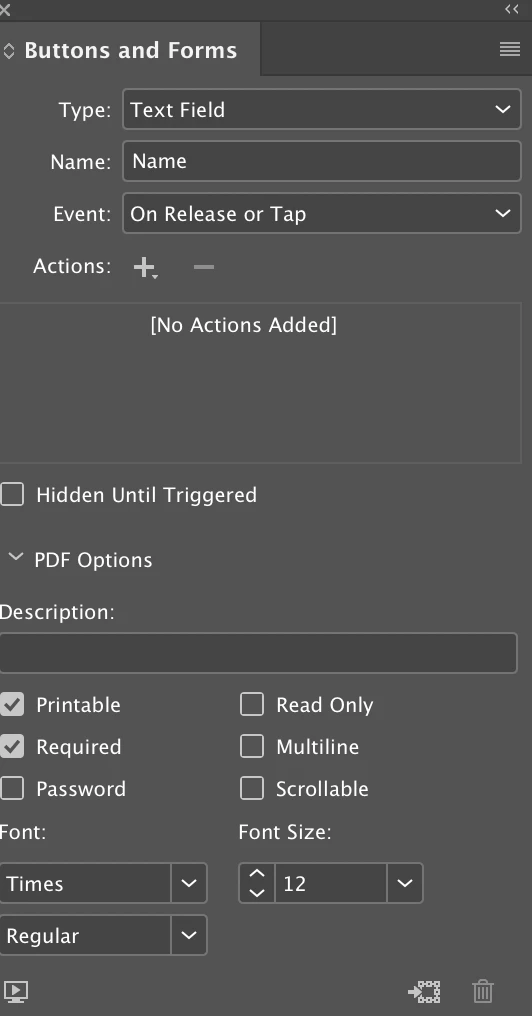
    Looking at this again, it appears that in the latest version you can do that in InDesign now (keep Multiline unticked).

    2 replies

    jane-e
    Community Expert
    Community Expert
    August 4, 2019

    Hi BlueFire,

    All fields can be tweaked with the paid version of Acrobat, as Derek said. Go to Properties for the Text field, then Options and type in a limit for the number of characters.  It is not unlimited — I tested that by going high enough to get an error message, and I'm counting nine zeros after the one.

    Turn multi-line on if you have a lot of text. You wouldn't want 1,000,000,000 characters on one line — 40–60 characters is optimal.

    As for scrollable, if it's going to a database, you can make it scrollable. If the final output is print, turn off scrollable and make the multi-line field large enough to hold the text so it can still be seen on the printed page.

    ~ Jane

    Inspiring
    August 5, 2019

    awesome, thanks Jane for clarifying that, appreciated.

    Derek Cross
    Community Expert
    Derek CrossCommunity ExpertCorrect answer
    Community Expert
    August 4, 2019

    You create the form in InDesign and fine tune it in Acrobat Pro. This can include changing the size, font, alignment and colour of fonts that appear in the fields and there you can also limit the number of characters.

    Looking at this again, it appears that in the latest version you can do that in InDesign now (keep Multiline unticked).

    Inspiring
    August 4, 2019

    Thanks Derek!