
kenzieholmberg
Participating Frequently
May 29, 2019
Question

InDesign Photo Placement Issue

  • May 29, 2019
  • 4 replies
  • 1065 views

Hello,

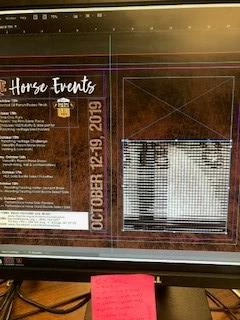
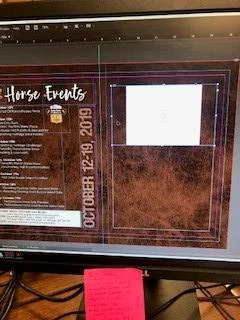
So I've had this problem before on my own Mac (now at work with a Windows computer) and I normally restart InDesign and it fixes itself. But, what is happening, is that when I go to drag in a photo into the box I have created, it pops up as a solid white block or a fuzzy gray/multicolored mess. It is not the display performance or the Dropbox folder that the photos are coming from. It is a problem with InDesign. I have tried multiple photos from various locations and none of them will import correctly. I have restarted the computer as well and nothing has changed. I was working on the same document yesterday and had no issues. HELP!
This topic has been closed for replies.

4 replies

Participant
May 31, 2019

I have had a similar issue -- although based on a few of your comments it may not be exact -- and the issue wasnt ID it was the photo.

Opened and resaved the photo and the preview popped right up.

If these photos are all from the same source, might be the issue. Even if you are dragging and dropping from multiple locations.

jane-e
Community Expert
Community Expert
May 29, 2019

Hi Kenzie,

For testing purposes:

  • What happens if you don’t create a frame first and drag the image to the pasteboard and click or drag to place it?

  • What happens if you download from Dropbox first and then place the image instead of going directly from Dropbox to InDesign?

~ Jane

kenzieholmberg
Participating Frequently
May 29, 2019

So here is the latest:

I went to my "Properties" side bar after clicking into the image box, clicked on "Import File", clicked the checkbox that said "show import options", chose the JPG image I wanted, clicked "open". Then it took me to the image import options and changed the following setting to:

Profile: Use Document Default

Rendering Intent: Perceptual (Images)

Pressed "Okay"

AND THAT WORKED. Image was uploaded.

BUT, I still cannot drag and drop my images in like I used to (or place them)???

Annoying... How can I fix that?

jane-e
Community Expert
Community Expert
May 31, 2019

Hi Kenzie,

I just checked and I can drag and drop from the Mac Finder and from Adobe Bridge — both into an existing frame and to create a new frame, as it always has.

  • Where are you dragging from?

  • Open your Layers panel and spin open the layer. Are there any objects on top of the expected frame?

  • Try creating a brand new document. Does it work there?

~ Jane

Michael Bullo
Community Expert
Community Expert
May 29, 2019

Have you tried resetting the InDesign Preferences?

Set preferences in Adobe InDesign

  • (Windows) Start InDesign, and then press Shift+Ctrl+Alt. Click Yes when asked if you want to delete preference files.
  • (Mac OS) While pressing Shift+Option+Command+Control, start InDesign. Click Yes when asked if you want to delete preference files.
kenzieholmberg
Participating Frequently
May 29, 2019

The Shift+Control+Alt doesn't bring up anything on my computer?

Derek Cross
Community Expert
Community Expert
May 29, 2019

You turn off InDesign first!

Derek Cross
Community Expert
Community Expert
May 29, 2019

Use File > Place to add an image to an InDesign document.

kenzieholmberg
Participating Frequently
May 29, 2019

Thank you, but that doesn't work either. Still get the same messed up image.

Derek Cross
Community Expert
Community Expert
May 29, 2019

Which version of InDesign and OS?