


Copy link to clipboard
Copied
Hi,
I need to enable the options in InDesign Preferences. How to enable the Font Preview Size.

InDesign Preferences for Appearance of Black and File Handling is under which preference?? (Eg., viewpreference, textpreference)
Some of them are found. Some of them are not found.
Preserve Images Dimension when Relink, Snippet Import Position at and properties under Applearance of black. Where can i find the properties for these ??
If anyone know pls let me know.
Thanks in advance,
Sudha K


 1 Correct answer


Use the CHM version of my reference. The wording in Javascript is at times different from the exact phrase in the interface. With a good CHM viewer, you can use search the full text.
Educated guesses lead me to:
http://jongware.mit.edu/idcs6js/pc_DocumentPreference.html#snippetImportUsesOriginalLocation
http://jongware.mit.edu/idcs6js/pc_ImagePreference.html#preserveBounds
http://jongware.mit.edu/idcs6js/pc_ColorSetting.html#idealizedBlackToScreen

 13
Replies
13
13
Replies
13


Copy link to clipboard
Copied
I presume you are using Jongwares reference guide. If not you shoud be.
If you want you can make your own in an indesign document.
Here's a start of how to expore the properties.
for (n in app) $.writeln(n);
$.writeln("\r\rFOR MORE DETAILs ITERATE THE LIST\r\r");
for (n in app.generalPreferences) $.writeln(n);
Copy link to clipboard
Copied
Hi,
I have searched in the preferences which I have but could not find. Can u tell me in which preference to search.
- Sudha K
Copy link to clipboard
Copied
Use the CHM version of my reference. The wording in Javascript is at times different from the exact phrase in the interface. With a good CHM viewer, you can use search the full text.
Educated guesses lead me to:
http://jongware.mit.edu/idcs6js/pc_DocumentPreference.html#snippetImportUsesOriginalLocation
http://jongware.mit.edu/idcs6js/pc_ImagePreference.html#preserveBounds
http://jongware.mit.edu/idcs6js/pc_ColorSetting.html#idealizedBlackToScreen
Copy link to clipboard
Copied
Ok thank you...
Copy link to clipboard
Copied
Don't forget to click that button that says "This Answered My Question".

Copy link to clipboard
Copied
@Trevor – yes.
Sometimes it's important not only knowing the properties, but also their actual values:
var myObject = app.generalPreferences;
for(x in myObject){
try{
$.writeln(x+"\t"+myObject
); }catch(e){$.writeln(x+"\t"+e.message)};
};
Uwe
Copy link to clipboard
Copied
Hi,
General preferences are having properties like includePreview, previewSize. These are for File Handling -> Indesign File Saving Options, and not for Type -> Font Preview Size.
I have searched all preferences but I could not find this option Type -> Font Preview Size Options.
- Sudha K
Copy link to clipboard
Copied
Sudha
Jongware has made a tremendus contribution to indesign scripting development in general and with his reference guide in particular.
You can mark his answer as correct even if he does not answer every aditinal point you might want to add to your question.
It won't hurt you.

P.s.I do not think you can control the font preview size by scripting.
@ Jonware and Uwe
What I had in mind was more like this
// Application Properties and Preferences Catalog by Trevor
// take about 30 seconds to generate the catalog
// http://forums.adobe.com/message/6261541#6261541
var topics = [],
properties = [],
z = 0, t, p, c;
for (t in app) topics[z++] = t;
z--;
for (n = 0; n < z; n++) {
y = 0;
properties
= []; try {
properties
[0] = "******************** " + topics + " *************************\r" for (p in app[topics
]) { try {c = app[topics
] } catch (e) {c = "?";};
properties
[++y] = "app." + topics + "." + p + " = " + c; }
properties
= properties .join("\r"); }
catch (e) {};
}
temp = new File (Folder (Folder.temp) + "/" + app.name + " Properties and Preferences " + ("" + new Date).replace(/:/g,"\xB7").replace(/\s\S+$/,"")+ ".txt");
temp.open('w');
temp.write("************* " + app.name + " Properties and Preferences *************\r\r");
temp.write("******************** Contents *************************\r\rapp." + topics.join("\rapp.") + "\r\r\r" + properties.join("\r\r"));
temp.close();
$.sleep(300);
temp.execute(true);
The one significant benefit of it over the reference xml base reference guide is that the case sensitivity and plurality of all the preferences are correct.
I.e. app.generalPreferences.previewSize versus GeneralPreference
So Jongware here's for a nice challenge, do some decent grepware and combine your script for generating your reference guide with my script above to correct all the capitalization and plural forms, enjoy  .
.
One other feature request. When I first started using the guide it took me some time to figure out what it meant by void by some of the methods and also the distinction between methods and properties. Really basic stuff but when one comes from a zero knowledge base which is the case of a lot of people out there not too obvious. A little 1/2 page key and explanation of the concepts would I think add a lot to the guide.
Regards
Trevor
P.s. I have figured out by now the concepts of the guide and the difference between a method and a property and how to apply them 
Copy link to clipboard
Copied
@Jarek – cool snippet to assemble all the properties and values that go with the object fed into the for in-loop.
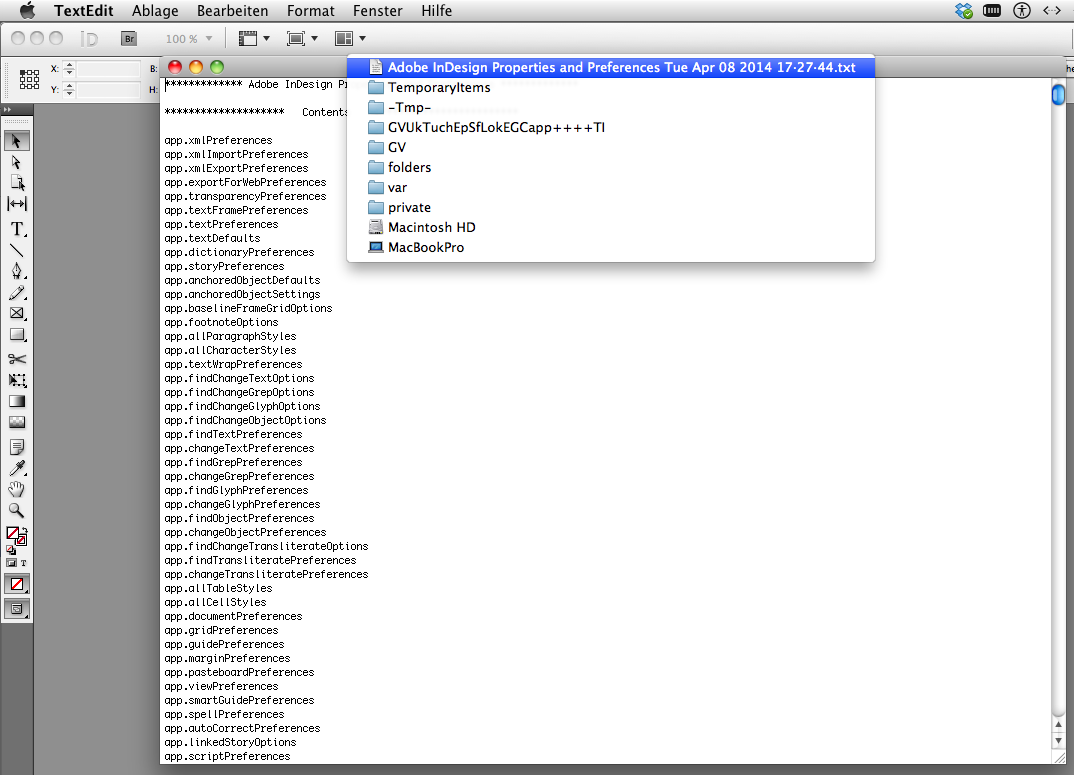
However I had no luck with the written temp file on my OSX 10.6.8. The file was created, opened in Textedit app, but had no contents. I tracked down the location of the file in my file system in finder, could locate it, but could not get access to it. Knew the exact path, but the Finder command "Go To / Go To Folder" refused the path.
Here a screen grab from Textedit app:

So I decided to exchange the writiting to a file to a simple $.writeln() action in ESTK. Also changed the " = " a couple of lines before to "\t" (tab) so I will get a more tabular result, better fitting in an Excel spreadsheet.
And as you already pointed out: there is a valid point in seeing the use case for an object like "GeneralPreference" (documentation) vs. "generalPreferences" (usage in ExtendScript). Once I struggled with that as you did (and a lot of people still do).
And yes:
I couldn't find a property to control the "Font Preview Size" other than doing it in the GUI.
Some things are missing in DOM. That is obvious… Lack of priority at side of Adobe, I guess.
Uwe
Copy link to clipboard
Copied
Uwe, Jarek,
The one significant benefit of it over the reference xml base reference guide is that the case sensitivity and plurality of all the preferences are correct.
I.e. app.generalPreferences.previewSize versus GeneralPreference
and
... there is a valid point in seeing the use case for an object like "GeneralPreference" (documentation) vs. "generalPreferences" (usage in ExtendScript). Once I struggled with that as you did (and a lot of people still do).
Sorry to disagree, there is no 'valid point'. There is a difference between the abstract Object (which usually has its name Capitalized) and the use of it in a property instanceOfAnObject (which usually have camelCaseNames).
In general, when there is an Object which is only used once inside the DOM as a property, the property has the same name as the object (but camelCased, per convention, because it's a property name).
app.generalPreferences is an object of type GeneralPreference
pdf.appliedObjectStyle is an object of type ObjectStyle
But that's not always true. All Paragraphs objects of Cell, Line, Note, Story, and so on are called "paragraphs" and the Fonts object is called 'fonts' in both Application and Document, but the Color object for a Tint is called 'baseColor' and for a GradientStop it is called 'stopColor'. You can also have the same object used as a property more than once:
TextFrame.endTextFrame is a TextFrame
TextFrame.nextTextFrame is a TextFrame
TextFrame.previousTextFrame is a TextFrame
TextFrame.startTextFrame is a TextFrame
TextFrame.textFrames is a collection of TextFrames
It would not make sense to have the same 'name' "textframe" for all of these objects.
As for the plural: most (but not all...) properties-that-are-objects are collections: you can -- if only in theory -- have more than one. This becomes apparent in constructions such as
Story.texts "A collection of text objects"
even though InDesign's model forbids a single story to contain more than one 'text' object. I think this was a conscious design decision to consistently name 'collections' as plurals. (IIRC Marc Autret addressed this; it's probably somewhere on his site.)
To find out what a certain property is called for a certain object, scroll down in my reference to the section Element of. That tells you where it is used and how it is called in that object.
Copy link to clipboard
Copied
@Jongware – alright; point taken 🙂
Uwe
Copy link to clipboard
Copied
Hi Jarek Jongware,
Regarding the suggestion for the capitalization and plurals of the words I was really talking about the preferences suite. This was the suite that had caused me more problems when I started scripting. I clicked onto the plural use of and capitalization of objects like rectangles and can see a logic (all be it a bit of a pain in the neck) of having a singular capitalized form Rectangle for the the [object Rectangle], after all a rectangle's constructor.name is Rectangle and not
rectangles and the use of the plural form for a collection of rectangles (or rectangle objects). I did struggle a bit more with the preferences which have no visible singular working form, there are [object Preferences] but not [object Preference].
All sounds pretty simple that I shouldn't have had any trouble with it but seeing as both and Uwe and I did somewhat struggle with the issue and that we probably are not too much thicker than the average bloke on the street and given the convenience of of having a copyable title up the top for simple copy paste purposes I don't think it's a completely invalid "feature request".
All said you are 100% the boss on this topic and the chm Object Reference is probably the most useful and used scripting resource out there.
Thanks.
Hi Jarek Uwe,
I guess you must of had some German in your script titles or somewhere else in the file which caused it to be a 0 byte file.
Please can you try the below which has encoding, lineFeed and BOM added to it. I'm sure that will work but would like to hear some confirmation.
Regards,
Jarek Trevor
P.s. Hi Jarek
var topics = [],
properties = [],
z = 0, t, p, c;
for (t in app) topics[z++] = t;
z--;
for (n = 0; n < z; n++) {
y = 0;
properties
= []; try {
properties
[0] = "******************** " + topics + " *************************\r" for (p in app[topics
]) { try {c = app[topics
] } catch (e) {c = "?";};
properties
[++y] = "app." + topics + "." + p + "\t=\t" + c; }
properties
= properties .join("\r"); }
catch (e) {};
}
temp = new File (Folder (Folder.temp) + "/" + app.name + " Properties and Preferences " + ("" + new Date).replace(/:/g,"\xB7").replace(/\s\S+$/,"")+ ".txt");
temp.encoding = "UTF-8";
temp.lineFeed = ($.os[0]=="M") ? "Macintosh" :" Windows";
temp.open('w');
temp.write("\uFEFF************* " + app.name + " Properties and Preferences *************\r\r");
temp.write("******************** Contents *************************\r\rapp." + topics.join("\rapp.") + "\r\r\r" + properties.join("\r\r"));
temp.close();
$.sleep(300);
temp.execute(true);
Copy link to clipboard
Copied
Hi, Trevor!
Now. It's working as intended 🙂
Uwe


Get ready! An upgraded Adobe Community experience is coming in January.
Learn more
 AdChoices