
Indesign Print Profile
Please help! 
The work we are sending to print digitally is very washed out and the colors are a bit off. I know we will not get the same result as printing offset but thought maybe we are using the wrong settings.
Please see below for screen grabs I have included to make it easier to follow what I am asking.
The photoshop images we use are RGB. When we save the inDesign files for print:
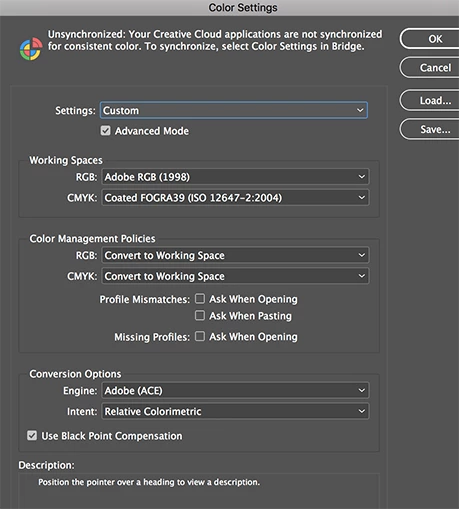
'Colour Settings' we assign Working Spaces > RGB > Adobe RGB (1998) and CMYK > Coated FOGRA39 (ISO 12647-2:2004)
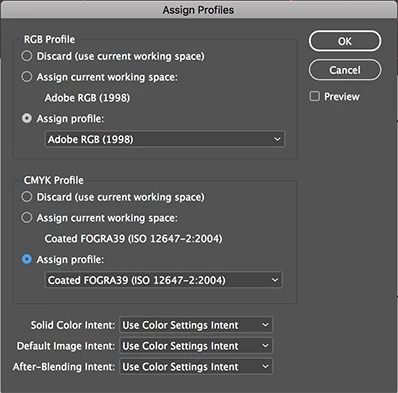
'Assign Profiles' Adobe RGB (1998) and Coated FOGRA39 (ISO 12647-2:2004)
When the inDesign file is exported to Adobe PDF:
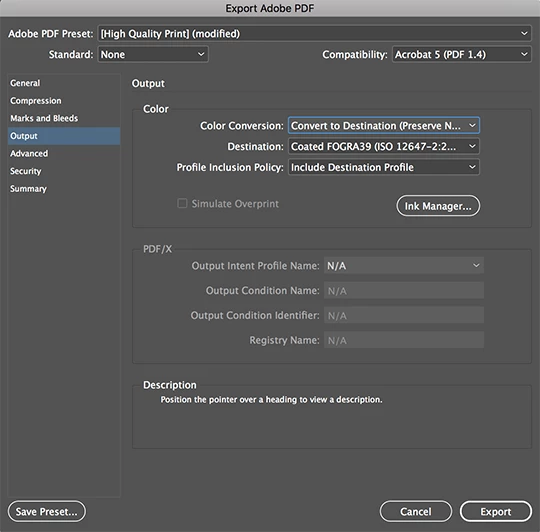
Output > Color > Color Coversion > Convert to Destination (Preserve Numbers)
Destination > Coated FOGRA39 (ISO 12647-2:2004)
Cheers
Sonja
 AdChoices