

Christian Schröter
Inspiring
February 3, 2024
Answered

InDesign problems: slashed zero, sudden crashes, find & replace

  • February 3, 2024
  • 2 replies
  • 1086 views

InDesign crashes suddenly from time to time since ever (worst version was CS6, most stable version was CS4). Especially after PDF exports. Sometimes it gets stuck while exporting PDF instead after on or more PDF exports.


Secondly and very annoying: Since the last update it always gives me a slashed zero instead of a normal zero and that is not searchable and not replacable. I’ve always select the wanted zero from “glyphs” menu and copy and paste it. Very annoying. This happens with the font Myriad Pro—not with every font.


Third annoying bug is that the options for search & replace suddenly and often diminish to only two options (“Document” and ”All documents”—the other options disappear (such as “Marked Text”, “Paragraph”—I’ve translated this as I use the german version) …
This topic has been closed for replies.
Correct answer Barb Binder

Hi Christian:


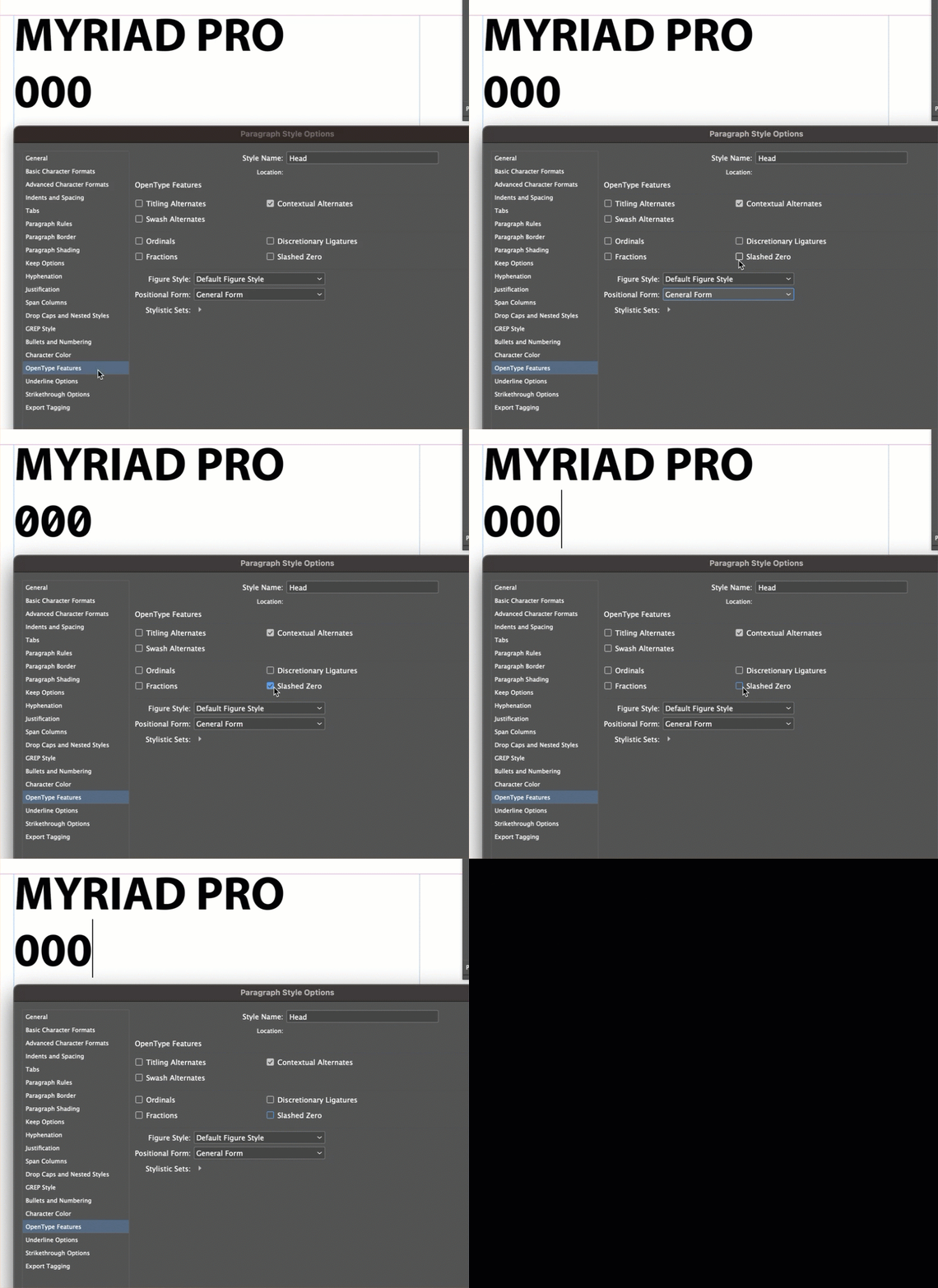
Myriad Pro can assign slashed zeros as an independent Open Type feature or as a Stylistic Set. The controls are in a few places so I'm showing it you in a Paragraph style definition. Could slashed zeros have been in advertently enabled as a new default? If you aren't using styles, let me know and I can share a different screen shot. 


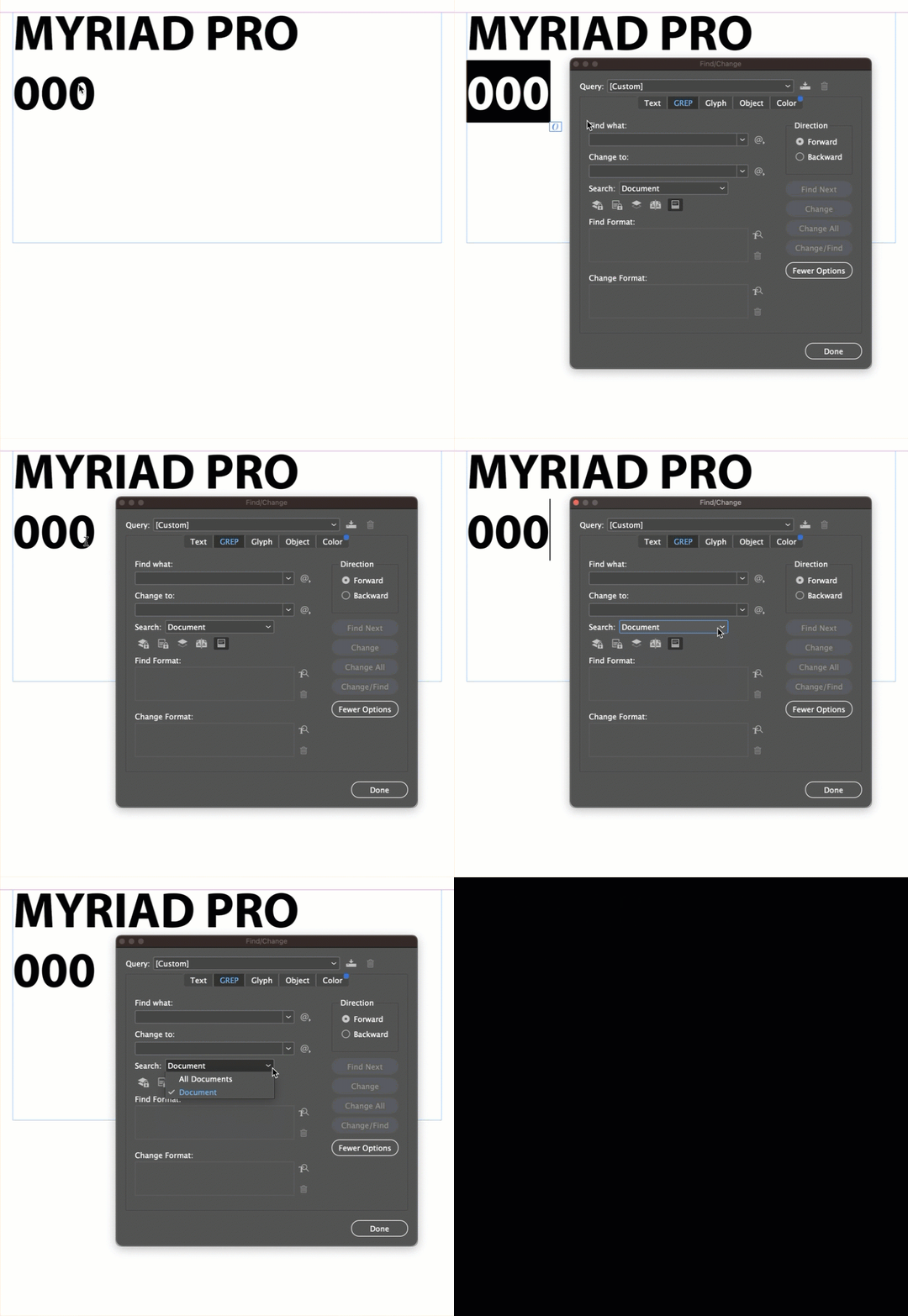
Now, Find/Change varies what it offers you based on where your cursor is. This is normal:


If yours is behaving differently than what I showed above, then this points to corrupt preferences, which can happen at any time, but we get more reports on this after an upgrade than any other time. You can reset your preferences following this link: https://www.rockymountaintraining.com/adobe-indesign-rebuilding-preferences-cache/


~Barb

2 replies

Barb Binder
Community Expert
Barb BinderCommunity ExpertCorrect answer
Community Expert
February 3, 2024

Hi Christian:


Myriad Pro can assign slashed zeros as an independent Open Type feature or as a Stylistic Set. The controls are in a few places so I'm showing it you in a Paragraph style definition. Could slashed zeros have been in advertently enabled as a new default? If you aren't using styles, let me know and I can share a different screen shot. 


Now, Find/Change varies what it offers you based on where your cursor is. This is normal:


If yours is behaving differently than what I showed above, then this points to corrupt preferences, which can happen at any time, but we get more reports on this after an upgrade than any other time. You can reset your preferences following this link: https://www.rockymountaintraining.com/adobe-indesign-rebuilding-preferences-cache/


~Barb

~Barb at Rocky Mountain Training
Christian Schröter
Inspiring
February 4, 2024

Thank you … that was quite qualified and led me to the solution. The option “Slashed Zero” was not active. But I activated it (nothing changed) then deactivated it (again)—now it works. Apparently a funny bug. It seems that InDesign got hooked believing the option was active after the last update.

Community Expert
February 4, 2024

Can't replicate the behaviour - and I can't say it's a bug or not. But seems to have solved your issue. 


Hard to know what went wrong.

Glad it's fixed for you.

Community Expert
February 3, 2024

Can you provide your OS and your computer specs? 
What version of InDesign are you using now?

What steps can we take to recreate the issues?

Can you provide sample documents to try the issue for ourselves?


If you think it's bugs then you can post the bugs Forum where your issues and bugs will be read by the Adobe team.

https://indesign.uservoice.com/forums/601180-adobe-indesign-bugs


These forums are really aimed at users helping users resolve issues.


We'd be delighted to help you - but require more information at the moment.

Thanks

Christian Schröter
Inspiring
February 3, 2024

M2 Mac … latest Sonoma … I won’t post bugs to the bugs team as they ignore them since ever …

Christian Schröter
Inspiring
February 3, 2024

And what version of InDesign?
They don't ignore them - that's just not true. 

If you don't post to the bugs forum then it may never be fixed. 


Can you address the rest of my requests - very difficult to help you otherwise?


By the way there’s another annoying bug since CS5 … in some apps. If you want to enter colour values manually and jump between the fields with the tab key too fast the entered values mix up or disappear …