
Participant
December 5, 2017
Question

Indesign question: What should I do if my image box is pushing my text away - ruining the layout?

  • December 5, 2017
  • 3 replies
  • 504 views

Thank you for taking the time to tackle this problem with me. 

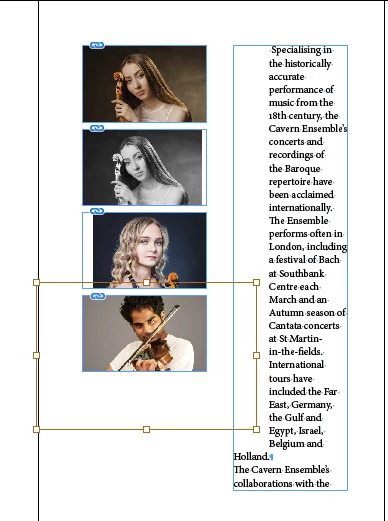
The problem: I fit some images into some boxes I created.  The issue now is that the original image can't be seen - but it is still pushing my text away - ruining the layout of the page in Adobe Indesign.  What can I do to align the text to the left in the box?

Where the text starts with "Holland" is how I'd like the rest of the text to be.

Thanks!

Krisonia
This topic has been closed for replies.

3 replies

Barb Binder
Community Expert
Community Expert
December 6, 2017

Oh good, glad that worked for you.

~Barb

~Barb at Rocky Mountain Training
rob day
Community Expert
Community Expert
December 5, 2017

Or, select the text frame then Object>Text Frame options>check Ignore text Wrap

Barb Binder
Community Expert
Community Expert
December 5, 2017

I'm guessing the image frames (the four of them) have text wrap on. Select the four frames and disable text wrap in Window > Text Wrap.

~Barb at Rocky Mountain Training
Participant
December 5, 2017

It worked!! Thanks.