
Participant
January 23, 2017
Answered

InDesign resizes jpeg when exporting larger dpi than 72

  • January 23, 2017
  • 4 replies
  • 12934 views

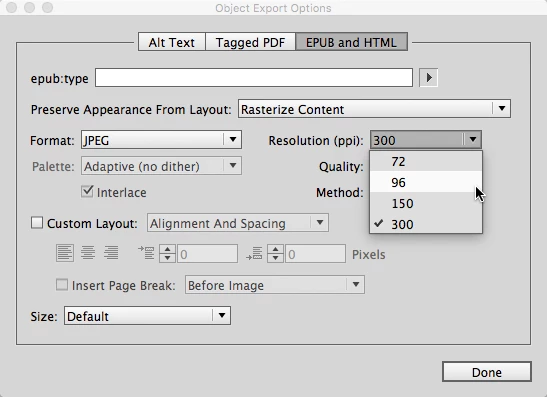
When I export an image as a jpeg in InDesign and select anything above 72 dpi, I end up with a larger jpeg. This seems to correlate with the dpi, so my original 1612 x 640 would end up as 2149 x 853 with 96 dpi, 8463 x 3360 with 150 dpi and so on. I can easily resize in Photoshop, but if there is a way to skip the middle man, that would be awesome and save me time. Is there any way to fix this problem within InDesign?
    This topic has been closed for replies.
    Correct answer Randy Hagan

    Photoshop has more robust tools for sizing pixel images than InDesign. All InDesign can do is output a graphic with a new resolution.

    InDesign does not have the more sophisticated capabilities to not only scale the number of pixels but do the math to resize it in length and width dimensions as well as rescale its pixel resolution. As it is now, I know of no shortcut for getting Photoshop's more sophisticated features out of InDesign.

    That doesn't mean that there can't be one in the future, though. Adobe is constantly looking for new features to add to its software. I'd suggest you ask the developers for this feature directly, though here:

    Feature Request/Bug Report Form

    4 replies

    Participant
    May 21, 2024

    Hello! I had this same problem when I would export my files they would scale in both InDesign and Illustrator. 

    Here is the 2024 fix:

    For InDesign: preferences -> general -> look at the bottom options, select "reset preferences on quit"


    *should be noted this shouldn't mess with your custom workspace settings.


    You then have to completely quit/close InDesign and reopen the working file. From there you can do your usual File -> Export and the dimensions should be the same as your page size!  🙂  


    Hope this helps!

    Mike Witherell
    Community Expert
    Community Expert
    May 21, 2024

    Sorry to disagree, but that is not a good idea at all. 😞

    Mike Witherell
    rob day
    Community Expert
    Community Expert
    January 23, 2017

    When I export an image as a jpeg in InDesign and select anything above 72 dpi, I end up with a larger jpeg. This seems to correlate with the dpi, so my original 1612 x 640 would end up as 2149 x 853 with 96 dpi, 8463 x 3360 with 150 dpi and so on.

    The JPEG/PNG export exports the page to its print output dimensions at the chosen resolution. The image's actual pixel dimensions are not considered. So I could have a 5"x7" image placed on the page and its actual pixel dimensions could be anything, i.e., 360x504 @ 72ppi, 1500x2100 @ 300ppi, 3000x4200 @ 600ppi, etc. If I export the page to JPEG with the res set at 100ppi, the 5"x7" image will continue to have an output dimension of 5"x7" at the requested 100ppi (500x700pixels).

    rob day
    Community Expert
    Community Expert
    January 23, 2017

    so my original 1612 x 640 would end up as 2149 x 853 with 96 dpi, 8463 x 3360 with 150 dpi and so on.

    Also, if you want to export a page to a specified pixel dimension set the resolution to the target dimension divided by the page dimension in inches.

    So if your page is 8.5"x11" and you want to export it to JPEG that has a width of 1200 pixels, set the resolution field to 1200/8.5

    Note that resolution has to be in whole pixel increments so the final export dimension might get rounded.

    cinziamarotta
    Participating Frequently
    January 23, 2017

    Therefore you should resize the images in InDesign until you'll get the resolution you want. Check the links panel.

    Participant
    January 23, 2017

    I guess I should've clarified, a design I'm exporting as an jpeg image that would include linked images, text and vector shapes. I'm referring to the end process after I've placed the logo, image and content and would like to export for web or maybe export for specific size to be placed in a document/powerpoint. 

    cinziamarotta
    Participating Frequently
    January 23, 2017

    No, it's the same in Photoshop if you increase the resolution without changing the dimensions. That creates new pixels.

    Participant
    January 23, 2017

    True, but I use the image resize in Photoshop to keep my dpi the same and size it according to what is needed. I'm basically looking for a solution to exporting in InDesign since it's a quicker process for me to get to the client.

    Randy Hagan
    Community Expert
    Randy HaganCommunity ExpertCorrect answer
    Community Expert
    January 23, 2017

    Photoshop has more robust tools for sizing pixel images than InDesign. All InDesign can do is output a graphic with a new resolution.

    InDesign does not have the more sophisticated capabilities to not only scale the number of pixels but do the math to resize it in length and width dimensions as well as rescale its pixel resolution. As it is now, I know of no shortcut for getting Photoshop's more sophisticated features out of InDesign.

    That doesn't mean that there can't be one in the future, though. Adobe is constantly looking for new features to add to its software. I'd suggest you ask the developers for this feature directly, though here:

    Feature Request/Bug Report Form