
Participant
May 15, 2025
Question

InDesign Screen Glitch in Windows — Fixes With Zoom In/Out

  • May 15, 2025
  • 1 reply
  • 284 views

Hello,


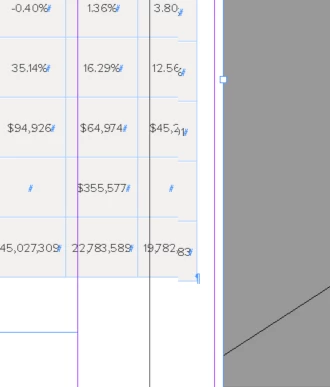
I have an issue within InDesign 20.2 where the screen pixelates/glitches. It fixes upon zooming in or out, but it's a continuous problem.

Tried setting the display performance at typical and high, the problem still occurs on both settings. I am on a Windows (a brand new computer) so there is no GPU Performance setting.

Any ideas?
1 reply

Abhishek Rao
Community Manager
Community Manager
May 15, 2025

Hi @8044089,


Thanks for sharing the details about the issue. Could you please confirm which version of Windows OS you're using? Are you seeing this glitch on a secondary monitor instead of your primary one? If it’s on a secondary monitor, could you let me know the physical connection type, like USB Type-C or HDMI?

Also, please make sure your graphics driver is up-to-date, as outdated drivers can sometimes cause display problems. Let me know if this happens with all InDesign files or only specific ones. Lastly, could you please test this issue on the latest version 20.3.1 by updating InDesign through the Creative Cloud desktop app?


Looking forward to your update.

Abhishek

Participant
May 15, 2025

Hi @Abhishek Rao,

It's Windows version 11.
The glitch is happening on a laptop as well as when it's connected to a secondary monitor through a docking station.
It's a brand new laptop so I imagine the graphics driver is up to date. 

And unfortunately our company hasn't pushed the InDesign 20.3.1 update yet.

Anubhav M
Community Manager
Community Manager
May 15, 2025

Hello @8044089,

Thanks for sharing the details. Would you mind performing a clean reinstallation of the GPU(s) drivers (Intel / NVIDIA / AMD) and setting the Graphics Preference to High-Performance for InDesign (https://adobe.ly/3FbYGb1) and checking if it helps?

If the problem persists, kindly share a small screen recording of your exact workflow and the problem, so I can try and replicate this on my end.

Looking forward to hearing from you.


Anubhav