
InDesign SDK Plugin won't load when I include openssl
Hello there, I've been developing a plugin for InDesign using SDK. I'm facing the issue of plugin not loading when I try to use OpenSSL library (version 3.14). The build is succeeding without any errors, but the plugin failing to load. Assertion window popping up and saying:
Cannot load plugin CHLINGUISTIC.SDK.PLND:\RESS\ID\19.0\Release\source\omlib\plugins\WPlugInListUtils.cpp (168)
I've installed openssl with vcpkg package manager, and enabled automatic linking to Visual Studio:
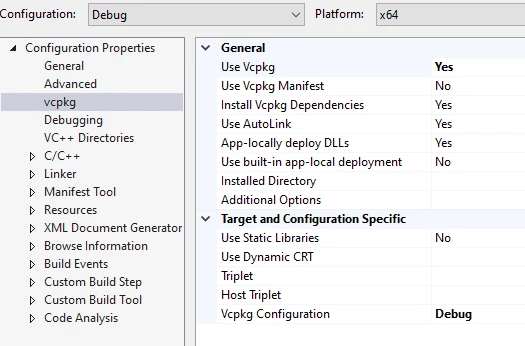
During building phase, there is this vcpkg related log:
1>Target VcpkgTripletSelection:
1>  Using triplet "x64-windows" from "C:\dev\vcpkg\installed\x64-windows\"
1>  Using normalized configuration "Debug"
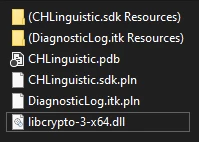
There is 'libcrypto-3-x64.dll' file being created in the build directory alongside with plugin files:
Plugin building and loading successfully without any errors when I only include openssl headers:
#include <openssl/conf.h>
#include <openssl/evp.h>
#include <openssl/err.h>
But InDesign stops loading the plugin when I start using openssl components in my methods, for example:
EVP_CIPHER_CTX* ctx;
ctx = EVP_CIPHER_CTX_new();
So, I was wondering what could be the issue, since assertion window doesn't tell any usefull info, output window in Visual Studio stops after printing:
'InDesign.exe' (Win32): Loaded 'D:\Program Files\Adobe\SDK\InDesign\2024\build\win\debugx64\SDK\CHLinguistic.sdk.pln'. Symbols loaded.
'InDesign.exe' (Win32): Unloaded 'D:\Program Files\Adobe\SDK\InDesign\2024\build\win\debugx64\SDK\CHLinguistic.sdk.pln'
The thread 'com.adobe.ngl-null' (0x438c) has exited with code 0 (0x0).
The thread 'com.adobe.ngl-null' (0x730c) has exited with code 0 (0x0).
I hope you guys can help me out with the issue I'm facing. I'm looking forward to your responses. Thanks in advance!
 AdChoices