Exit
  • Global community
    • Language:
      • Deutsch
      • English
      • Español
      • Français
      • Português
  • 日本語コミュニティ
  • 한국 커뮤니티
0

InDesign shows menu & toolbar badge but no main screen

New Here ,
Feb 18, 2019 Feb 18, 2019

Hello, When I launch InDesign 2019 on Mac from the Finders "Applications" folder, it shows no main screen. It does show the menu options at the top and the toolbar badge at the bottom. How can I get InDesign to display on the main screen so I can work?

thanks
461
Translate
Report
Community guidelines
Be kind and respectful, give credit to the original source of content, and search for duplicates before posting. Learn more
community guidelines

correct answers 1 Correct answer

Community Expert , Feb 18, 2019 Feb 18, 2019

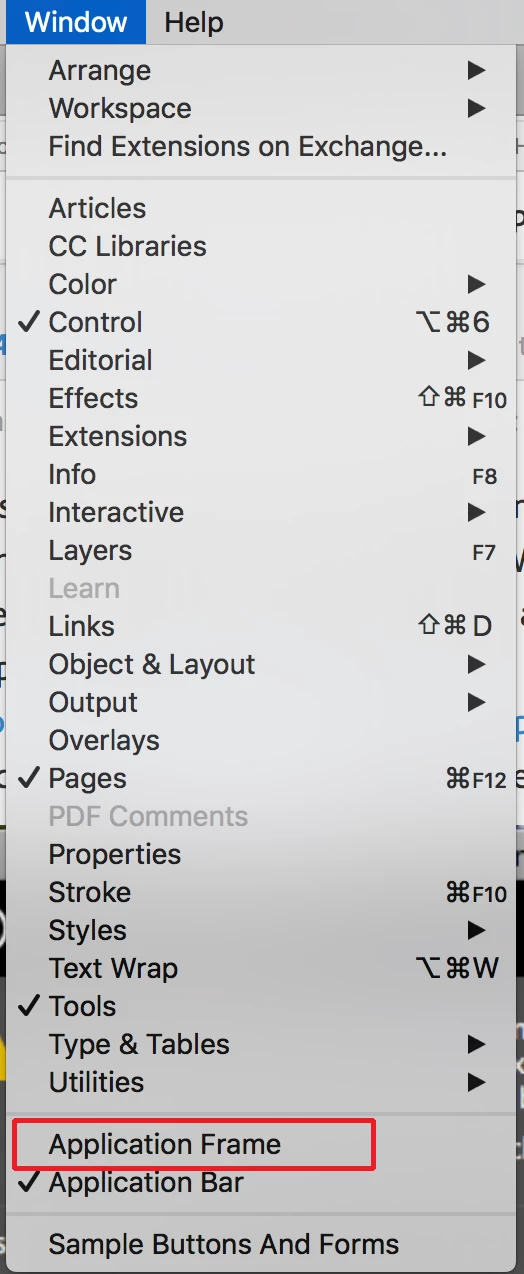
You should be able to access the Application Frame under the Window Menu. See screen shot:

Screen Shot 2019-02-18 at 3.03.32 PM.png

As to the messages that you are getting that just means that there are fonts in your document that you do not have open on your system. The second dialog window (Find Font) is showing what's missing and gives you the opportunity to substitute other fonts for the missing ones.

Translate
New Here ,
Feb 18, 2019 Feb 18, 2019

This issue is across versions. I had InDesign 2019 installed and it crashed, so I installed version 2018, which had the same issue of nothing displayed in the main screen. When I launch InDesign, it comes up with the two attached messages before opening. As already stated, I see the toolbar badge, and the top menu bar menu options. I looked in the View menu but could not find the "Application Frame" setting advised to be selected or deselected by this article. https://indesignsecrets.com/indesign-is-disappearing-except-for-the-menu-bar.php

What can I do to bring back the main screen of InDesign?

Screen Shot 2019-02-18 at 10.50.17.pngScreen Shot 2019-02-18 at 10.51.32.png

Translate
Report
Community guidelines
Be kind and respectful, give credit to the original source of content, and search for duplicates before posting. Learn more
community guidelines
Community Expert ,
Feb 18, 2019 Feb 18, 2019
LATEST

You should be able to access the Application Frame under the Window Menu. See screen shot:

Screen Shot 2019-02-18 at 3.03.32 PM.png

As to the messages that you are getting that just means that there are fonts in your document that you do not have open on your system. The second dialog window (Find Font) is showing what's missing and gives you the opportunity to substitute other fonts for the missing ones.

Translate
Report
Community guidelines
Be kind and respectful, give credit to the original source of content, and search for duplicates before posting. Learn more
community guidelines