
Participant
September 26, 2019
Answered

InDesign symbols characters moving to the front of words

  • September 26, 2019
  • 2 replies
  • 829 views

So im havining an issue with InDesign thats driving me nuts and I was hoping someone here could help me. Im writing a company profile document that uses lots of symbols like &,%,$,(,), but for some reason when I go to type out something like 100% the % symbol will jump to the front of the word so it ends up like %100 so im having to write everything backwords. this isnt a massive issue right now but I dont want to have to explane all this to our corpotate writer when its time for edditing. 
This topic has been closed for replies.
Correct answer Barb Binder

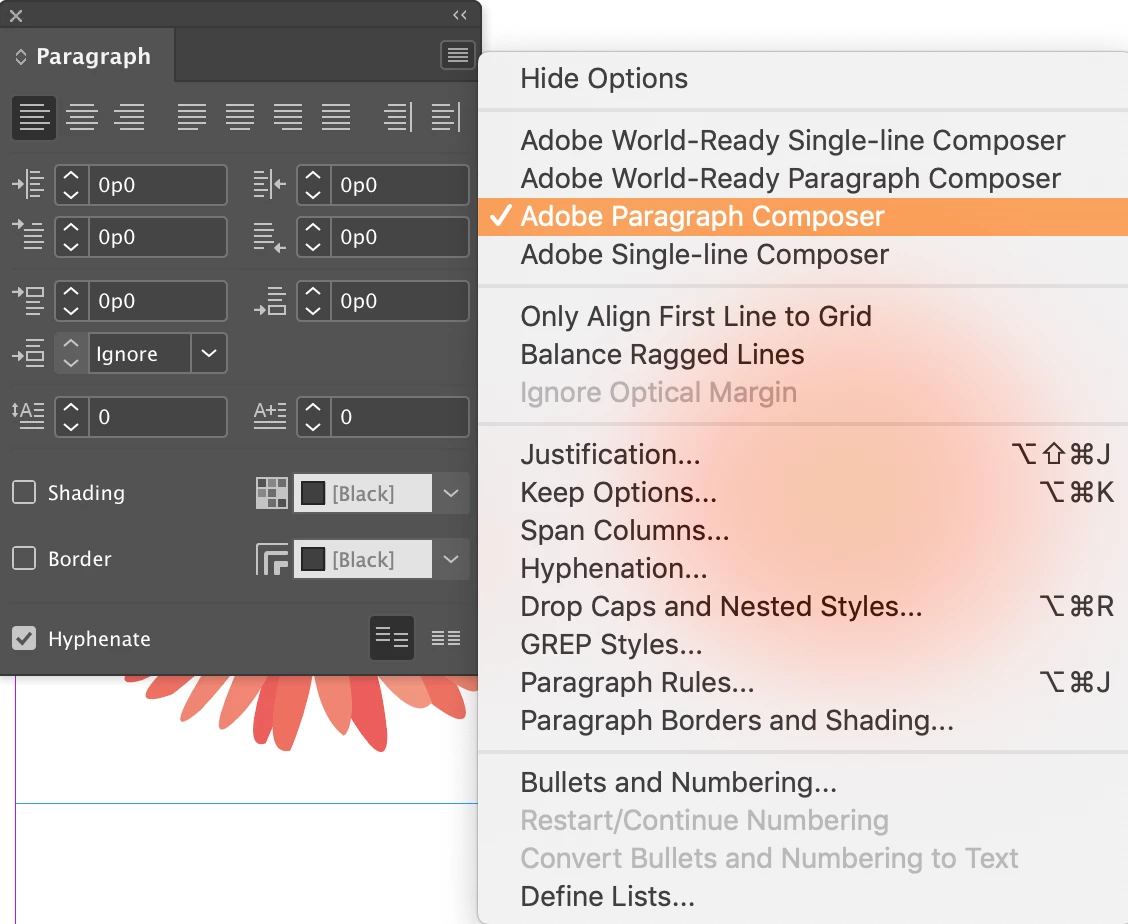
Hi Jake: Can you check your composer? Type > Paragraph > Panel menu. Is it set to World-Ready Para Composer? Does changing it to Adobe Paragraph Composer solve this for you?

~Barb

2 replies

Barb Binder
Community Expert
Barb BinderCommunity ExpertCorrect answer
Community Expert
September 27, 2019

Hi Jake: Can you check your composer? Type > Paragraph > Panel menu. Is it set to World-Ready Para Composer? Does changing it to Adobe Paragraph Composer solve this for you?

~Barb

~Barb at Rocky Mountain Training
Participant
August 28, 2023

It just did for me! Thank you so much!!

Barb Binder
Community Expert
Community Expert
September 26, 2019

Hi Jake:


What version of InDesign are you using? And do you have an ME version installed? (Middle East)


~Barb

~Barb at Rocky Mountain Training
Participant
September 26, 2019
Its InDesign 2019 CC and its a Canadian version