

Walter7575
Participant
January 12, 2022
Answered

Indesign Template Prints as Blank PDF

  • January 12, 2022
  • 2 replies
  • 598 views

Hi, I'm brand new to Indesign (use Photoshop and Lightroom regularly) and I'm unable to print a PDF of a supplied template.

An advertising company sent me a template to complete for a print property listing. Unfortunately I am unable to print my work as the PDF generated keeps coming out blank.

I have reviewed a number of threads within the community where other users have this problem - I have "Print Layer" selected and believe I have the PDF export settings correct.

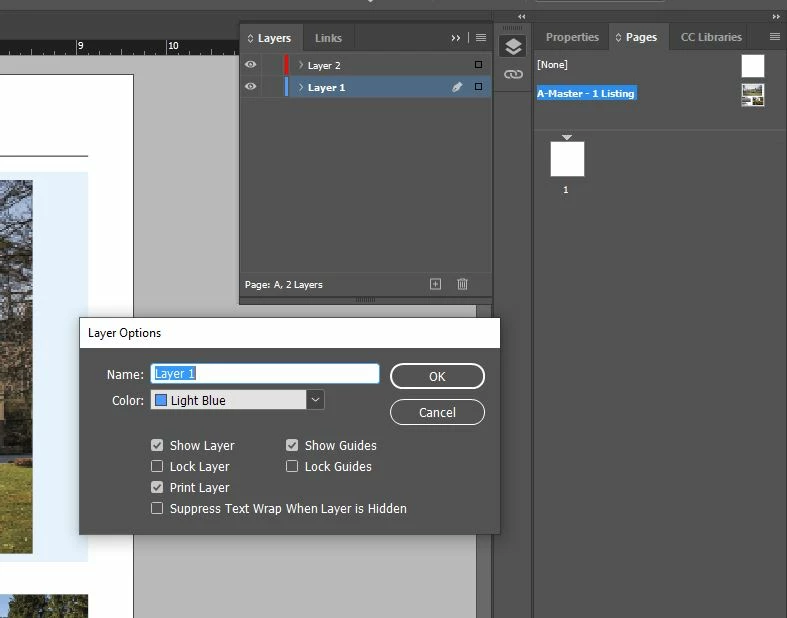
I suspect it has something to do with the "None" page at the tope of the pages tab.  I have included a screenshot.

If anyone is able to provide advice, it would be most appreciated.
This topic has been closed for replies.
Correct answer SJRiegel

As Bob mentioned, you have done your layout on a Master Page. The reason you see nothing on your document page is that the Master containing your layout is not applied to the document page. 

Your options are to apply the Master Page to Page 1 of your document my dragging the Master to Page 1 in your pages pallet, or by copying all from the master page, and using Paste in Place on page 1 to put your content there. 

I'd go with option 2, so that you wind up with editable content on your document page.

2 replies

SJRiegelCorrect answer
Legend
January 12, 2022

As Bob mentioned, you have done your layout on a Master Page. The reason you see nothing on your document page is that the Master containing your layout is not applied to the document page. 

Your options are to apply the Master Page to Page 1 of your document my dragging the Master to Page 1 in your pages pallet, or by copying all from the master page, and using Paste in Place on page 1 to put your content there. 

I'd go with option 2, so that you wind up with editable content on your document page.

Peter Spier
Community Expert
Community Expert
January 12, 2022

I'd go a step further and CUT, rather than copy, the content from the master page.

Legend
January 12, 2022

Yes - I should have said Cut. 

BobLevine
Community Expert
Community Expert
January 12, 2022

You have everything on a master page. Open that and check the attributes there.