kellyp91276472
Participating Frequently
June 1, 2018
Answered

InDesign TOC - Formatting Being Picked Up From Chapters / Headings

  • June 1, 2018
  • 2 replies
  • 7425 views

Hi,

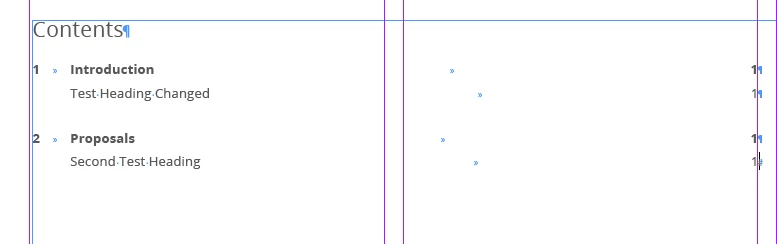
I'm trying to create an Indesign TOC which displays in a specific format depending on which paragraph style it is picking up (chapter or heading). I've created styles within my TOC, which are based on a basic paragraph style which is contained outside of the TOC group. The TOC chapter / heading paragraph styles then contain a slight variation in tab and font. Whilst these displayed as expected, as soon as i update the contents page, all of this is lost and the various headings/chapters revert to the formatting used within the document.

I have a previous document i've based this off which shows it working, and i can't see any differences in the set-up. When i tried copying the old TOC style into my new document, the same issue arises. This doesn't include nesting, etc, which I don't really know how to use.

If anyone knows where i'm going wrong, please let me know.
Correct answer hammer0909

https://www.dropbox.com/sh/ee5xc44wgw3gj31/AAB-iDF8Dg4Gn4lJuss-6ZaEa?dl=0

Design and Access Folder  I've packed it here. Thanks in advance.


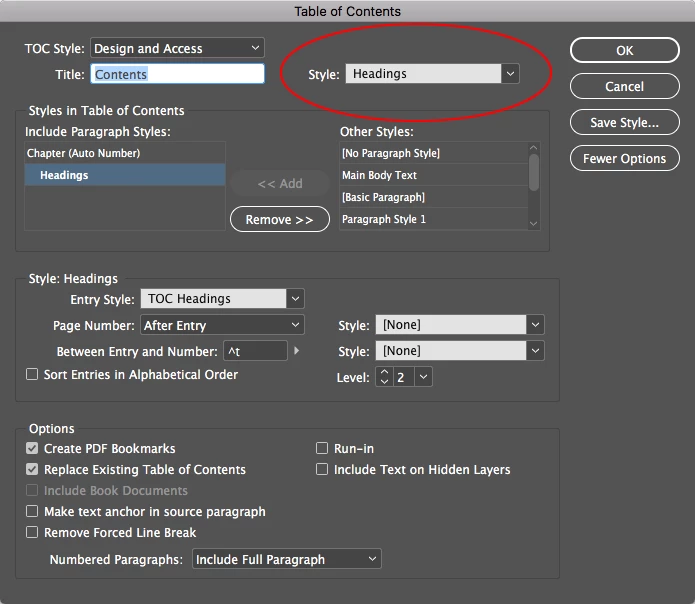
I think the problem is that you're leaving InDesign to its own devices by not defining a style to apply to the Title of the TOC. If you notice, the title is coming in with a numbered format (which I don't think you want), and it actually has no style applied to it. So somewhere it's grabbing that formatting (possibly from the default text of that frame). Anyway, I assigned a style of Headings to the Title although you could assign whichever style you wish, and now when I update the TOC, you get the appearance that you see in the second figure below with no overrides and expected formatting.

2 replies

Bevi Chagnon - PubCom.com
Legend
June 1, 2018

Glad to know it's now working.

Whew!

|    Bevi Chagnon   |  Designer, Trainer, & Technologist for Accessible Documents ||    PubCom |    Classes & Books for Accessible InDesign, PDFs & MS Office |
hammer0909
Community Expert
Community Expert
June 1, 2018

When you're defining your table of contents, make sure to click on the More Options button. Then for each style that you add in the "Styles in Table of Contents" section make sure you choose the entry style that you want applied to the text in the Table of Contents. It sounds to me like it's set to "Entry Style" which is why it wants to keep reverting back to that appearance when you update.

schroef
Inspiring
May 15, 2020

How can i overrule character styles applied to section headers. I got a paragraph style I used and in some section I needed to use a character style to overrule the color. But now this color also comes into my TOC. Ive apply a separate TOC section paragraph style and also tried adding "Non-Jointer". The character style keep being pulled into the TOC when I use update.


Since my TOC is completely black, I used a simply Character style after regenerating it. But this feels like cheating and I want to know a proper method for this

June Rabbit
Known Participant
October 24, 2024

4 years later, this is the same issue I am having. One of my [Paragraph] "Styles in Table of Contents" requires a Character Style on parts of it (some key words are in bold, with the use of the Character Style on top of the regular Paragraph Style used as section titles throughout the document). When I update my ToC, I get that Character Style pulled in over the ToC Entry [Paragraph] Style which makes a mess of the ToC. I can manually reapply the ToC Paragraph Style and select "Clear Character Styles" but I don't want to hand this project off like that.