
Participant
January 28, 2022
Question

InDesign TOC Run-in - Using one line

  • January 28, 2022
  • 3 replies
  • 320 views

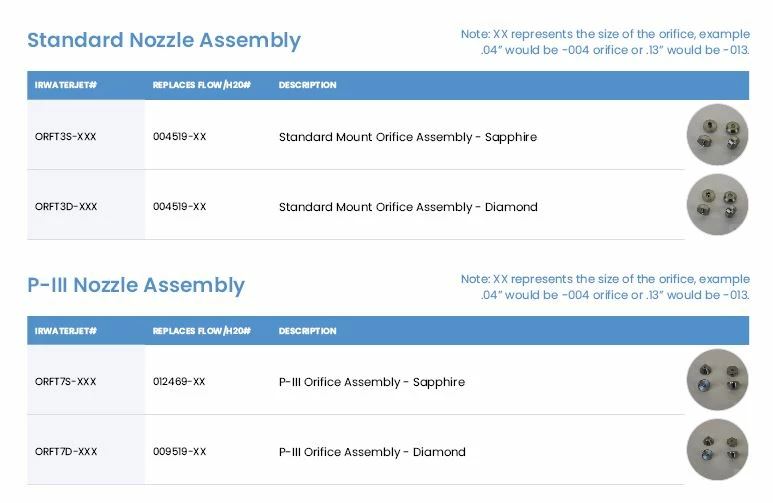
I am creating an index at the back of the brochure based upon Product Numbers. There are two product numbers per product. In the image below it is one product per line. 


Ideally I need the first product number, then a tab, then the next product number, then a page number -- All on the one line. 


This is my data -> 
 

This is the desired way I'd like it displayed -->  
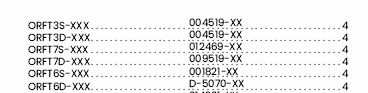
 

I required the two product codes to stay grouped together, as it would be good if the entire index was in alphabetical order. 


My first product codes have one paragraph style assigned, the second have another assigned. 


Any help greatly appreciated! 

This topic has been closed for replies.

3 replies

Barb Binder
Community Expert
Community Expert
January 31, 2022

Hi @LSY86:


As I said in my post, "...this works, according to what you have shared with us." We can work with what you choose to share. 


  ~Barb

~Barb at Rocky Mountain Training
LSY86Author
Participant
January 31, 2022

Thanks Barb - Do you have any further suggestions? For example, here is another sample of the data. Thanks 


Dave Creamer of IDEAS
Community Expert
Community Expert
January 31, 2022

Same principle but you need to put something distinctive at the end of the first paragraph style so you can distinguish it when doing the find/change. Search for with GREP so you can replace the actual paragraph style content and remove the special characters and any digits before the paragraph return. 

You would search for "P60113@@4^p" and replace it with "P60113^t".

Let us know if you need the actual GREP F/C query.

David Creamer: Community Expert (ACI and ACE 1995-2023)
Barb Binder
Community Expert
Community Expert
January 28, 2022

Hi @LSY86:


I agree with Dave's approach. I would set this up as a TOC and not an index—it will take less time and effort.


Taking it a bit further, call both paragraph styles into the TOC—and check the Sort Entries in Alphabetical Order checkbox.


That will produce the list similar to this (but I typed it in your order and not alphabetical). Set the two necessary tab stops.


GREP is not my strength, but this works, according to what you have shared with us. 


Change All.


Result. 


Once working, save the query because you will need to run it after each TOC update. 


~Barb

~Barb at Rocky Mountain Training
LSY86Author
Participant
January 31, 2022

Thank you so much for your response. Unfortunately I see now the data isn't quite represenative of the entire table. The XXX or XX don't appear on data further down.

Dave Creamer of IDEAS
Community Expert
Community Expert
January 28, 2022

I assume the original data in a table, hence the two paragraph styles. 

You could collect the two product numbers and just the page number on the second one with a TOC Style.

     ORFT3S-XXX 

     004519-XX   <tab> PageNum

Clean up with a Find/Change.


David Creamer: Community Expert (ACI and ACE 1995-2023)