Participating Frequently
October 21, 2024
Answered

InDesign Update 20.0 Performance Issues: Spinning Wheel and Delays

  • October 21, 2024
  • 2 replies
  • 1792 views

I thought my iMac had all the right specifications. Does anyone have any idea what the problem might be?
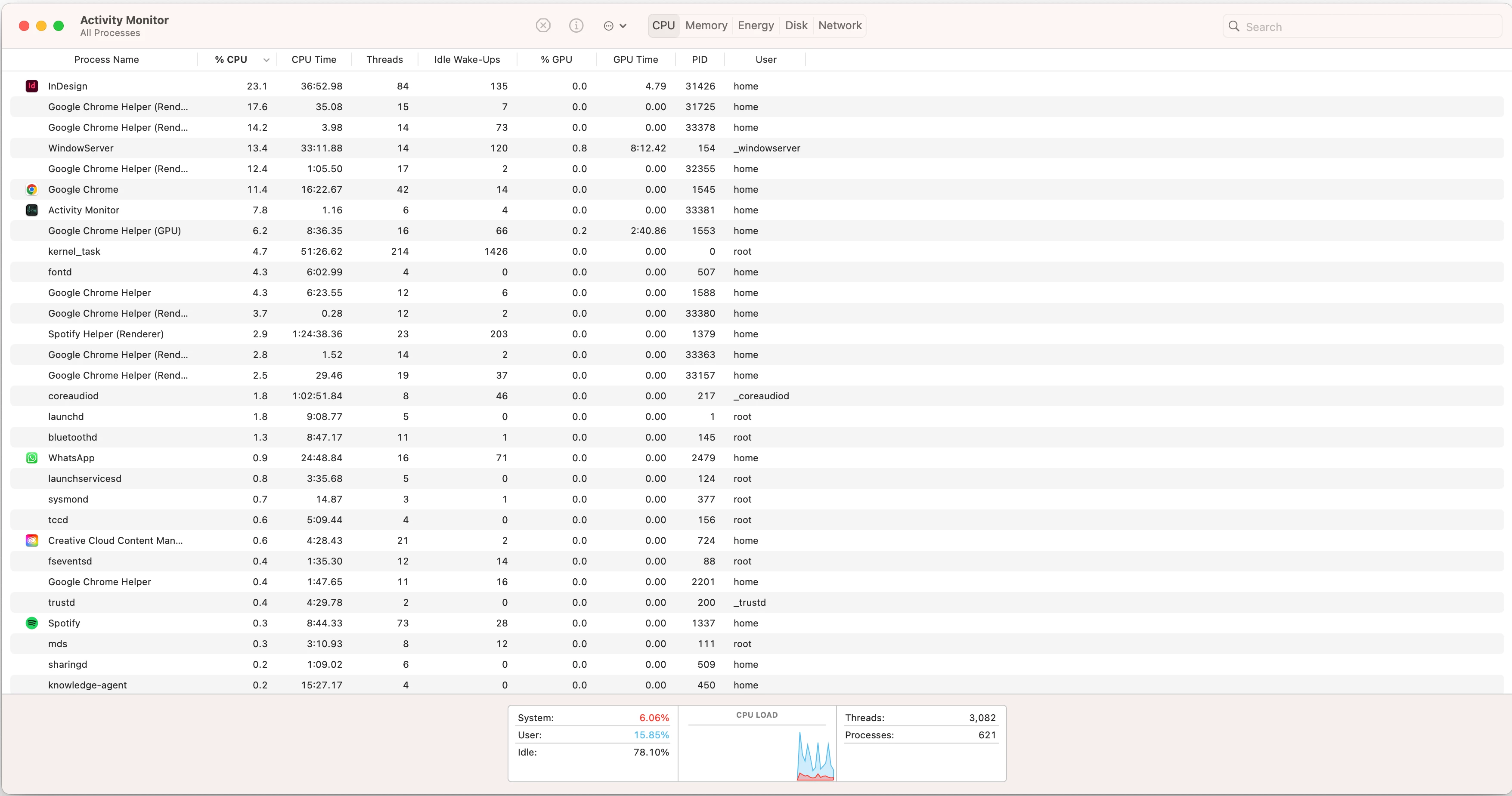
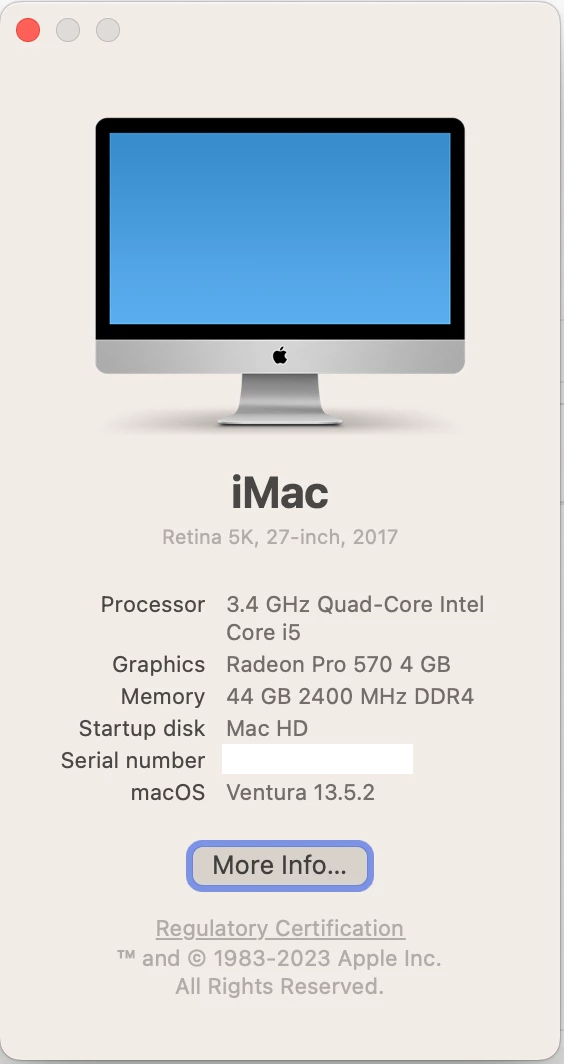


<Title renamed by MOD>

  

Correct answer Lauren31415629us32

Hey @Lauren31415629us32,


Thanks for the update! Just checking-did you get a chance to go through the other thread I shared earlier? A few folks there mentioned that updating to version 20.1 improved their performance quite a bit. Maybe give that a shot and see if it helps?

Also, where are your files stored—locally, on a remote server, cloud, or external drive? The beachball symbol often indicates a process delay. Storing the file locally might speed things up—worth testing!

Also, about the cache path—it's a directory on your Mac where you manually go and delete stuff. For example, on my Mac, I’d navigate to something like:
~/Library/Caches/Adobe InDesign


Note: Location starting with this “~” sign indicates the User Library, which is hidden. So, you need to copy & paste the exact path in spotlight search or from Finder Menu > Go > Go to Folder > Paste the location in the dialog box like this:


Let me know how it goes or if you’re stuck-I’m here to help! 


Best,
Abhishek


Hello,


I updated to the new version and it fixed all my problems! It must've been the bugs with the original udpate.


Thanks for your help! I'll keep this in mind whenever I do need to clear my cache.

2 replies

MisterArt5
Participant
December 11, 2024

From the minute INDD 20 installed itself multiple bugs and delays have made this app difficult to use. The minor update for INDD (20.01) helped but not much. There are several issues related to the "beachballing" issue.

  • Every movement or click of the mouse produces a spinning - Beachballing affect.
  • Copying and pasteing text spins and also pasteing text form one document to another that contain the EXACT same fonts and styles can be sketchy at best. Often the fonts come up as missing.
  • Scrolling either within a page or from page to page can be jerky or down right unpredictable.
  • Opening or closing documents produces a weird blank progress bar and a significant delay.
  • Unexpected movements also produce a spinning delay. 

Some of the work arounds I have read about are to disable font management. For large agencies that deal with mutliple large projects with literally 1000's of fonts - disabling font mangament is not an option...EVER. It seems like there are several levels of breakdown here. Cache issues, font management, other coding issues causing delays. Is ths part of the AI influx in InDesign? Or the prep of that technology coming in? All I know is INDD 20.0 (and its update - 20.01) is the worst build I have seen in recent years, and I have used INDD since version 1.0. It is worse than INDD 19. Although, INDD 19 eventually worked out it's issues. I really hope you all can work out these issues quickly because if you can't, maybe we should all start looking at Quark again.


Tech specs for the nmachines this is happening on:

  • Mac Mini -Intel  i7 - 6 core, 32g RAM, 1TB hard drive
  • Mac Mini -Apple M1, 16g RAM, 1TB hard drive
  • Macbook Proi -Apple M2-Pro, 16g RAM, 1TB hard drive
  • All three machines run Mac OS Sequoia 15.1.1

I love Adobe Creative Cloud. Please get focused back on the fact this application is a professional standard.

Abhishek Rao
Community Manager
Community Manager
December 16, 2024

Hi @MisterArt5,


Thank you for sharing such detailed feedback, and I completely understand how disruptive these issues can be to your workflow, especially in a professional setting. Let’s work through this together to improve your InDesign experience.

1. You’re using InDesign 20.0/20.01 on macOS Sequoia 15.1.1-thanks for highlighting that.


2. If disabling font management isn’t an option, let’s ensure font caches are not contributing to the issue. Try clearing InDesign font caches:

- Mac: Go to /Users/<Username>/Library/Caches/Adobe InDesign and delete the contents. Restart InDesign.

- Additionally, confirm that fonts are active in your font manager and system library.


3. Beachballing & Performance Delays:

- Reset Preferences: Sometimes resetting preferences can resolve unexpected slowdowns. Press Cmd+Opt+Shift+Ctrl while launching InDesign. (Note: Back up your preferences first!)

- Disable GPU Performance: Go to Preferences > GPU Performance and uncheck the option to see if it helps with scrolling or delays.

- Turn off Background Tasks: This can sometimes improve responsiveness: Window > Background Tasks > Pause/Cancel.


4. Known Issues & Troubleshooting: Please check these articles for detailed steps:

- Resolve Slow Performance in InDesign

- Troubleshoot InDesign Issues.


I understand the frustration-this build clearly poses challenges. I’ll also relay this feedback to the product team to ensure they are aware of your experience. If none of the above steps improve the situation, we can dive deeper with logs or explore other potential causes. Let me know how it goes!


Thanks for your patience and understanding.


Best,

Abhishek Rao

Participant
January 13, 2025

Hello @Abhishek Rao 


I am having exact the same issues as MisterArt5, so I am hoping you could help me as well. The beachballing and performance delays are dragging out even the simpliest of task for my job. I've tried to open up my Cache but I can't get past the Username portion. When I type something into it, nothing happens so I'm at a loss here. 

Abhishek Rao
Community Manager
Community Manager
October 21, 2024

Hi @jessican41366163,


I completely understand how frustrating it can be to deal with slowness in InDesign, especially when you're trying to work efficiently. Thank you for reaching out and sharing your experience! I recommend checking out these reference articles that offer troubleshooting steps for performance issues: 

1. [Resolve Slow Performance and Unexpected Behavior of InDesign](https://adobe.ly/4eNO3aX)
2. [Troubleshoot Slow Performance in InDesign](https://adobe.ly/4eNO3HZ)


Please let us know if these tips help improve your experience! We're here to support you. 


Best,

Abhishek Rao


Participating Frequently
October 21, 2024

Thanks for this. I have just reset preferences and now lots of fonts are showing as missing. Could this be to do with resetting preferences? This has happened before.

Abhishek Rao
Community Manager
Community Manager
October 21, 2024

Hi @jessican41366163,


Thank you for the update! Yes, resetting preferences in InDesign can sometimes cause fonts to appear as missing. This happens because resetting preferences restores the settings to their default state, which may not include any custom font mappings or settings you had previously configured.

Please try below to get the custom fonts back: 

  1. Make sure the fonts are installed on your system. You can check your font library or the Adobe Fonts service if you’re using Adobe’s font subscription.

  2. If the fonts are installed but still showing as missing, try relinking them in InDesign. Go to the "Type" menu, select "Find Font," and then you can locate and replace the missing fonts.

  3. If you had specific styles associated with the missing fonts, you might need to reapply those styles after relinking.

If you continue to experience issues, feel free to reach out, and we can explore further options together!


Best,
Abhishek Rao