
Participant
December 12, 2021
Answered

InDesign using a lot of memory.

  • December 12, 2021
  • 3 replies
  • 660 views

I recently purchased a new MacBook Pro after some damage to my previous one.

I'm a Graphic Design student, so I tend to run a few adobe products at a time. My previous MacBook had the exact same specs as the one I just purchased (8GB Ram, 251GB SSD), both running Monteray. The exception in the specs is that my new laptop has the Apple M1 chip, as the old one had the Intel i5.


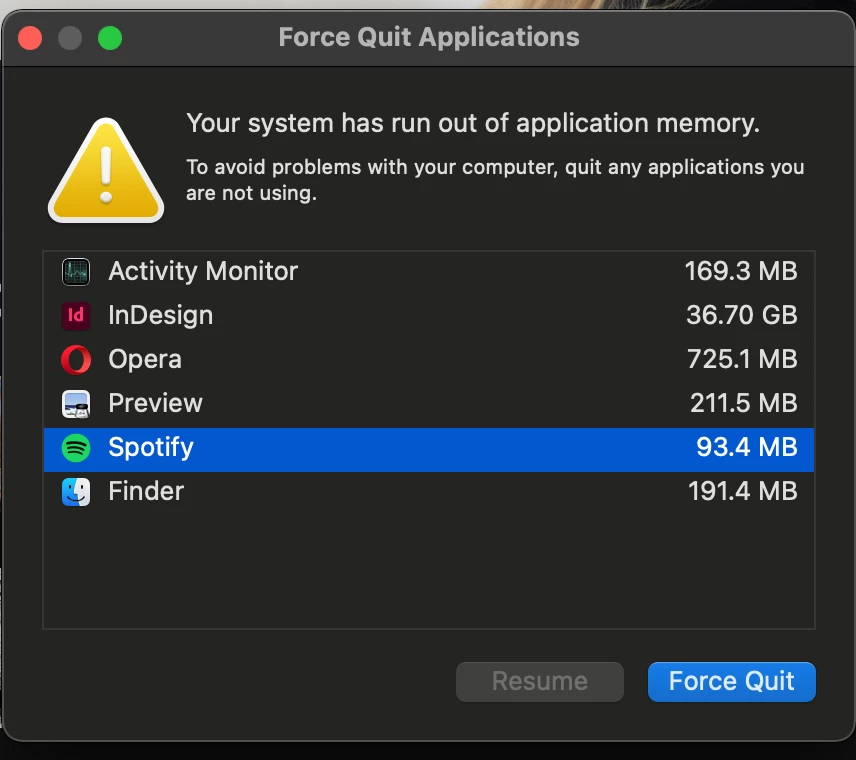
The only program I've used on the new one is Indesign, and it's using an insane amount of memory. If I have anything open other than Indesign, I get this error message.


Does anyone know why this might be? I could run Ai, Ps, and Id with my other laptop with little to no issue.


This topic has been closed for replies.
Correct answer Barb Binder

Hi @kyle5DC5:


Please check out the final entry on this post:

https://community.adobe.com/t5/indesign-discussions/indesign-application-memory-issues-m1-macbook-pro/m-p/12526516


~Barb

3 replies

Barb Binder
Community Expert
Barb BinderCommunity ExpertCorrect answer
Community Expert
December 13, 2021
~Barb at Rocky Mountain Training
kyle5DC5Author
Participant
December 13, 2021

Thanks for pointing me in the direction of this topic, this seems to be the root of the issue I was having!

Bill Silbert
Community Expert
Community Expert
December 13, 2021

You should make sure that you are using the latest update for all of your Creative Cloud apps. Earlier versions did not run natively on the M1 and did cause a lot of issues.

kyle5DC5Author
Participant
December 13, 2021

To correct myself, my old unit was running Big Sur. I did a side-by-side and the new one running Monterey has InDesign running at 6gb-ish with a relatively small file while the Big Sur was handling a similar file at around 1gb. I'm all up to date, so I'm guessing it's the OS causing the issue. After some fiddling I tested running  Indesing, Lightroom, Illustrator and photoshop all at once and I didn't run out of memory, but I hope Apple and Adobe can work out this issue with Monterey soon.

BobLevine
Community Expert
Community Expert
December 12, 2021
There are other posts about this but you should be aware that the recommended minimum RAM is 16GB.