
Participant
January 31, 2025
Answered

InDesign v. 20.1 Trouble selecting objects. Super slow.

  • January 31, 2025
  • 11 replies
  • 3553 views

Recently updated to InDesign 20.1. When I click on any box or shape, text or picture it takes 10-15 seconds before it shows that it is selected. Sometimes I can move/edit the box although it doesn't have the blue lines indicating it is selected. Other times, I can not. Selecting multiple items often crashes InDesign. Today I selected to text boxes and a picture. Crash. As a result to the time killing aspect of the update, I have had no choice but to revert to InDesign 2024. (19.5.2), which you might imagine, is also an inconvenience


I am running Sonoma 14.4.1 on M1, 2021 iMac with 16 Gb Ram. 
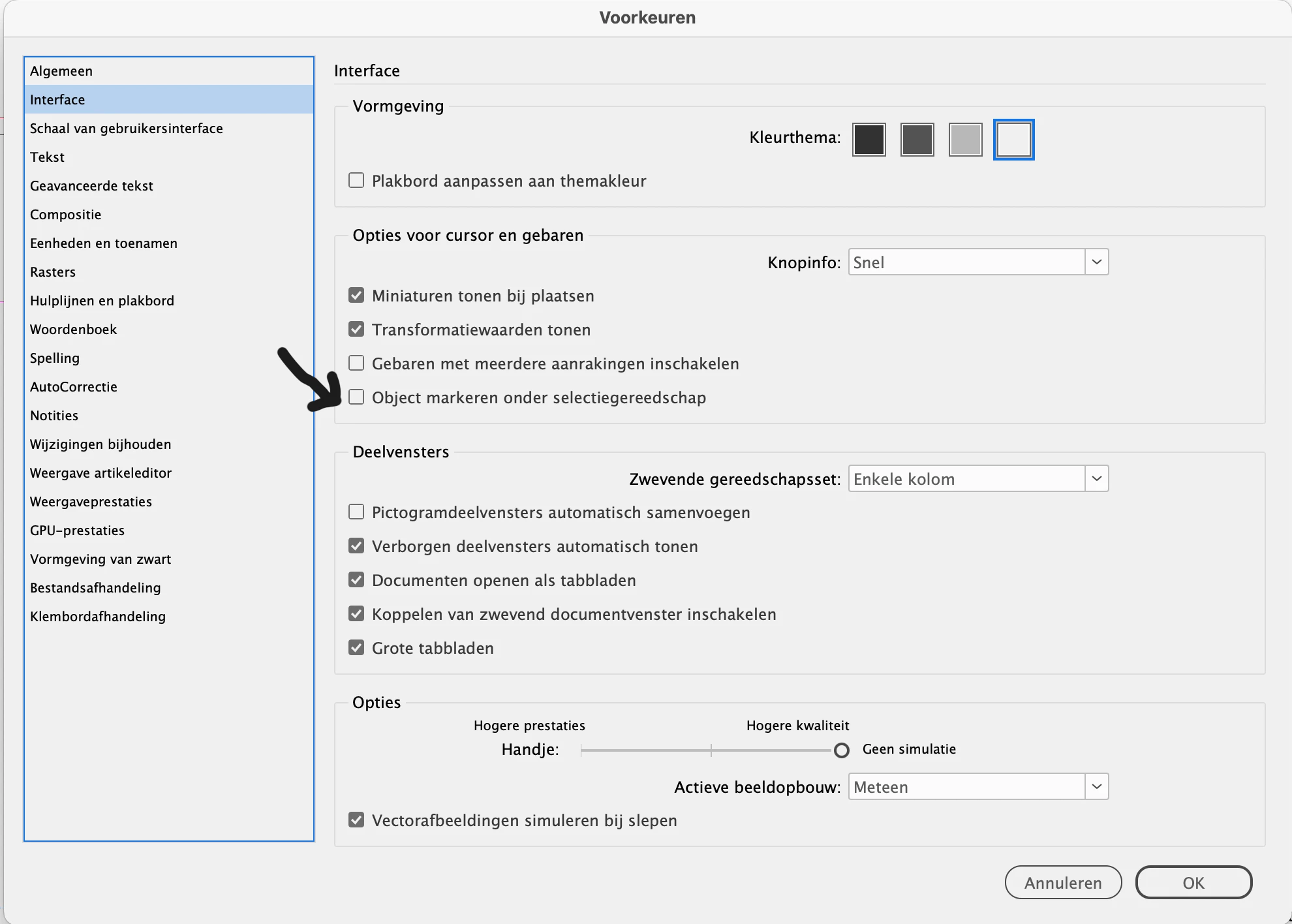
Correct answer janv69453393

 Uncheking this box solved the issue for me (see arrow)


11 replies

Participating Frequently
July 2, 2025

In the comment section of this bug report, a user suggests switching workspaces and it seems to be a temporary fix for me without having to turn on GPU performance or disabling the "Highlight Object Under Selection Tool" option.

https://indesign.uservoice.com/forums/601180-adobe-indesign-bugs/suggestions/49399328-selecting-object-defining-box-appears-only-after-l

Participating Frequently
July 2, 2025

Also, i would suggest upvoting this bug report. 

janv69453393Correct answer
Participant
March 13, 2025

 Uncheking this box solved the issue for me (see arrow)


Participating Frequently
March 17, 2025

This worked for me too! Thank you so much.

Participating Frequently
March 18, 2025

Interesting fix, thanks for sharing: as luck would have it, my system is an Intel Mac mini with no dedicated graphics card, so no option for me.  😞

Abhishek Rao
Community Manager
Community Manager
March 7, 2025

Hi everyone,


The InDesign 20.2 update is now fully rolled out and available for download. If you're still experiencing slow selection issues or crashes in 20.1, I highly recommend updating to 20.2 and testing again. Let me know if the issue persists!


^

Abhishek

Participating Frequently
March 7, 2025

I've had the laggy selection issue when I was still on 20.1; updated to 20.2  is still more or less the same issue (it still happens, but not to the same degree). It is likely important to know my system is 3.2 Ghz mac mini i7 6-core intel machine. and the graphics is Intel UHD 630 (mac OS Sequoia 15.1.1). The selection lag (and subsequent movement of the object) is evident for me only when selecting text objects (lag) vs graphics objects (no lag: interestingly, I tested it with grouped items - when I have a text object and graphic object grouped together, it does the same thing, there is lag if I click-select on the text object(s) in that group, but no lag if I click-select one of the graphic objects). At one point, I could click to select a text object, and then use my arrow/nudge keys to position it somewhere: I know its moving because the coordinates (in the Control panel) of that text object are changing as I nudge around, however, it does not immediately show it moving on my screen preview: often I might wait up to five seconds or more to see the movement on the screen, in fact the screen preview would not show the text object moving at all while the mouse is still hovering the object. 

The 'coloured' mouse-over outline appearing has never been an issue, but when you click on a text object, the control handles for the text object do not appear until the mouse leaves the bounds of the object, exactly like the video post earlier in the thread. 

I tried testing it with various conditions, such as Screen Mode (Normal, Preview etc - no difference) as well as Overprint Preview (on or off, no difference).

Click-and-drag has always worked, no issue there. Just click-select is the issue i am having. 

Participant
March 12, 2025

I updated to 20.2 today (missed out 20.1 so jumped straight from 20). I'm not experiencing any unusual lag, but any objects I click on only appear as selected (with blue edges and handles shown) when the pointer is moved off the object. In addition, the object previously selected appears to remain selected when the next object is clicked on, until the pointer is moved away and the blue edges and handles jump to the newly selected object.


This means that it's possible to inadvertently manipulate an object by nudging with arrow keys, but not see any changes until you move the pointer away from the object. It also means that when double clicking to select the content of a frame, it's not immediately possible to tell whether the frame or the content is selected without moving the pointer away from the object to see the colour of the selection edges.


Not being able to immediately see what is selected is a very big deal and highly detrimental to the user experience. In just half a day this has already resulted in numerous mistakes where objects that don't appear to be selected have suddenly jumped position when the pointer is rolled away. It also makes a nightmare of selecting specific objects in complex areas of overlapping objects.


I'm using a Macbook Pro M4 with Sequoia 15.3.1. I've restarted several times, and tried both normal and safe boot mode without a solution. Makes no difference which Screen Mode is active, or which display I'm using.

Mike Witherell
Community Expert
Community Expert
March 6, 2025

For some users, Time Machine has been implicated in slowdowns.

Mike Witherell
Mike Witherell
Community Expert
Community Expert
February 6, 2025

I watched the example video and compared it to my installs and I am not seeing this behavior. Therefore, it is not a change in the way InDesign normally behaves. The problem must be something else.

I will say again: I wish we had a way to have folks with these problems list all the other installed programs and browser plug-ins. I think a pattern would emerge showing the source of these odd problems.

Mike Witherell
Participant
March 6, 2025

I agree. Listing everything might make diagosis easier. See if this helps. The original post was concerning my work computer. However, this same issue has begun on my personal machine: MacBook Pro, M1, 16GB, Sequoia 15.1. The two are never on the same network. Here is a list of the apps they have in common.


Adobe Acrobat DC
Adobe After Effects 2025
Adobe Bridge 2025
Adobe Creative Cloud
Adobe Illustrator 2025
Adobe InDesign 2025
Adobe Lightroom Classic
Adobe Media Encoder 2025
Adobe Photoshop 2025
Adobe Premiere Pro 2025
App Store.app
Automator.app
Books.app
Calculator.app
Calendar.app
Chess.app
Clock.app
Contacts.app
Dictionary.app
FaceTime.app
Find My.app
Firefox 2.app
Font Book.app
Freeform.app
Home.app
Image Capture.app
Keynote.app
Launchpad.app
Mail.app
Maps.app
Maxon Cinema 4D 2023
Maxon Cinema 4D 2024
Maxon Cinema 4D 2025
Maxon Cinema 4D R25
Messages.app
Microsoft Excel.app
Microsoft PowerPoint.app
Microsoft Word.app
Mission Control.app
Music.app
News.app
Notes.app
Numbers.app
OneDrive.app
Pages.app
Photo Booth.app
Photos.app
Podcasts.app
Preview.app
QuickTime Player.app
Reminders.app
Safari.app
Shortcuts.app
Siri.app
Stickies.app
Stocks.app
System Settings.app
TextEdit.app
Time Machine.app
TV.app
Utilities
VLC.app
Voice Memos.app
Weather.app


Dave Creamer of IDEAS
Community Expert
Community Expert
February 5, 2025

I am not seeing that behavior on my Mac (or Windows). 

MacBook Air

2023 M1

24 GB

OS: Sequoia 15.3

InDesign 20.1


David Creamer: Community Expert (ACI and ACE 1995-2023)
leo.r
Community Expert
Community Expert
February 5, 2025
quote

I am not seeing that behavior on my Mac (or Windows). 

By @Dave Creamer of IDEAS


Yes, I also can't reproduce this issue (just like I've never seen some 98% of other unusual issues reported by other users in the last couple of years). I guess the majority of users also don't experience these problems. Which, I think, is exactly what makes it hard to reproduce and fix on Adobe's side.

Dave Creamer of IDEAS
Community Expert
Community Expert
February 5, 2025

Indeed. One of my first suspicions is the GPU driver. The OS update only updates it to the last version the OS company (Apple or Microsoft) deemed "safe" so they don't have to deal with support calls. Often the GPU company has newer drivers available that have not been tested by the OS companies. 


David Creamer: Community Expert (ACI and ACE 1995-2023)
Will Price
Inspiring
February 4, 2025

Googled the same problem, ended up here. It takes 3-4 seconds to select basic objects with an Apple Silicon Max chip.


Rendering your flagship product useless. What in the actual Adobe.

leo.r
Community Expert
Community Expert
February 4, 2025
quote

Googled the same problem, ended up here. It takes 3-4 seconds to select basic objects with an Apple Silicon Max chip.


By @Will Price


Did you update to InDesign 20.1?

Will Price
Inspiring
February 5, 2025

I've noticed something. Objects don't appear selected until you move your cursor away from the object. It might be a new preference to hide bounding box. It's very annoying.


Mike Witherell
Community Expert
Community Expert
February 3, 2025

Lane,

In case it helps, here is a roundup of most all troubleshooting possibilities that this forum is currently aware of.

Mike Witherell
Robert at ID-Tasker
Legend
January 31, 2025

@Lane26467051ux60


There is Sonoma 14.7.3


Abhishek Rao
Community Manager
Community Manager
January 31, 2025

Hi everyone, 


Thanks, Frans, for your input on this. Your insights help clarify the potential cause. We've noticed multiple reports of this issue. @Lane26467051ux60, could you please check if you have any desktop management apps like Magnet, Rectangle, BetterSnap Tool, BenQ Display Pilot, etc., installed on your system? These apps can interfere with the selection process in InDesign and Illustrator, causing them to malfunction. Please try uninstalling or disabling these apps and then test the issue again.


Additionally, try disconnecting your system from the Internet and see if the problem persists.

If these steps don't resolve the issue, please provide us with a sample file and a screen recording demonstrating the problem. Also, let us know where the affected file is located (local drive, external drive, remote network location, or cloud).

Regarding the crash you mentioned, please submit the crash report and share the email address used to submit the crash with me via DM on the Community. Reference: https://adobe.ly/4hGXmdT


Looking forward to your response.


^

Abhishek 


Frans v.d. Geest
Community Expert
Community Expert
February 1, 2025

[removed by moderator]