Exit
  • Global community
    • Language:
      • Deutsch
      • English
      • Español
      • Français
      • Português
  • 日本語コミュニティ
  • 한국 커뮤니티
0

InDesign: width columns

Guest
Dec 27, 2016 Dec 27, 2016

In the office where I work there is Indesign CC 2015.

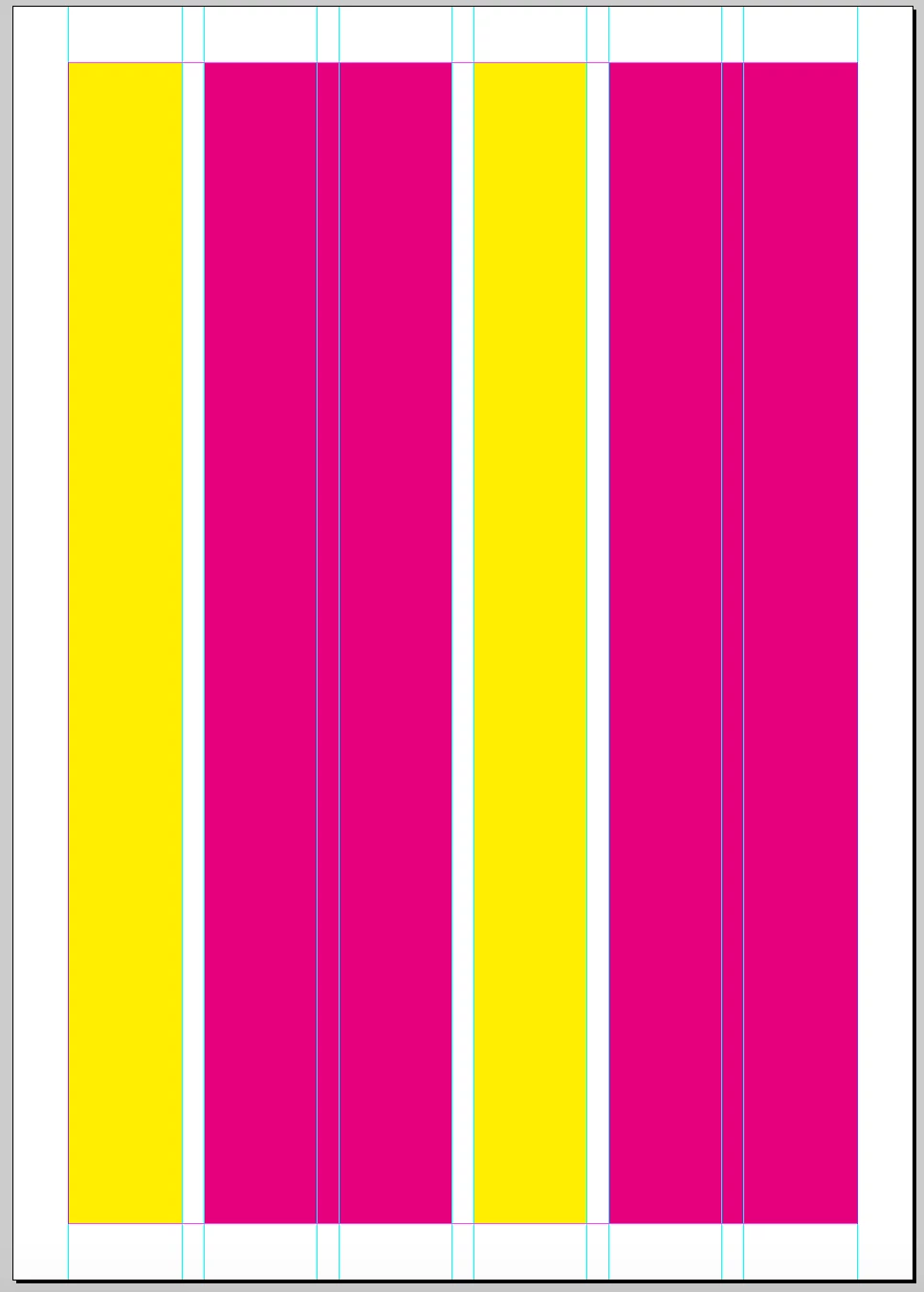
In a page I would want to create 4 columns: A, B, C and D.

The columns A and C must be narrower than the columns B and D.

The columns A and C must have the same width, the same for the columns B and D, that are those wider

The page is 210 mm.

The borders 13 mm for every side: total 26 mm.

The space among the columns is 5 mm.

How can I make the columns A and C of the same width and the same for the columns B and D?

PS: if you want, you can reply in Italian, thanks.
2.5K
Translate
Report
Community guidelines
Be kind and respectful, give credit to the original source of content, and search for duplicates before posting. Learn more
community guidelines

correct answers 1 Correct answer

Enthusiast , Dec 27, 2016 Dec 27, 2016

Ciao

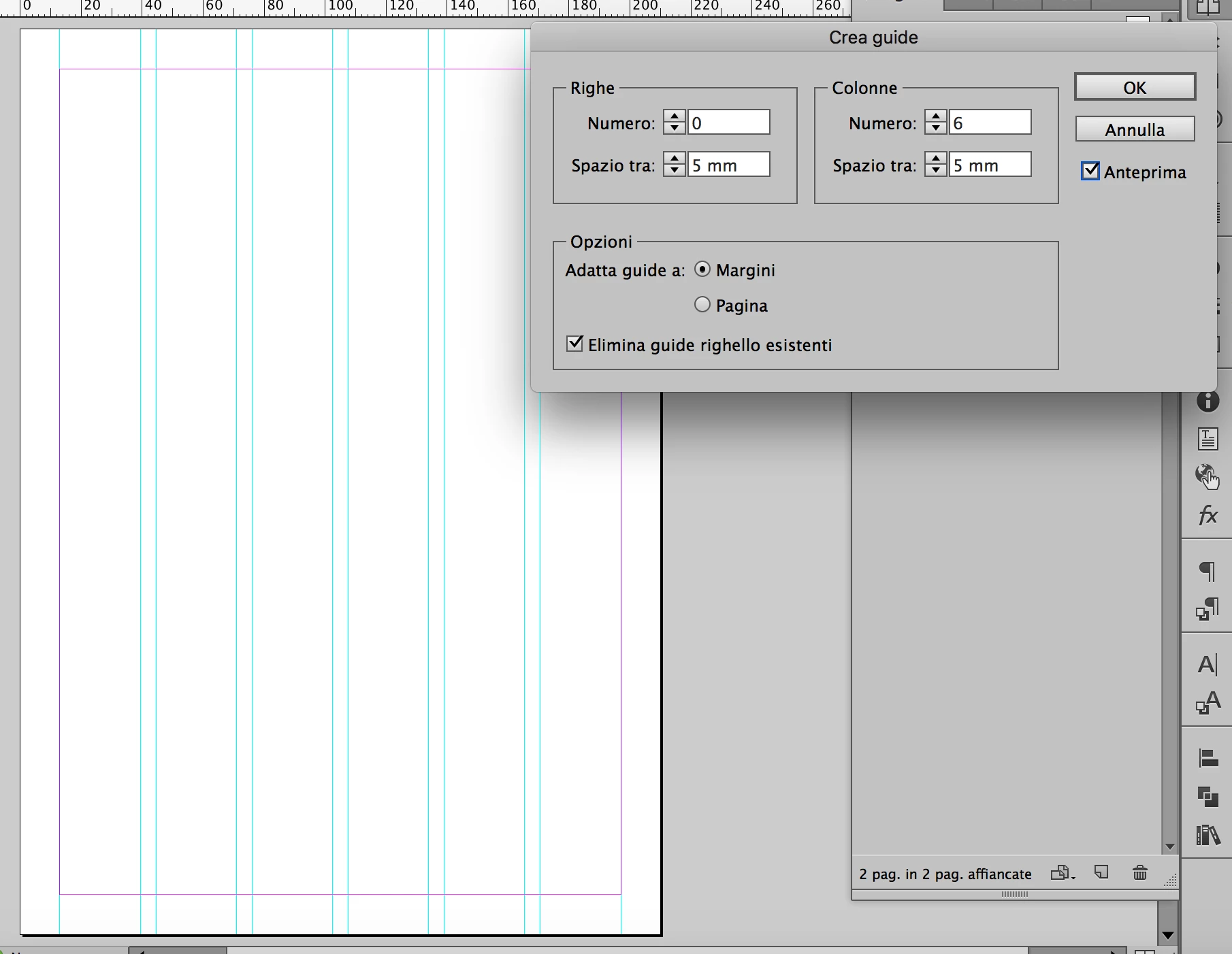
il sistema più veloce per dividere la pagina in colonne con diversa larghezza ma proporzionali fra di loro è creare una griglia modulare.

Menù LAYOUT > CREA GUIDE: 6 colonne con 5 mm di distanza. Ne utilizzerai 1 per le colonne A e C e 2 per le colonne B e D.

Schermata 2016-12-27 alle 17.56.45.png

Schermata 2016-12-27 alle 17.56.02.png

In questo modo le colonne A - C e B - D avranno la stessa larghezza.

Se preferisci, puoi creare le guide sulla pagina mastro e cancellare quelle al centro delle colonne più larghe. Oppure puoi tenerle e utilizzarle in maniera modulare, alt

...
Translate
Mentor ,
Dec 27, 2016 Dec 27, 2016

http://indesignsecrets.com/tip-of-the-week-create-unequal-columns.php

Remember, never say you can't do something in InDesign, it's always just a question of finding the right workaround to get the job done. © David Blatner
Translate
Report
Community guidelines
Be kind and respectful, give credit to the original source of content, and search for duplicates before posting. Learn more
community guidelines
Community Beginner ,
Dec 27, 2016 Dec 27, 2016

Hi!

Like that?

If is true, after to define the number of columns you have to go here (menu view) to unlock the guides.

Then, with the selection tool on the master page or on another page change the columns by dragging.

I hope this helps.

Translate
Report
Community guidelines
Be kind and respectful, give credit to the original source of content, and search for duplicates before posting. Learn more
community guidelines
Guest
Dec 27, 2016 Dec 27, 2016

Thank you George_Salnik, thank you Nikkershaw!

Your answers are the solution that I looked for!

PS: sorry for my english...

Translate
Report
Community guidelines
Be kind and respectful, give credit to the original source of content, and search for duplicates before posting. Learn more
community guidelines
Enthusiast ,
Dec 27, 2016 Dec 27, 2016

Ciao

il sistema più veloce per dividere la pagina in colonne con diversa larghezza ma proporzionali fra di loro è creare una griglia modulare.

Menù LAYOUT > CREA GUIDE: 6 colonne con 5 mm di distanza. Ne utilizzerai 1 per le colonne A e C e 2 per le colonne B e D.

Schermata 2016-12-27 alle 17.56.45.png

Schermata 2016-12-27 alle 17.56.02.png

In questo modo le colonne A - C e B - D avranno la stessa larghezza.

Se preferisci, puoi creare le guide sulla pagina mastro e cancellare quelle al centro delle colonne più larghe. Oppure puoi tenerle e utilizzarle in maniera modulare, alternando le colonne strette e quelle larghe sulle altre pagine.

Spero sia stata utile.

Translate
Report
Community guidelines
Be kind and respectful, give credit to the original source of content, and search for duplicates before posting. Learn more
community guidelines
Guest
Dec 29, 2016 Dec 29, 2016
LATEST

GRAZIE!

Utilissima, splendida soluzione

Translate
Report
Community guidelines
Be kind and respectful, give credit to the original source of content, and search for duplicates before posting. Learn more
community guidelines