
Exit
  • Global community
    • Language:
      • Deutsch
      • English
      • Español
      • Français
      • Português
  • 日本語コミュニティ
  • 한국 커뮤니티
0

InDesign won't export single pages to spreads as a PDF

Engaged ,
Sep 11, 2020 Sep 11, 2020

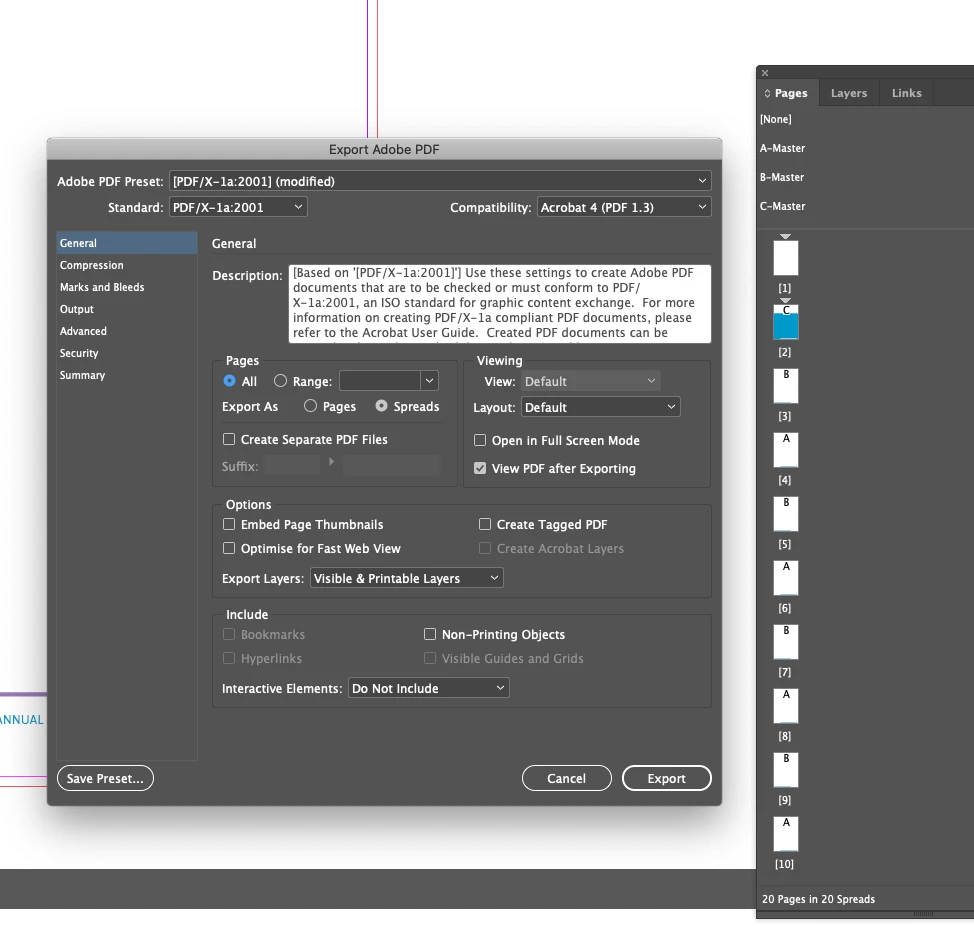
I have created an InDesign booklet consisting of 20 single pages but would like to export it as spreads, I select Spreads in the PDF export option but when it then opens the exported PDF it is still single pages, am I missing an option to tick on or off, or could it be a bug, I just cant seem to get it to export the PDF as Spreads? (I do get some funny things happening in my 'Range' option box that looks a little funky but I'm not sure that that has anything to do with my issue). Screenshot 2020-09-11 at 11.42.35.png
TOPICS
Bug , How to , Import and export
8.3K
Translate
Report
Community guidelines
Be kind and respectful, give credit to the original source of content, and search for duplicates before posting. Learn more
community guidelines

correct answers 1 Correct answer

LEGEND , Sep 11, 2020 Sep 11, 2020

Instead of exporting as spreads, you could use the Viewing Layout menu (seen in the middle right of the panel in your screenshot) to change the view to Facing Pages (or Facing Pages, Cover Page). This will cause the booklet to open in Acrobat as facing pages, but still be searchable as their own page numbers.

Translate
Community Expert ,
Sep 11, 2020 Sep 11, 2020

Before creating your PDF – In InDesign select File > Document Setup – tick Facing Pages.

Translate
Report
Community guidelines
Be kind and respectful, give credit to the original source of content, and search for duplicates before posting. Learn more
community guidelines
LEGEND ,
Sep 11, 2020 Sep 11, 2020

Instead of exporting as spreads, you could use the Viewing Layout menu (seen in the middle right of the panel in your screenshot) to change the view to Facing Pages (or Facing Pages, Cover Page). This will cause the booklet to open in Acrobat as facing pages, but still be searchable as their own page numbers.

Translate
Report
Community guidelines
Be kind and respectful, give credit to the original source of content, and search for duplicates before posting. Learn more
community guidelines
Engaged ,
Sep 11, 2020 Sep 11, 2020

That's it, Two-Up Continuous (Cover Page) worked perfectly! Thanks so much, you're a star! Can I send my PDF to the printer with that setting selected and the printer still has them as single pages, or will I need to send him an additional version which shows as single pages? 

Translate
Report
Community guidelines
Be kind and respectful, give credit to the original source of content, and search for duplicates before posting. Learn more
community guidelines
Community Expert ,
Sep 11, 2020 Sep 11, 2020

Hi,

that's no bug. Your document consists of spreads with only one page each.

At the bottom of your Pages panel it says: "20 Pages in 20 Spreads".

Can you tell us more? Maybe there is a good reason for this?


Thanks,
Uwe Laubender

( ACP )


Translate
Report
Community guidelines
Be kind and respectful, give credit to the original source of content, and search for duplicates before posting. Learn more
community guidelines
LEGEND ,
Sep 11, 2020 Sep 11, 2020
LATEST

Hi there,


Thanks for reaching out. In addition to good information shared earlier, I'd request checking out this help article as well to know more about pages and spreads in InDesign.


Hope it helps.


Regards,

Ashutosh

Translate
Report
Community guidelines
Be kind and respectful, give credit to the original source of content, and search for duplicates before posting. Learn more
community guidelines