
Participant
April 22, 2018
Question

InDesign won't let me drag in or add photos

  • April 22, 2018
  • 2 replies
  • 15161 views

InDesign decided to stop letting me add photos or drag any in?

Anyone else have this problem, or how do I fix it?

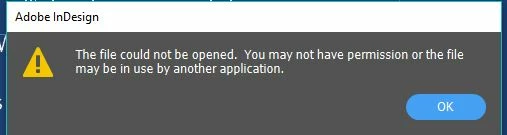
Attached snip of what it says when I try placing an image, but i have full permission and it isn't in use.

When I drag one in, nothing happens.

Strange thing is that it let me put in a .png logo, but not a .jpeg image...?
    2 replies

    Jeff Witchel, ACI
    Community Expert
    Community Expert
    April 22, 2018

    Are you using File > Place to bring in your photo.

    Never drag in photos.

    Banana20*Author
    Participant
    April 22, 2018

    I used file > place and got the above error message.

    Does dragging in photos not do any good?

    Using Windows

    InDesign CC 2018 - 13.1 x64

    Steve Werner
    Community Expert
    Community Expert
    April 23, 2018

    You should be able to drag photos from Windows Explorer or Adobe Bridge. You shouldn't drag from Photoshop or another application.

    Bill Silbert
    Community Expert
    Community Expert
    April 22, 2018

    What version of InDesign and what operating system are you using?

    Known Participant
    December 22, 2023

    It has nothing to do with the InDesign version but all with the user/admin ("UAC") privileges Windows forces us to use these days. If one app runs with admin privileges and the other with (default) user privileges, drag and drop does not work (anymore). There used to be a workarround by starting apps with admin privileges but this does not work anymore in recent versions of the Windows OS. Using "place..." from within InDesign is the only thing left we can do to accomplish the job, unfortunately 😞

    chriss18229469
    Participant
    August 6, 2024

    For me, this was a server issue. Tried to drag place from the server... no dice. On a whim, I copied the folder to my desktop and then tried to drag place and BiNGO! This is not the first issue I have had with InDesign (and Acrobat) not playing nice with the server.