
Participant
November 11, 2019
Question

InDesign wont open file. Program is up to date. What to do?

  • November 11, 2019
  • 2 replies
  • 430 views

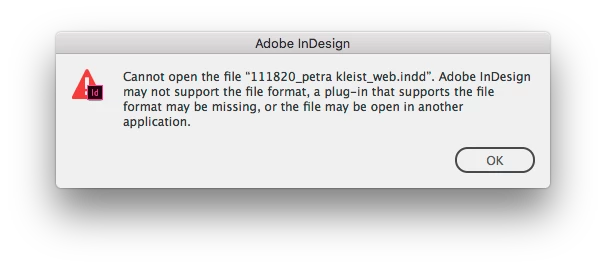
When trying to open a file from a colleague i get this error message.  


Cannot open the file. Adobe InDesign may not support the file format, a plug-in that supports the file format may be missing, or the file may be open in another application.
 

  • InDesign is fully up to date.
  • Tried restarting InDesign as well as computer.
  • Tried reinstalling InDesign.
  • The file opens on a third colleagues computer who has the same version of InDesign as i have.


I cant see what else to do?


Thanks in advance.

This topic has been closed for replies.

2 replies

BobLevine
Community Expert
Community Expert
November 11, 2019

Are you attempting to open from a network or local harddrive? Do other files open okay?

Participant
November 11, 2019

Hi Bob.


I am trying to open it from Dropbox. It is not all files but it is more files than the one mentioned above. 

Participant
November 11, 2019

Ah. Make sure you have the new dropbox feature that allows you to save harddrive space automatically turned OFF! I don't know where that option is on a Mac but here's my screenshot from Windows.


Thank you for the answer Bob. I cant see that feature in Dropbox sync but the problem fixed when changing the content from online to syncing it to my computer. Thank you for the reply!

Steve Werner
Community Expert
Community Expert
November 11, 2019

You may NOT be up to date. The message sounds like you're not and your colleague is. The latest version is InDesign 2020.


Choose About InDesign from the InDesign menu (Mac) or Help menu (Windows). Please tell us (exactly) what InDesign version you're using. Please tell us what operating system (exactly) you're running.

Participant
November 11, 2019

Hi Steve. I'm quite sure that InDesign is up todate. I am running InDesign 2020, 15.0.


As for my OS i am running macOS High Sierra Version 10.13.6