
Known Participant
February 7, 2023
質問

InDesign2023 - ghosting artifacts

  • February 7, 2023
  • 返信数 3.
  • 607 ビュー

Hello,


I have had some issues (possibly since the last update) with visual "ghosting" artifacts. Use to be, it would have been an issue with the refresh rate of a monitor, or not having the latest Nvidia graphics card update, but neither of these appears to be the issue.


I'm open to some recs to fix this issue. Please see the image for a clearer explanation of the problem. 
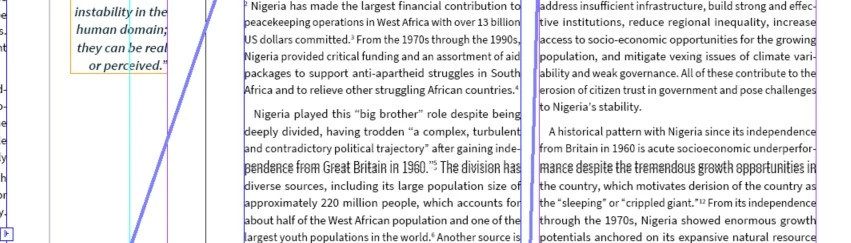
 

And yes, when I move the stage/the issue, visibility does go back to normal. 

このトピックへの返信は締め切られました。

返信数 3

Community Expert
February 8, 2023

Yeh, been happening to me too - didn't really panic with it - I just zoom in and out (CMD + or CMD-) and continue on.


Hasn't got to the stage where I've wanted to look for a fix.


Annoying though!

Barb Binder
Community Expert
Community Expert
February 8, 2023

That link doesn't work, Bevi. It's https://indesign.uservoice.com


@SusanL, are you on a Mac or Windows? When it happens on my Mac, I find that disabling GPU performance makes it stop. Windows does not have the equivalent command so I'm not sure what to offer you, if you're on a Windows computer. I know it can happen on both.


~Barb

~Barb at Rocky Mountain Training
Bevi Chagnon - PubCom.com
Legend
February 7, 2023

Yes, this is a relatively new problem on both Macs and Windows systems. For us, it started to appear in the 2022 version.

It's annoying and disruptive, but I have no solution other than to complain to Adobe about it. File your complaint at https://www.InDesignUserVoice.com.


|    Bevi Chagnon   |  Designer, Trainer, & Technologist for Accessible Documents ||    PubCom |    Classes & Books for Accessible InDesign, PDFs & MS Office |